weibaohui/dsh-continue
自动续跑插件 for DeepSeek Harness — 有序规则表:按失败类型路由 继续续跑 / 换模型 / 压缩后继续 / 停止
Project Overview项目介绍
weibaohui/dsh-continue is a DSH-native plugin published on npm as @weibaohui/dsh-continue and explicitly built for the DeepSeek Harness (@deepseek-ai/dsh) runtime, with no other agent platform listed as a target. Installation is handled through the first-party DSH command line: dsh plugin --profile web add @weibaohui/dsh-continue -w, after which a restart of dsh web activates the plugin. Its core capability is automatic resumption of interrupted agent sessions, where transport errors, orphan crashed turns, rate limits, quota exhaustion, authentication failures, or context overflow trigger a reorder of the same conversation rather than forcing the user to type "continue" again.
In typical use, an operator enables the master toggle inside the Web UI under Settings → Auto-Resume and reviews the default rule table, which already maps common failure types to specific actions: HTTP 429 receives exponential backoff with up to five retries honoring the provider's Retry-After header, quota and auth failures stop immediately and surface a notification, context overflow triggers an automatic compression step before resuming, and orphan or generic errors simply retry. Rules are evaluated top-to-bottom, custom HTTP codes (such as 529 or 520) or machine codes (such as UNKNOWN) can be added via a match-condition editor, and a fallback model can be selected from dropdowns so that repeated failures on the primary model automatically switch providers while an in-app activity log records every retry, model swap, and stop reason.
The plugin depends entirely on the host version of @deepseek-ai/dsh and pins compatibility through both the engines.dsh field in package.json and a documented mapping table that records the exact dsh release each plugin version was validated against, currently 0.3.x against dsh 0.1.7-rc.2. No license is declared in the repository metadata, so users should verify redistribution terms before reuse. Default rules are applied out of the box and require no manual configuration, but first-time users should open the settings page, confirm the master toggle, review the rule ordering (noting that custom server-error codes must sit above the catch-all "server error" entry), and choose their primary and fallback provider/model from the dropdowns before running long jobs.
weibaohui/dsh-continue 是一个面向 DeepSeek Harness(DSH,原生插件)的自动续跑插件,命名为 @weibaohui/dsh-continue,安装命令为 dsh plugin --profile web add @weibaohui/dsh-continue -w,装完重启 dsh web 即生效。它针对 agent 会话因网络错误或服务异常中断的场景,自动在同一会话内重发续跑指令,并提供可视化设置面板用于调整退避、上限与备用模型等参数,目标用户是经常跑长任务、遭遇限流或额度耗尽而被迫手动输入"继续"的 DSH 用户。
典型工作流是:在 dsh web 设置页打开「自动续跑」总开关后,默认规则表即可覆盖 429 限流、额度耗尽、上下文超限、孤儿轮等常见失败;命中规则后插件会按策略处理,例如上下文超限时自动压缩后再续跑,连续失败则自动切换到备用模型继续。用户也可在规则表里添加自定义 HTTP 状态码(如 529、520)或机器码(如 UNKNOWN)以触发专属动作,所有续跑、换模型与停止事件都会写入活动日志。
依赖方面,插件以 @deepseek-ai/dsh 作为宿主,package.json 通过 engines.dsh 声明最低支持版本,并附带验证表记录每个发行版实际跑通的 dsh 版本(当前为 0.3.x 适配 0.1.7-rc.2);license 未在仓库中明示,开箱可用、首次运行无需手动配置,仅需在 dsh web 设置页确认开关、规则顺序以及下拉选定的 provider 与模型即可投入使用。
请帮我安装这个 DSH 插件。安装前先完成【兼容性检查 + 安全性检查】,检查通过再动手。

插件:dsh-continue(weibaohui/dsh-continue)
仓库:https://github.com/weibaohui/dsh-continue
本站详情页:https://www.yhbd.top/plugins/weibaohui-dsh-continue/
本站登记:类型 plugin · 归类 原生 DSH 插件 · 许可证未声明 · ⭐ 3 · 最近提交 2026-09-29 · 主语言 JavaScript

按下面顺序执行,每步先把结论告诉我,再进入下一步:

【1 兼容性检查】
① 我这边:DSH 版本、Node 版本、操作系统、当前 profile(web / desktop)。
② 读它的 README、package.json、插件 manifest,列出它要求的 DSH 版本 / Node 版本 / 操作系统 / 外部依赖 / 需要另外先装的运行时。
③ 逐条比对,结论只写「满足 / 不满足 / 未知」三种;不满足的给出可行替代方案。
④ 检查是否和我已装的插件冲突:命令名重复、skill / tool 重名、端口占用、重复注册的 MCP server。

【2 安全性检查】
① 仓库可信度:和上面「本站登记」是否一致;star / fork 数、创建时间、最近提交,是否归档或长期停更。
② 安装脚本:逐行看 package.json 的 preinstall / install / postinstall,以及 install.sh、setup.ps1 之类脚本。出现 curl|bash、下载后直接执行、混淆代码、访问与插件功能无关的域名,立刻停下来告诉我,不要继续装。
③ 依赖:列出新增依赖,标出无人维护、或与知名包拼写近似的可疑包(typosquatting)。
④ 权限与副作用:它会读写哪些目录、访问哪些域名、需要哪些 DSH 权限(filesystem / network / shell / clipboard 等),以及怎么卸载和回滚。
⑤ 如果它要求 sudo / 管理员权限,或权限明显超出功能所需,先停下来问我。

【3 安装】
上面两步没有「不满足」和「高危项」时才执行;用官方推荐方式安装,不要自行提权。

【4 汇报】
用表格输出:检查项 / 结论 / 依据 / 是否需要我决策。拿不准的一律写「未知」并说明要我怎么确认——不要猜,也不要替我决定。
Send this message to DSH in your current session: it verifies compatibility and security first (answering met / not met / unknown item by item) and only installs once everything checks out — it will stop and ask you if it finds a high-risk item. The box scrolls; the copy is the full prompt. CLI install commands may not be accurate across systems, so DSH is the safer route.把上面这条消息直接发给当前会话里的 DSH:它会先核对兼容性与安全性(逐条给「满足 / 不满足 / 未知」),确认没问题再安装,有高危项会停下来问你。框内可滚动,复制到的是完整提示词;安装命令不一定准确,发给 DSH 更稳。
- No license declared - all rights reserved by default; ask the author before commercial use or redistribution未声明开源许可证 —— 默认「保留所有权利」,商用或再分发前先问作者
- Only 3 stars - very few users, little community feedback星标只有 3,几乎没人在用,遇到问题缺少社区反馈
DSH walks through these 9 checksDSH 会逐条核对这 9 项
Compatibility兼容性
- DSH, Node, OS and profile requirementsDSH 版本 / Node 版本 / 操作系统 / profile 是否满足要求
- External dependencies and runtimes (Electron / Python / Docker, ...)外部依赖与运行时(Electron / Python / Docker 等)是否齐备
- Conflicts with installed plugins: command names, skill / tool names, ports, duplicate MCP registration与已装插件是否冲突:命令名、skill / tool 重名、端口占用、重复 MCP 注册
Security安全性
- Repo matches the facts registered here; archived or abandoned?仓库是否与页面登记一致,是否归档或长期停更
- Safety of preinstall / install / postinstall and install.sh / setup.ps1preinstall / install / postinstall 与 install.sh、setup.ps1 是否安全
- curl|bash, download-then-execute, obfuscation, unrelated domains → stop immediatelycurl|bash、下载即执行、混淆代码、无关域名 → 立刻停止
- Typosquatting or unmaintained packages among the new dependencies新增依赖里有没有 typosquatting 或无人维护的包
- Requested permissions vs. what the feature actually needs申请了哪些权限、是否超出功能所需(filesystem / network / shell / clipboard)
- Any sudo / admin requirement, plus uninstall and rollback是否要求 sudo / 管理员权限,以及卸载与回滚方式
Anything uncertain must be marked unknown with a note on how to confirm it. This site's signal screen is a static snapshot, not a security audit.拿不准的必须标「未知」并说明要我怎么确认。本站的信号筛查是静态快照,不能替代安全审计。
Or use CLI install (for developers)或使用命令行安装(适合开发者)
CLI Install命令行安装
dsh plugin --profile web add @weibaohui/dsh-continue -w把 weibaohui/dsh-continue 加入你的 DSH 配置(web profile)即可启用。
READMEREADME
@weibaohui/dsh-continue


自动续跑插件:agent 会话中断后自动帮你续上,不用手敲「继续」。
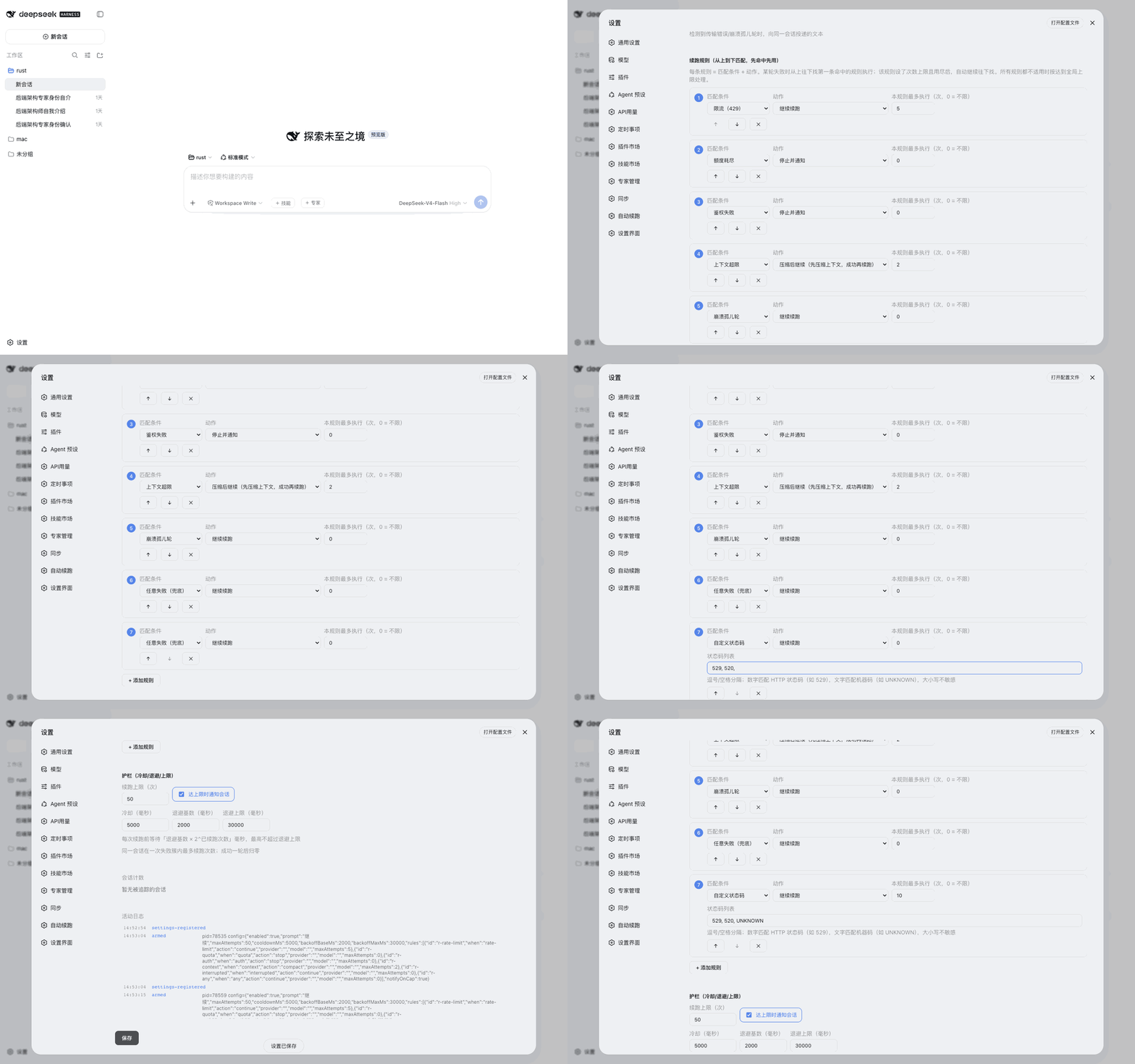
核心功能
- 自动续跑:检测到传输错误、崩溃孤儿轮等失败后,自动向同一会话重发续跑指令,带冷却与指数退避
- 有序规则表:不同失败类型走不同策略,从上到下先命中先用——
- 限流(429):自动退避重试(尊重服务商要求的等待时间),最多 5 次
- 额度耗尽 / 鉴权失败:立即止损并通知,不白白重试
- 上下文超限:自动压缩会话上下文,压缩成功后继续跑(宿主平面若没挂压缩后端,降级为一行止损通知)
- 崩溃孤儿轮 / 其他错误:自动继续
- 自定义状态码:自己填状态码列表,命中即按该规则续跑——数字匹配 HTTP 状态码(如
529、520),文字匹配机器码(如UNKNOWN),大小写不敏感;放在「服务端错误」上方即可让特定状态码优先走专属策略
- 失败后自动换模型:同一失败连续 N 次仍不成功,后续续跑自动切换到备用模型(如主模型限流后换备用模型接着跑)
- 可视化管理:设置页里规则、开关、次数、退避参数全部可视化编辑;provider 和模型一律下拉选择
- 全程可查:每次续跑、换模型、停止原因都有活动日志
安装
dsh plugin --profile web add @weibaohui/dsh-continue -w
装完重启 dsh web 即生效。默认规则开箱可用,无需任何配置。
本插件的 bundle patch 不改动
compaction-basic。 web bundle 默认把压缩后端 放在每个 agent preset 的 isolate 域里,profile 也可能在宿主平面挂别的后端 (例如@aiwayds/dsh-dcp);强行把那一行改成disabled: false会和它们抢同一个compaction服务,导致对方启动失败。插件改为懒解析ctx.get('compaction'): 宿主平面有后端就用,没有就降级为止损通知。
使用
- 打开 Web UI → 设置页 → 自动续跑
- 总开关默认开启,默认规则表已覆盖常见失败场景
- 想自定义:编辑规则表(匹配条件 + 动作)、调整续跑上限/退避参数、选备用模型
- 失败发生时插件自动介入;会话里会收到续跑与停止原因的通知,活动日志在设置页可查
联系我 :飞书群

版本兼容性
本插件与 DeepSeek Harness(@deepseek-ai/dsh)的版本对应关系:
| 插件版本 | 适配 dsh 版本 | 备注 |
|---|---|---|
| 0.3.9 | 0.1.7-rc.2 | 当前版本;冷却窗口内的失败改为推迟续跑(修复快速失败场景只续跑一次即停摆);通知延后投递并带 surfaceOp 标记(修复止损/达限通知静默丢失)。已在隔离 web 实例端到端实测续跑循环 |
| 0.3.8 | 0.1.7-rc.2 | 适配 dsh 0.1.7 会话来源格式(producer-owned dsh-continue kind)与压缩后端懒解析(不再进 inject、不再改 compaction-basic 行),修复 web profile 续跑必失败 |
| 0.3.4 | 0.1.7-rc.2 | 修复宿主将 volatile 字段物化为 {} 导致的设置毒化(saneConfigValues 清洗 + 移除 Config 兼容字符串字段) |
| 0.3.3 | 0.1.7-rc.2 | 当前版本;适配 0.1.7 settings 模型(导出 volatile Config,ctx.settings.update 持久化),面板改动重启不再丢失 |
| 0.3.1 | 0.1.7-rc.2 | 已在 @deepseek-ai/dsh@0.1.7-rc.2 下验证运行 |
发版约定:每次发布新版本时,请在上表追加一行,记录该插件版本实际验证所用的
@deepseek-ai/dsh版本。package.json的engines.dsh声明最低支持版本;本表记录实际验证版本,二者配合使用。
Related相关推荐
- voyager-crew/voyager Enhancement suite for Gemini, AI Studio, Claude, ChatGPT & DeepSeek — plus a prompt manager for any website, DeepSeek Ha…
-
 Q00/ouroboros
Agent OS: the agent gets smarter on its own. We just hold the line: Interview-gated, staged evaluation, budgeted evoluti…
Q00/ouroboros
Agent OS: the agent gets smarter on its own. We just hold the line: Interview-gated, staged evaluation, budgeted evoluti…
-
 crafter-station/petdex
A public gallery of animated pets for Codex, Claude Code, DeepSeek Harness, Hermes, OpenCode, Gemini CLI, and more.
crafter-station/petdex
A public gallery of animated pets for Codex, Claude Code, DeepSeek Harness, Hermes, OpenCode, Gemini CLI, and more.
-
 whiteguo233/OpenBiliClaw
本地私有、开源的自进化跨平台 AI 内容发现 Agent:先理解你,再主动从 B站、小红书、抖音、YouTube、X、知乎、Reddit、微博等平台与开放 Web 寻找内容。(支持 deepseek harness 插件) | Local-…
whiteguo233/OpenBiliClaw
本地私有、开源的自进化跨平台 AI 内容发现 Agent:先理解你,再主动从 B站、小红书、抖音、YouTube、X、知乎、Reddit、微博等平台与开放 Web 寻找内容。(支持 deepseek harness 插件) | Local-…
-
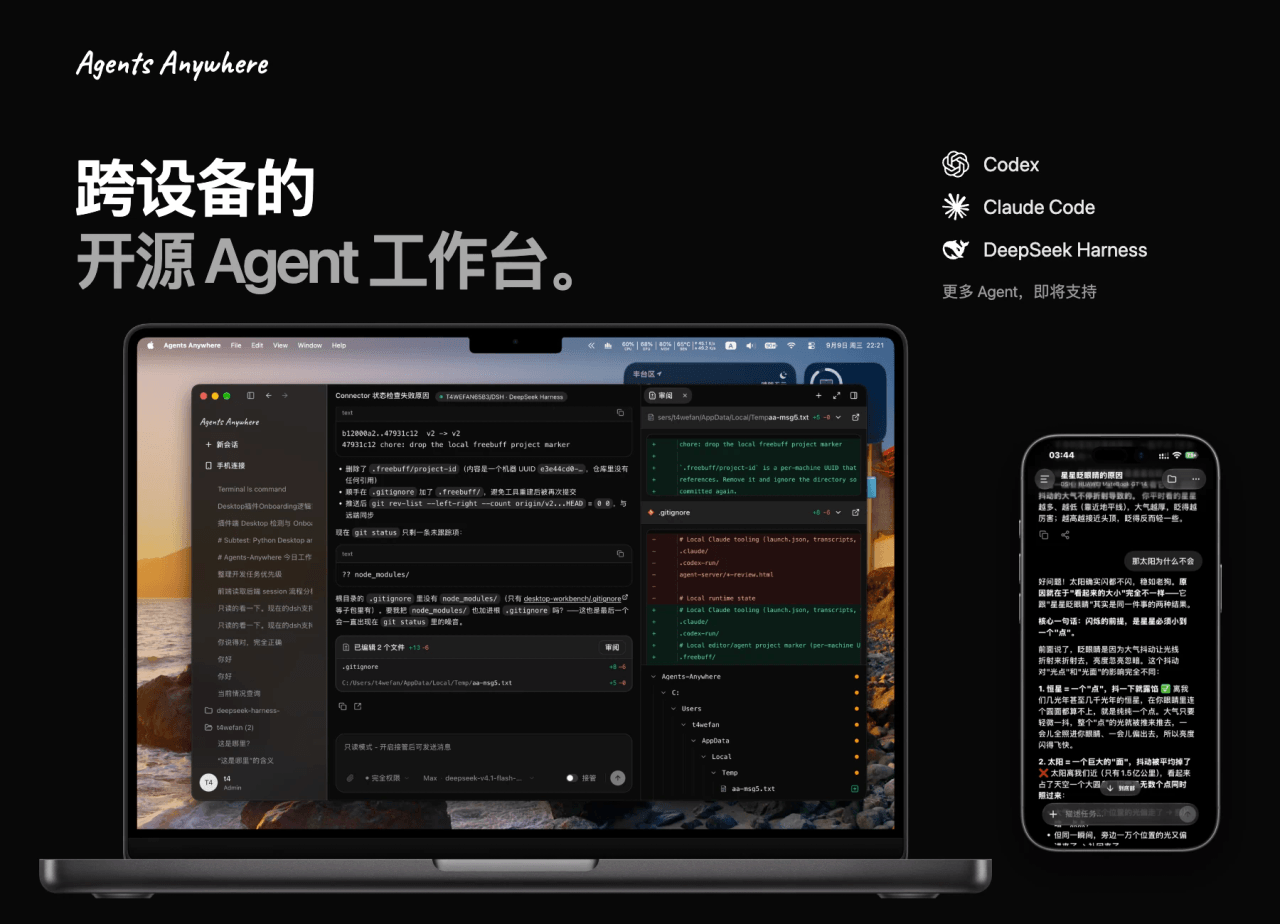 anywhere-labs/Agents-Anywhere
跨设备的开源Agent工作台
anywhere-labs/Agents-Anywhere
跨设备的开源Agent工作台
-
 agentrq/agentrq
AgentRQ: Human-in-loop realtime conversational task manager for AI Agents. Self-hosted! Control your own agents from whe…
agentrq/agentrq
AgentRQ: Human-in-loop realtime conversational task manager for AI Agents. Self-hosted! Control your own agents from whe…
-
 freestylefly/wesight
Open-source desktop AI agent workspace with one-click Claude Code, Codex, OpenClaw, Hermes Agent setup and custom LLM mo…
freestylefly/wesight
Open-source desktop AI agent workspace with one-click Claude Code, Codex, OpenClaw, Hermes Agent setup and custom LLM mo…
- zouyuxuan122/dsh-our-free-model 在 dsh 里装上这个插件即可,无需登录、注册或填 API Key,就能使用包括 Muse Spark 1.3、MiMo V2.6 在内的前沿模型——完全免费,不限量。 All you do is install this plugin i…