yanglongyun/ramify-dsh
Ramify 是 DeepSeek Harness 的创意分支画布插件,用树状工作区生成、对比和迭代多个可交互方案。
编辑导读Editor's Brief
## 核心特性
- Ramify 是一个 DeepSeek Harness 插件,可将 agent 生成的创意方向、可运行作品和修订内容整理到 DSH 内的实时分支画布中。
- 它通过当前 DSH 会话和模型提交请求,因此插件中无需单独配置模型或填写 API key。
- 画布支持从任意已完成节点创建分支,同时保留早期版本不变;节点或预览会随着 agent 的写入实时显示。
- 它可在节点卡片中直接预览 HTML、Markdown、SVG、图片、视频和音频输出。
- 本地持久化使用 SQLite,前端通过轻量轮询检测变更。
## 使用场景
- 在 agent 生成多个落地页方向后,先进行比较,再选择或修改其中一个。
- 通过从项目树中的选定节点创建分支,对视觉或文档产物进行迭代。
- 在 DSH 工作区内审阅 HTML、Markdown、SVG、图片、视频或音频输出。
## 技术细节
- 该插件使用标准 DSH 插件 manifest、Cordis 服务和 Client UI 插槽,无需修改 Harness 源代码。
- 它注册了 ramify_start、ramify_project_create、ramify_node_add、ramify_node_batch、ramify_node_complete、ramify_node_update 和 ramify_settings 等工具,用于模型交互。
- DSH Web UI 通过 HTTP 与本地 Ramify runtime 通信,默认地址为 DSH 127.0.0.1:3099、Ramify 127.0.0.1:9519。
- 画布缩略图使用空 sandbox 以防止 JavaScript 执行,而详情视图和独立窗口允许脚本、外部资源、网络访问和表单提交。
## 注意事项
- 需要 Node.js 22.19 或更高版本,以及 DeepSeek Harness 0.1.0-rc.6 或兼容版本。
- 该插件不会读取、接收或存储模型 API key;模型调用由当前 DSH 会话处理。
- Runtime 默认监听 0.0.0.0:9519,配置可覆盖 port、dataDir、启动超时和关闭超时。
## Core Features
- Ramify is a DeepSeek Harness plugin that organizes agent-generated creative directions, runnable works, and revisions into a live branching canvas inside DSH.
- It submits requests through the current DSH session and model, so no separate model configuration or API key entry is required in the plugin.
- The canvas supports branching from any completed node while keeping earlier variants unchanged, and nodes or previews appear as the agent writes them.
- It previews HTML, Markdown, SVG, image, video, and audio outputs directly in node cards.
- Local persistence uses SQLite, while the frontend detects changes through lightweight polling.
## Use Cases
- Comparing multiple landing-page directions generated by an agent before selecting or revising one.
- Iterating on visual or document artifacts by branching from a selected node in a project tree.
- Reviewing HTML, Markdown, SVG, image, video, or audio outputs within the DSH workspace.
## Technical Details
- The plugin uses a standard DSH plugin manifest, Cordis services, and Client UI slots without modifying Harness source code.
- It registers tools such as ramify_start, ramify_project_create, ramify_node_add, ramify_node_batch, ramify_node_complete, ramify_node_update, and ramify_settings for model interaction.
- The DSH web UI communicates with a local Ramify runtime over HTTP, with defaults at 127.0.0.1:3099 for DSH and 127.0.0.1:9519 for Ramify.
- Canvas thumbnails use an empty sandbox to prevent JavaScript execution, while detail views and separate windows allow scripts, external resources, network access, and form submission.
## Notes
- Requires Node.js 22.19 or later and DeepSeek Harness 0.1.0-rc.6 or a compatible version.
- The plugin does not read, receive, or store model API keys; model calls are handled by the current DSH session.
- Runtime listens on 0.0.0.0:9519 by default, and configuration can override port, dataDir, startup timeout, and shutdown timeout.
安装Install
dsh plugin --profile web add @ramify/dsh-ramify把 yanglongyun/ramify-dsh 加入你的 DSH 配置(web profile)即可启用。
READMEREADME

dsh-ramify
DeepSeek Harness 的原生创意分支画布插件



Ramify 是一个专为 DeepSeek Harness(DSH)开发的 dsh-plugin。它把 Agent 生成的多个创作方向、可运行作品和后续修订组织成一棵实时更新的创意树,让你可以在 DSH 内直接查看、比较并继续分叉。
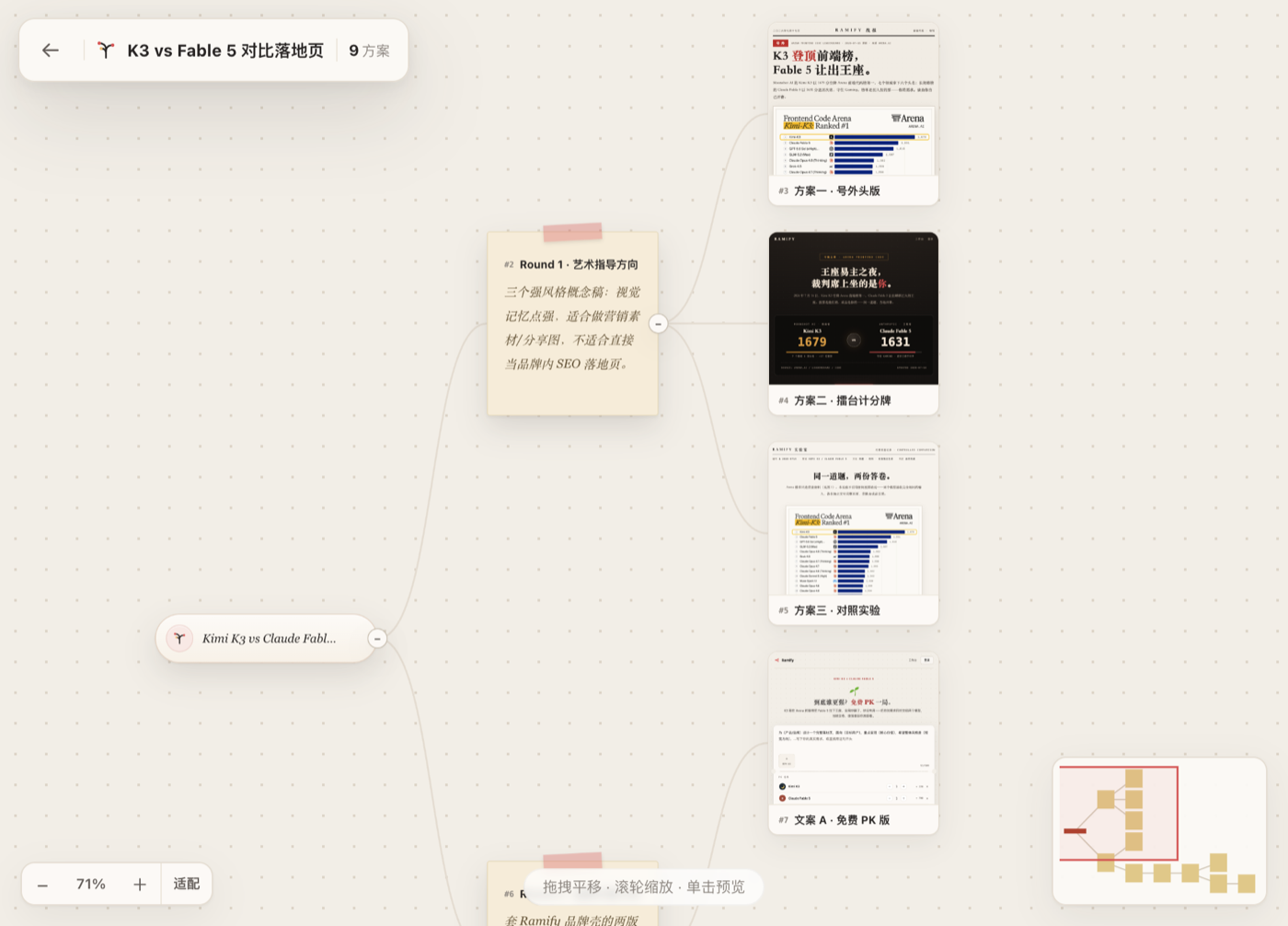
工作方式
- 点击 DSH 左侧栏的 Ramify,打开内置工作台。
- 在 Ramify 原生输入框中输入需求并选择方案数量。
- 插件立即创建项目并进入画布,同时把任务提交给当前 DSH 会话和模型。
- Agent 通过 Ramify 工具把方案持续写入画布,节点和预览实时出现。
- 点击节点右上角的发散按钮,输入修改要求,即可从该节点继续生成分支。
整个过程不需要复制本地地址,也不需要在 Ramify 中再次配置模型或 API Key。
特性
- 原生 DSH 插件:使用标准插件清单、Cordis 服务和 Client UI 插槽,没有修改 Harness 源码。
- 原生 Ramify UI:保留网站版创作票据、数量选择、画布、节点卡片和分支气泡的视觉与交互。
- 当前会话驱动:界面提交通过 DSH 官方会话输入能力发送给当前模型。
- 即时进入画布:首页提交后先创建项目并立即打开画布,Agent 随后向同一项目写入节点。
- 可视化分支:从任意已完成节点继续发散,旧方案保持不变。
- 安装后自动启动本地画布,不需要单独运行 CLI。
- HTML、Markdown、SVG、图片、视频和音频作品可直接预览。
- SQLite 本地持久化,前端轻量轮询感知变更。
- 不接收或存储模型 API Key。
- 插件卸载时清理自己启动的运行时;已有 Ramify 实例会被复用而不会被关闭。
环境要求
- Node.js 22.19 或更高版本
- DeepSeek Harness 0.1.0-rc.6(当前测试版本)或兼容版本
安装
从源码安装(当前推荐)
git clone https://github.com/yanglongyun/dsh-ramify.git
cd dsh-ramify
npm install
npm run build

dsh plugin --profile web add "$PWD"
dsh web --port 3099
npm 包发布后
dsh plugin --profile web add @ramify/dsh-ramify
dsh web --port 3099
启动后点击 DSH 左侧栏底部的 Ramify。插件会自动启动运行时,并把工作台嵌入 DSH 覆层;顶部的外部打开按钮仅作为可选的独立窗口模式。
使用
你可以直接从 Ramify 输入框开始,也可以在 DSH 对话中要求 Agent 使用 Ramify。例如:
使用 Ramify 为这个 AI 搜索产品探索三个明显不同的落地页方向,做出可预览页面让我比较。
插件向模型注册以下工具:
| 工具 | 用途 |
|---|---|
ramify_start |
启动或连接画布 |
ramify_project_create |
创建项目与根节点 |
ramify_project_list |
列出项目 |
ramify_project_tree |
读取完整创意树 |
ramify_node_add |
添加单个节点或作品占位符 |
ramify_node_batch |
原子化创建多层节点树 |
ramify_node_complete |
写入 HTML、Markdown、SVG 或媒体作品 |
ramify_node_update |
更新标题、文本或树位置 |
ramify_settings |
切换主题和界面语言 |
架构
Ramify UI (DSH overlay iframe)
        │ 结构化创建/分支意图
        ▼
DSH Client UI 会话桥 ──► 当前 DSH 会话与模型
        │                         │
        │ 轻量轮询感知变更        │ Ramify tools
        ▼                         ▼
本地 Ramify runtime ◄──── 项目、节点与作品
        │
        └── SQLite + 本地 artifact 文件
- DSH Web UI:默认
http://127.0.0.1:3099 - Ramify runtime:默认
http://127.0.0.1:9519 - DSH Web UI 与 Ramify runtime 通过 HTTP 连接;作品详情按普通网页完整运行。
配置
用户可以在 profile 的 cordis.patch.yml 中覆盖插件配置:
- id: ramify
  name: '@ramify/dsh-ramify'
  config:
    port: 9519
    dataDir: '/absolute/path/to/ramify-data'
    startupTimeoutMs: 5000
    shutdownTimeoutMs: 3000
dataDir 省略时使用平台默认目录:
- macOS:
~/Library/Application Support/Ramify/ - Windows:
%APPDATA%/Ramify/ - Linux:
${XDG_DATA_HOME:-~/.local/share}/ramify/
开发
npm install
npm run typecheck
npm test
npm run build
npm pack --dry-run
一条命令执行完整检查:
npm run check
检查内容包括 TypeScript、插件测试、Ramify runtime/UI 测试、生产构建和 npm 包内容验证。
构建产物 lib/ 与 app/dist/ 会提交到仓库,因此从本地 checkout 或 Git 安装时不需要执行安装期构建脚本。
浏览器端通过包清单中的 dsh.client 声明加载,使用 DSH 提供的侧栏、覆层、工具卡和会话输入插槽,并复用 Harness 提供的 React 运行时。npm 关键字和 GitHub Topic 均包含 dsh-plugin。
数据与作品运行
- 默认数据保存在操作系统应用数据目录,升级或重启不会清空。
- 插件不读取、不接收也不保存模型 API Key;模型调用由当前 DSH 会话负责。
- Runtime 监听
0.0.0.0:9519,DSH 默认通过127.0.0.1:9519访问并管理它。 - 画布卡片缩略图使用空
sandbox,不会运行 JavaScript,避免大量作品同时执行脚本拖慢画布。 - 右侧详情与新窗口作品不使用 sandbox 或 CSP,可正常运行脚本、加载外部资源、联网和提交表单。
许可证
MIT。第三方依赖许可见 THIRD_PARTY_NOTICES.md。
相关推荐Related
- deepseek-ai/deepseek-harness DeepSeek Harness (dsh) — 由 DeepSeek AI 开发的开源 agent harness(智能体框架)。一切皆插件:核心 + 插件 + 技能 = 可热插拔的 AI 编程工作台。DeepSeek Harness: …
-
 amruthpillai/reactive-resume
A one-of-a-kind resume builder that keeps your privacy in mind. Completely secure, customizable, portable, open-source a…
amruthpillai/reactive-resume
A one-of-a-kind resume builder that keeps your privacy in mind. Completely secure, customizable, portable, open-source a…
-
 tt-a1i/archify
Agent skill for beautiful, verifiable architecture, workflow, sequence, data-flow, and lifecycle diagrams—self-contained…
tt-a1i/archify
Agent skill for beautiful, verifiable architecture, workflow, sequence, data-flow, and lifecycle diagrams—self-contained…
-
 strukto-ai/mirage
The World's First Unified Virtual Filesystem For AI Agents
strukto-ai/mirage
The World's First Unified Virtual Filesystem For AI Agents
-
 liustack/modlens
The first vision plugin for DeepSeek Harness, and the vision bridge for every text-only coding agent. Paste an image, ge…
liustack/modlens
The first vision plugin for DeepSeek Harness, and the vision bridge for every text-only coding agent. Paste an image, ge…
-
 omdsh-dev/DSH-better-sidebar
开放的侧边栏底座,支持三方拓展注册新侧边栏页面。内置文件渲染编辑/终端/Git/子代理页面 | Open sidebar foundation, supports third-party extensions to register new…
omdsh-dev/DSH-better-sidebar
开放的侧边栏底座,支持三方拓展注册新侧边栏页面。内置文件渲染编辑/终端/Git/子代理页面 | Open sidebar foundation, supports third-party extensions to register new…
-
 dsh-market/dsh-market
The plugin market inside DeepSeek Harness — browse, search, one-click install · DSH 可视化插件市场
dsh-market/dsh-market
The plugin market inside DeepSeek Harness — browse, search, one-click install · DSH 可视化插件市场
-
 GanyuanRan/Aegis
Make AI coding agents architecture-aware: baseline-first, evidence-verified, drift-checked, and safe across long tasks.
GanyuanRan/Aegis
Make AI coding agents architecture-aware: baseline-first, evidence-verified, drift-checked, and safe across long tasks.