zdjmrq/dsh-usage-balance
DeepSeek Harness 侧边栏用量/余额插件
Project Overview项目介绍
dsh-usage-balance is a sidebar plugin built specifically for DeepSeek Harness that surfaces a compact "Usage | Balance" tag right above the Settings button and unfurls a glassmorphic detail card on hover, fully themed via DSH's native --dsw-* variables so it tracks light/dark mode automatically. It installs with dsh plugin --profile web add github:zdjmrq/dsh-usage-balance, requires Node.js ≥ 20 plus a DSH host exposing the dsh plugin command, and takes effect after restarting dsh web; updates and removals go through the matching update and remove subcommands.
The detail card streams runtime as a per-second "xxmxxs" counter, shows input/output tokens from the session's tokenUsage projection, and prints an estimated cost prefixed with "≈" that is computed from an in-plugin price table editable at the top of src/index.js. For balance it issues GET {baseURL}/user/balance, reusing the same API key already configured for llm-deepseek, caches the response for 60 seconds, prefers Node fetch, and silently falls back to curl on failure. A curtain-style oval slider at the card's foot toggles between hover-only and pinned display, while an adaptive layout flips the card to the left when right-side space is tight and collapses to a "¥" badge when the sidebar is folded into a strip.
The package ships as a DSH bundle-manifest plugin and is licensed MIT, with the monetary figures explicitly labelled as estimates and the balance query dependent on outbound access to api.deepseek.com together with a valid API key. A full textual mirror of features, architecture, structure, key implementation notes and replication prompts lives in the companion hub repository dsh-text-open-source under plugins/dsh-usage-balance.md, so reviewers and contributors can understand or remix the design without reading source code first.
dsh-usage-balance 是一款专为 DeepSeek Harness 设计的侧边栏用量与余额插件,以 dsh plugin --profile web add github:zdjmrq/dsh-usage-balance 命令安装,并随 dsh web 重启即时生效。该插件在侧边栏底部设置按钮上方插入一行简洁的"用量 | 余额"标签,鼠标悬停后向右侧展开玻璃拟态风格的详情卡,整套样式都引用 DSH 自带的 --dsw-* 主题变量,可无缝跟随亮暗主题切换。
详情卡按秒跳动显示当前会话的运行时长、输入/输出 Token,并依据内置价格表给出估算金额(以"≈"标记),同时通过 GET {baseURL}/user/balance 接口拉取官方账户余额,复用 llm-deepseek 配置中的同一把 API Key,并对结果做 60 秒缓存。卡片底部还附带一枚椭圆滑杆开关,可在"悬停显示"与"固定常驻"两种模式间切换;当侧边栏空间不足时,详情卡会自动翻转到左侧展开,折叠为竖条后则简化为 ¥ 徽标。
数据依赖上,本插件读取会话的 tokenUsage 投影作为用量来源,单价可在 src/index.js 顶部调整;余额接口优先使用 Node fetch,失败自动回退 curl 调用,但要求具备可访问 api.deepseek.com 的网络与有效 API Key,且估算金额并非真实账单。插件以 MIT 协议开源,配套的完整文字描述存放于 dsh-text-open-source 仓库。
请帮我安装这个 DSH 插件。安装前先完成【兼容性检查 + 安全性检查】,检查通过再动手。

插件:dsh-usage-balance(zdjmrq/dsh-usage-balance)
仓库:https://github.com/zdjmrq/dsh-usage-balance
本站详情页:https://www.yhbd.top/plugins/zdjmrq-dsh-usage-balance/
本站登记:类型 plugin · 归类 原生 DSH 插件 · 许可证 MIT · ⭐ 2 · 最近提交 2026-08-16 · 主语言 JavaScript

按下面顺序执行,每步先把结论告诉我,再进入下一步:

【1 兼容性检查】
① 我这边:DSH 版本、Node 版本、操作系统、当前 profile(web / desktop)。
② 读它的 README、package.json、插件 manifest,列出它要求的 DSH 版本 / Node 版本 / 操作系统 / 外部依赖 / 需要另外先装的运行时。
③ 逐条比对,结论只写「满足 / 不满足 / 未知」三种;不满足的给出可行替代方案。
④ 检查是否和我已装的插件冲突:命令名重复、skill / tool 重名、端口占用、重复注册的 MCP server。

【2 安全性检查】
① 仓库可信度:和上面「本站登记」是否一致;star / fork 数、创建时间、最近提交,是否归档或长期停更。
② 安装脚本:逐行看 package.json 的 preinstall / install / postinstall,以及 install.sh、setup.ps1 之类脚本。出现 curl|bash、下载后直接执行、混淆代码、访问与插件功能无关的域名,立刻停下来告诉我,不要继续装。
③ 依赖:列出新增依赖,标出无人维护、或与知名包拼写近似的可疑包(typosquatting)。
④ 权限与副作用:它会读写哪些目录、访问哪些域名、需要哪些 DSH 权限(filesystem / network / shell / clipboard 等),以及怎么卸载和回滚。
⑤ 如果它要求 sudo / 管理员权限,或权限明显超出功能所需,先停下来问我。

【3 安装】
上面两步没有「不满足」和「高危项」时才执行;用官方推荐方式安装,不要自行提权。

【4 汇报】
用表格输出:检查项 / 结论 / 依据 / 是否需要我决策。拿不准的一律写「未知」并说明要我怎么确认——不要猜,也不要替我决定。
Send this message to DSH in your current session: it verifies compatibility and security first (answering met / not met / unknown item by item) and only installs once everything checks out — it will stop and ask you if it finds a high-risk item. The box scrolls; the copy is the full prompt. CLI install commands may not be accurate across systems, so DSH is the safer route.把上面这条消息直接发给当前会话里的 DSH:它会先核对兼容性与安全性(逐条给「满足 / 不满足 / 未知」),确认没问题再安装,有高危项会停下来问你。框内可滚动,复制到的是完整提示词;安装命令不一定准确,发给 DSH 更稳。
- Only 2 stars - very few users, little community feedback星标只有 2,几乎没人在用,遇到问题缺少社区反馈
DSH walks through these 9 checksDSH 会逐条核对这 9 项
Compatibility兼容性
- DSH, Node, OS and profile requirementsDSH 版本 / Node 版本 / 操作系统 / profile 是否满足要求
- External dependencies and runtimes (Electron / Python / Docker, ...)外部依赖与运行时(Electron / Python / Docker 等)是否齐备
- Conflicts with installed plugins: command names, skill / tool names, ports, duplicate MCP registration与已装插件是否冲突:命令名、skill / tool 重名、端口占用、重复 MCP 注册
Security安全性
- Repo matches the facts registered here; archived or abandoned?仓库是否与页面登记一致,是否归档或长期停更
- Safety of preinstall / install / postinstall and install.sh / setup.ps1preinstall / install / postinstall 与 install.sh、setup.ps1 是否安全
- curl|bash, download-then-execute, obfuscation, unrelated domains → stop immediatelycurl|bash、下载即执行、混淆代码、无关域名 → 立刻停止
- Typosquatting or unmaintained packages among the new dependencies新增依赖里有没有 typosquatting 或无人维护的包
- Requested permissions vs. what the feature actually needs申请了哪些权限、是否超出功能所需(filesystem / network / shell / clipboard)
- Any sudo / admin requirement, plus uninstall and rollback是否要求 sudo / 管理员权限,以及卸载与回滚方式
Anything uncertain must be marked unknown with a note on how to confirm it. This site's signal screen is a static snapshot, not a security audit.拿不准的必须标「未知」并说明要我怎么确认。本站的信号筛查是静态快照,不能替代安全审计。
Or use CLI install (for developers)或使用命令行安装(适合开发者)
CLI Install命令行安装
dsh plugin --profile web add github:zdjmrq/dsh-usage-balance把 zdjmrq/dsh-usage-balance 加入你的 DSH 配置(web profile)即可启用。
READMEREADME
dsh-usage-balance
DeepSeek Harness 侧边栏「用量 / 余额」插件
在侧边栏底部「设置」按钮上方显示一条简洁的 用量 | 余额 标签行,鼠标悬停时在右侧展开玻璃拟态详情卡。
功能
- 标签行:仪表盘图标 + 「用量 / 余额」标签(跟随界面中英文),与设置、Cordis 面板同一排位风格;与 Cordis 面板纵向堆叠、互不冲突
- 详情卡(悬停展开):
- 运行时长(xxmxxs,每秒跳动)
- Token(输入/输出)
- 估算金额(≈,按内置价格表计算)
- 官方账户余额(真实接口数据)
- 门帘式滑杆开关:卡片底部的椭圆滑杆控制详情「悬停显示 ↔ 固定常驻」
- 自适应:详情卡不超出桌面范围,右侧空间不足时自动翻转到左侧展开;侧边栏折叠成竖条时显示 ¥ 徽标
- 风格:全部使用 DSH 主题变量(
--dsw-*),跟随亮/暗主题;玻璃拟态(高级灰 + 透明度 + 背景模糊)
数据说明
- 用量:读取会话的
tokenUsage投影(与内置统计同源) - 金额:按内置价格表估算(
src/index.js顶部可修改单价) - 余额:调用官方
GET {baseURL}/user/balance,复用llm-deepseek设置里的同一把 API Key,60 秒缓存;优先 Node fetch,失败自动回退 curl
安装
需求:Node.js ≥ 20 + DeepSeek Harness(带
dsh plugin命令)
dsh plugin --profile web add github:zdjmrq/dsh-usage-balance
安装后重启 dsh web 生效。
更新 / 卸载:
dsh plugin --profile web update dsh-usage-balance   # 更新
dsh plugin --profile web remove dsh-usage-balance   # 卸载
已知限制
- 金额为估算值,实际账单以官方为准
- 余额查询需要可访问
api.deepseek.com的网络与有效 API Key
📖 文字开源描述
本插件在「文字开源」枢纽仓库 dsh-text-open-source 中配有完整描述(功能 / 技术路线 / 结构 / 关键实现 / 复刻提示词,不依赖代码即可复刻、便于理解与微调):plugins/dsh-usage-balance.md。
License
Related相关推荐
-
 MeteorNOX/DeepSeek-Balance-Whale-Widget
DeepSeek Harness(DSH)一只住在 DSH 界面右下角的小鲸鱼娘,帮你盯着DeepSeek账户余额。QQ弹弹,支持拖拽吸附、左吸附翻转、数字滚动动画,随界面自动启用,建议直接喊来你的dsh安装
MeteorNOX/DeepSeek-Balance-Whale-Widget
DeepSeek Harness(DSH)一只住在 DSH 界面右下角的小鲸鱼娘,帮你盯着DeepSeek账户余额。QQ弹弹,支持拖拽吸附、左吸附翻转、数字滚动动画,随界面自动启用,建议直接喊来你的dsh安装
-
 edison7009/EchoBird
Manage ChatGPT, Codex CLI, and Claude Code accounts and track quota in one place. Use multi-model smart routing with pri…
edison7009/EchoBird
Manage ChatGPT, Codex CLI, and Claude Code accounts and track quota in one place. Use multi-model smart routing with pri…
-
 Han-1413141/dsh-cost-meter
Cost tracking for DeepSeek Harness: session and model costs, token usage, budgets, provider balances, and coding-plan qu…
Han-1413141/dsh-cost-meter
Cost tracking for DeepSeek Harness: session and model costs, token usage, budgets, provider balances, and coding-plan qu…
-
 wssfk12138/dsh-damage-pulse
DeepSeek Harness Token 余额监控插件:鲸鱼娘待机/扣费/复苏动画、峰谷计费、连续扣费飘字与会话费用统计。
wssfk12138/dsh-damage-pulse
DeepSeek Harness Token 余额监控插件:鲸鱼娘待机/扣费/复苏动画、峰谷计费、连续扣费飘字与会话费用统计。
-
 zh667/TokenLedger
Relay-site attributed token usage for DeepSeek Harness — zero config, no credentials
zh667/TokenLedger
Relay-site attributed token usage for DeepSeek Harness — zero config, no credentials
-
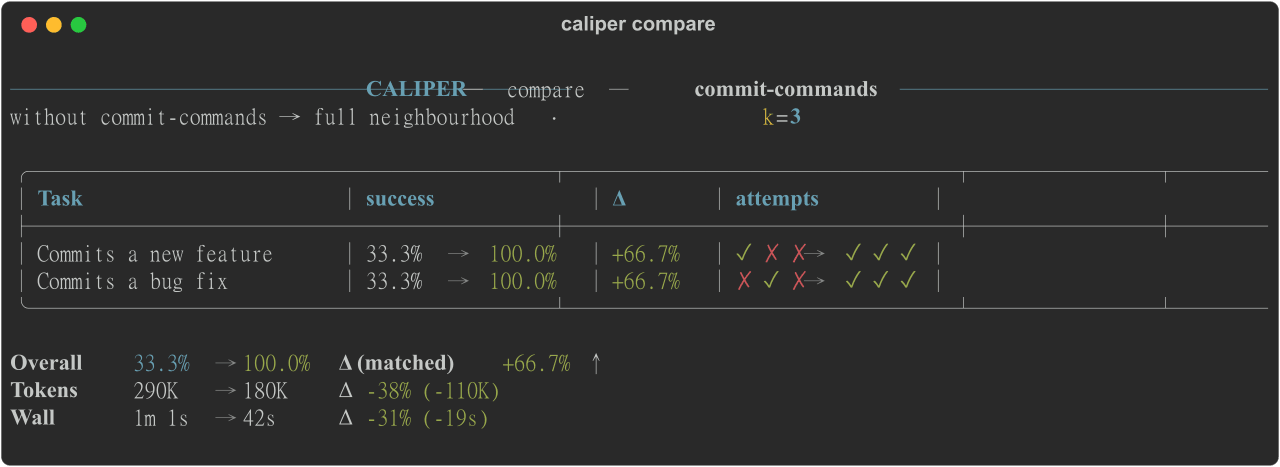 edonadei/caliper
Run your real agent with and without your skills, MCPs, and rules. See which ones actually help, and what they cost in t…
edonadei/caliper
Run your real agent with and without your skills, MCPs, and rules. See which ones actually help, and what they cost in t…
-
 Ychris12138/dsh-usage-stats
Provider balances, subscription quotas, and token-usage analytics for the DeepSeek Harness Web GUI (dsh web).
Ychris12138/dsh-usage-stats
Provider balances, subscription quotas, and token-usage analytics for the DeepSeek Harness Web GUI (dsh web).
-
 Aisland-SJL/dsh-usage
🌊 Persistent dock & fully-customizable balance/usage panel for DeepSeek Harness — activity heatmap, dual-channel compar…
Aisland-SJL/dsh-usage
🌊 Persistent dock & fully-customizable balance/usage panel for DeepSeek Harness — activity heatmap, dual-channel compar…