zhenghaoyang24/obsidian-plugin-deepshian
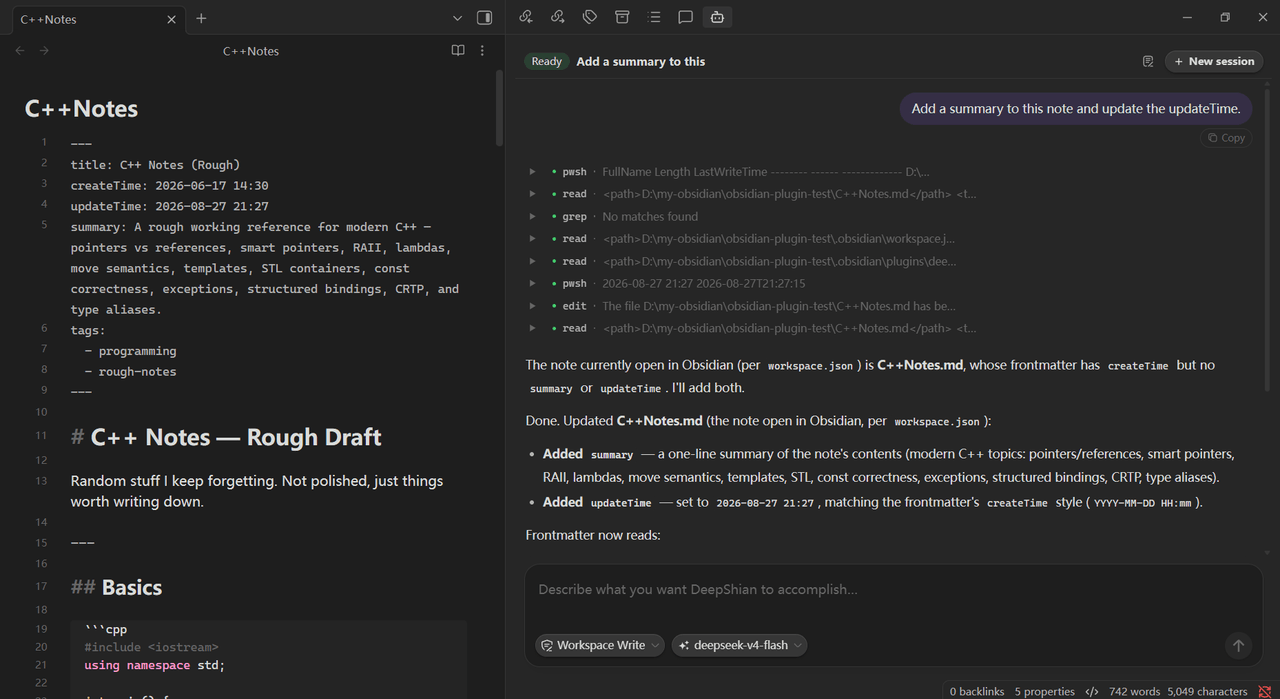
Sidebar AI chat powered by the local DeepSeek Harness (dsh): streaming replies, tool calls, and real vault file edits.
项目介绍Project Overview
DeepShian 是一款 Obsidian 插件,将本地 DeepSeek Harness 嵌入侧边栏。基于本机 dsh 运行,无云端、无账号,支持流式回答、思考步骤、工具调用卡片,并可读写 vault 文件。提供模型选择器、只读/工作区写入权限切换与会话历史共享。适用于需要本地 Agent 协助处理笔记的用户。需 Obsidian≥1.4、Node.js≥18 并全局安装 dsh。
DeepShian is an Obsidian plugin that embeds the local DeepSeek Harness into the sidebar. It runs against a local dsh with no cloud or account, delivering streaming replies, collapsible thinking steps, tool-call cards, and direct vault read/write. It offers a model picker, Read Only and Workspace Write modes, and shared conversation history. Use it for in-vault agent assistance. Requires Obsidian 1.4+, Node.js 18+, and a globally installed dsh.
请帮我了解并安装插件:【obsidian-plugin-deepshian】【https://github.com/zhenghaoyang24/obsidian-plugin-deepshian】把上面这条消息直接发给当前会话里的 DSH,让它帮你了解并安装。安装命令不一定准确,发给 DSH 更稳。Send this message to DSH in your current session. CLI install commands may not be accurate across systems — DSH will figure it out for you.
或使用命令行安装(适合开发者)Or use CLI install (for developers)
命令行安装CLI Install
dsh plugin --profile web add github:zhenghaoyang24/obsidian-plugin-deepshian把 zhenghaoyang24/obsidian-plugin-deepshian 加入你的 DSH 配置(web profile)即可启用。
READMEREADME
DeepShian
English | 简体中文



DeepShian brings DeepSeek Harness into Obsidian's right sidebar. There is no cloud API: it talks to the dsh already installed on your machine, so you get the full agent experience — streaming answers, thinking steps, tool-call cards — and it can read and edit your vault files directly.
DeepShian 把 DeepSeek Harness 直接带进 Obsidian 右侧栏。后端不是云端 API,而是你本机已经装好的 dsh,因此侧边栏里就是完整 Agent 体验——流式回答、思考过程、工具调用卡片——并且可以直接读写 vault 文件。
Features
🔒 Fully Local
- Runs entirely on your machine: no cloud API, no account, and no vault data leaves your device.
- The sidebar hosts the full agent — answers, tool calls, and file operations are all driven by your local
dsh.
✨ Model Picker
- One click lists every model available in your local
dshsetup; providers are grouped when you have several. - Your choice sticks across new conversations, restarts, and the dsh web app.
🔐 Access Control
- Pick an access mode next to the input box: Read Only (view and search only) or Workspace Write (edit files and run commands).
- The mode is enforced for real — not a prompt hint — so you always decide what the agent may touch.
💬 Conversations
- The current conversation title is always shown; the 📋 History button opens a panel with every conversation saved in this workspace.
- Click a past conversation to resume it with full context, tool calls included.
- History is shared with the dsh web app — both sides see the same conversations.
- New conversation restarts the agent for a fresh start.
🎨 Chat Experience
- Streamed replies render word by word; 💭 thinking steps are collapsible; tool calls appear as cards with input/output and status; token usage is shown at the end of every turn.
- The send button turns into Stop while generating — click it to interrupt the current turn.
- The UI follows Obsidian's language setting (English / 简体中文).
Requirements
| Dependency | Version | Notes |
|---|---|---|
| Obsidian | ≥ 1.4.0 | Desktop only |
| Node.js | ≥ 18 | Runtime for the dsh command |
| DeepSeek Harness | / | Installed globally so that dsh is available |
# Verify dsh is installed
dsh --version
Quick Start
1 Install into Obsidian
Option A: Install from the community plugin store
Open Obsidian → Settings → Community plugins → Browse → search deepshian → Install → Enable, then click the 🤖 icon in the left sidebar to open chat.
Option B: Download from Releases
Go to the Releases page and download these three files** from the latest release: main.js、manifest.json、styles.css. Put them into the vault's plugin folder <vault>/.obsidian/plugins/deepshian/.Then: Settings → Community plugins → Enable DeepShian → click the 🤖 icon in the left sidebar to open chat.
2 Build from source (optional)
npm install
npm run build     # type-check and bundle into build/ (main.js + manifest.json + styles.css)
npm run dev       # optional: watch-mode incremental builds
The output lands in build/ — the same three files (main.js, manifest.json, styles.css) — copy them into the vault's plugin folder:
3 Plugin settings
| Setting | Default | Description |
|---|---|---|
| dsh command | dsh |
Full path if dsh is not on PATH |
| Bridge profile | deepshian |
Profile that carries the JSONL bridge plugin (auto-installed on first run) |
| Start read-only | Off | New conversations open in read-only mode |
| Debug logging | Off | Log unparsed stdout lines and harness stderr to the console |
相关推荐Related
-
 PAKIKNOWLEDGE/dsh-client-ui-skin-claude
Claude-style skin for DeepSeek Harness (dsh) Web GUI — warm-black canvas, Anthropic clay accent, serif UI
PAKIKNOWLEDGE/dsh-client-ui-skin-claude
Claude-style skin for DeepSeek Harness (dsh) Web GUI — warm-black canvas, Anthropic clay accent, serif UI
-
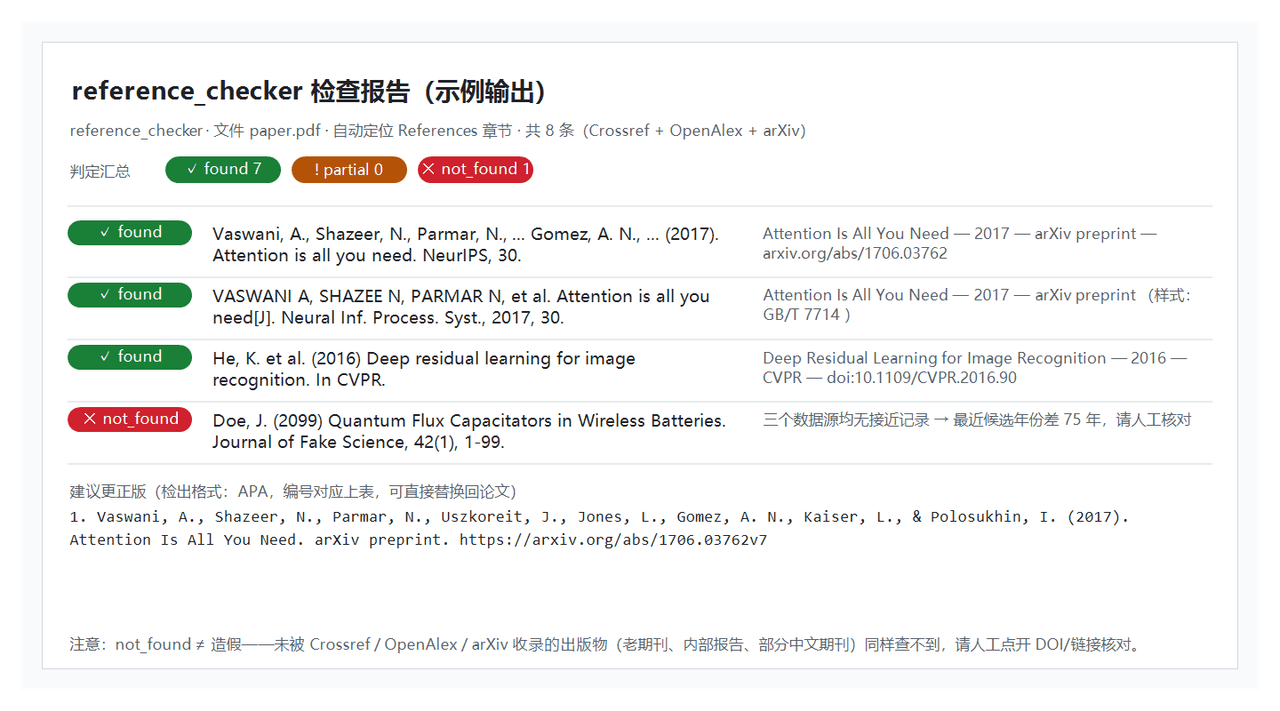 Yu-tao-Li/dsh-reference-checker
DeepSeek Harness 参考文献真实性检查器 (dsh-reference-checker) — refcheck_check 工具:逐条核对论文文献(PDF/BibTeX/tex/文本)于 Crossref / OpenAlex…
Yu-tao-Li/dsh-reference-checker
DeepSeek Harness 参考文献真实性检查器 (dsh-reference-checker) — refcheck_check 工具:逐条核对论文文献(PDF/BibTeX/tex/文本)于 Crossref / OpenAlex…
-
 haxi8/dsh-JujutsuKaisen-rainlove
听雨的声音 一滴滴清晰, 你的呼吸像雨滴渗入我的爱里, 真希望 雨能下不停, 让想念继续 让爱变透明, 我爱上 给我 勇气的 Rainie Love, 窗外的雨滴 一滴滴 累积, 屋内的湿气 像储存爱你的记忆, 真希望 雨能下不停, 雨爱的…
haxi8/dsh-JujutsuKaisen-rainlove
听雨的声音 一滴滴清晰, 你的呼吸像雨滴渗入我的爱里, 真希望 雨能下不停, 让想念继续 让爱变透明, 我爱上 给我 勇气的 Rainie Love, 窗外的雨滴 一滴滴 累积, 屋内的湿气 像储存爱你的记忆, 真希望 雨能下不停, 雨爱的…
- PerryLink/dsh-mask PII masking middleware for DeepSeek Harness: anonymize names, phones, emails, ID cards, bank cards, keys, and addresses …
- Pasumao/dsh-plugin-dev-kb DeepSeek Harness (dsh) 插件开发知识库:官方文档完整镜像 + 主题导航与检索。Plugin development knowledge base for dsh.
-
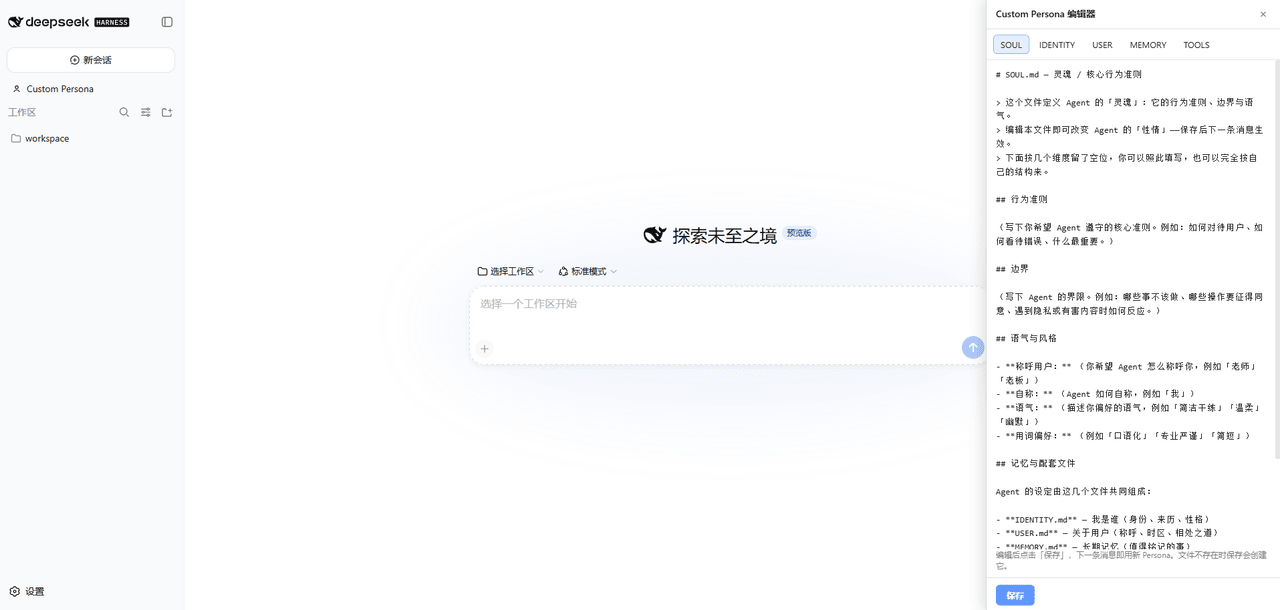 lynsucceed/dsh-openclaw-persona
Reuse OpenClaw persona files (SOUL/IDENTITY/USER/MEMORY/TOOLS.md) as the DSH agent persona, with a Web GUI editor — edit…
lynsucceed/dsh-openclaw-persona
Reuse OpenClaw persona files (SOUL/IDENTITY/USER/MEMORY/TOOLS.md) as the DSH agent persona, with a Web GUI editor — edit…
-
 MemTensor/MemOS
Self-evolving memory OS for LLM & AI Agents: ultra-persistent memory, hybrid-retrieval, and cross-task skill reuse, with…
MemTensor/MemOS
Self-evolving memory OS for LLM & AI Agents: ultra-persistent memory, hybrid-retrieval, and cross-task skill reuse, with…
-
 zilliztech/memsearch
A persistent, unified memory layer for all your AI agents (e.g. Claude Code, Codex, DSH), backed by Markdown and Milvus.
zilliztech/memsearch
A persistent, unified memory layer for all your AI agents (e.g. Claude Code, Codex, DSH), backed by Markdown and Milvus.