Otter AI 做会议记录到底行不行?Does Otter AI Perform Well at Taking Meeting Notes?
在「我靠脑子记住决定就行」和专门请一位速记员之间,存在着 Otter AI:一个悄悄加入你的 Zoom 通话、把每个字转成文字、甚至在你合上笔记本电脑之前就交出摘要的小机器人。在 AI 会议记录领域,它是最知名的名字之一,但名气本身从来不保证它契合你特定的会议量。下面坦率看看它真正能交付什么、边界又从哪里开始显现。
Otter AI occupies the space between telling yourself you will simply remember the decisions and bringing in a stenographer: a modest bot that slips quietly into your Zoom call, turns every word into text, and provides a summary before your laptop is even shut. In the AI meeting-notes world it is one of the best-known names, yet fame by itself never guarantees a match for your particular meeting volume. Here is a candid look at where it truly delivers and where its boundaries begin to show.
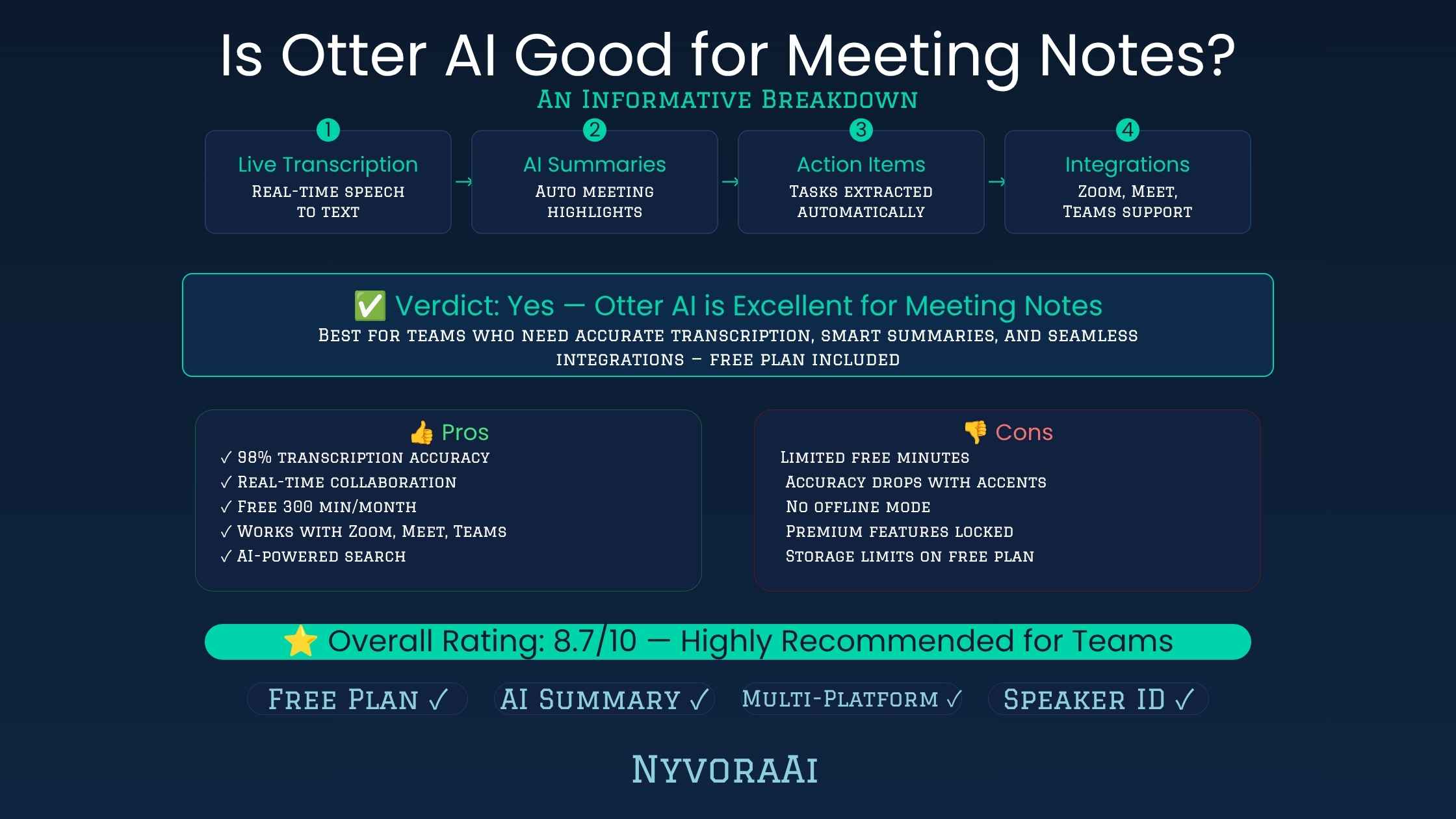
Otter AI 问世已久,如今提起「AI 会议记录」人们几乎会自动想到它,就像过去视频通话就意味着 Zoom 一样。这种地位在很多方面都名副其实,但真正的长处值得与单纯的品牌知名度分开来看——尤其是仔细审视各档价格和附带限制时。
01简短回答
对大多数日常场景,Otter AI 都能很好地处理会议记录。Zoom、Google Meet 和 Microsoft Teams 通话会多一位自动加入的参与者,提供精确的实时转录和说话人标注,通话结束后很快生成一份可用的摘要和待办事项。用量更高时契合度就会减弱:免费计划每月 300 分钟的上限和每次对话 30 分钟的限制很快就会用完;目前语言范围仅限英语、法语和西班牙语;更高级的销售与 CRM 自动化则被放在定制报价的 Enterprise 档内。会议量轻到中等的用户能得到可靠选择,而日常重度使用或多语言团队则值得先看看竞争对手。
02Otter AI 到底是做什么的
Otter AI 是一款由 AI 驱动的会议助手,以所有参与者都能看到的身份出现在视频通话中,录制音频,并在人们交谈时生成实时转录稿。通话一结束,就会出现结构化摘要,标出重要讨论点,还能识别待办事项并归到具体人名下。它与 Zoom、Google Meet、Microsoft Teams 直接集成,因此大多数情况下,你只需安排会议并允许 Otter 的机器人加入即可。
除了转录加摘要的基本循环,Otter 还增加了协作功能:团队可以高亮段落、添加评论、按关键词搜索以往会议。积累几个月历史之后,要定位一场想不起确切日期的通话内容,这确实很有用。
03主要功能详解
实时转录
自动摘要与待办事项
与 Zoom、Meet、Teams 集成
面向销售的工具
042026 年 Otter AI 价格
| 计划档位 | 价格 | 每月分钟数 | 每次会议上限 |
|---|---|---|---|
| Basic(免费) | $0/月 | 300 分钟 | 30 分钟 |
| Pro | 年付约 $8.33/月,月付 $16.99/月 | 1,200 分钟 | 90 分钟 |
| Business | 年付约 $19.99/月,月付 $30/月(每用户) | 不限 | 4 小时 |
| Enterprise | 定制报价 | 定制 | 定制 |
免费的 Basic 计划在检验转录质量或试用 Zoom、Meet 集成时确实有用,但它每次对话 30 分钟的上限,会把短站立会以外的内容中途切断,除非手动重启。免费计划的文件导入是整个账户生命周期内仅限 3 次,而不是每月 3 次;用完之后,导入预录音频就意味着要升级。
05Otter 真正出彩的地方
转录质量是 Otter 名声的主要来源,实际表现也站得住:即使在有好几个声音的多人通话里,说话人识别总体仍可信,实时转录也精确到可以当场跟着看,而不必会后再读。与 Zoom、Google Meet、Microsoft Teams 的集成同样真正顺滑,连上日历后机器人就能加入排定的通话,无需更多操作。
可搜索的转录存档是另一个被低估的长处。积累几个月会议之后,能用关键词搜索每一场以往通话——而不是苦想某个决定出自哪场会——这最终成为人们换到没有该功能的产品后最怀念的特性之一。
06它的不足之处
- 语言范围窄。截至 2026 年,Otter 的转录语言为英语、法语和西班牙语,与某些竞争对手相比,这对多语言团队是实打实的限制。
- 免费计划紧。每月 300 分钟加上每次对话 30 分钟的上限,让免费档更像一次试用,而非可长期使用的选择。
- 销售功能仅限 Enterprise。CRM 同步和通话辅导工具本会让小型销售团队最受益,却只在定制报价的 Enterprise 中提供。
- 客户支持方面的抱怨。用户评论反复提到支持响应比预期慢,在低档位尤其如此。
- Pro 的分钟数被削减。一些老客户注意到 Pro 的每月额度从更高数字降了下来,价格却没有相应下调;在选择年付之前,值得对照当前条款核实。
07Otter AI 真正适合哪些人
- 1
自由职业者与独立专业人士
1 中等会议量可以从容落在 Pro 每月 1,200 分钟的额度之内。
- 2
需要共享会议存档的小团队
2 Business 计划不限量的会议转录,免去了为团队追踪每月分钟数的紧张。
- 3
记录讲座的学生
3 Pro 甚至为学生和教师提供折扣,使它成为课业上真正负担得起的选择。
- 4
不适合多语言团队
4 经常用英语、法语、西班牙语以外语言开会的团队,应到别处寻找可靠转录。
- 5
不适合预算有限又想要 CRM 自动化的销售团队
5 如果 CRM 同步和辅导洞察很重要、Enterprise 价格却不合适,围绕这些功能打造的竞争对手可能更有效地服务你。
08会后该拿会议记录做什么
转录稿只有变成可执行的东西才有价值。如果会议经常产生要变成博客文章、内部报告或客户文档的材料,把 Otter 转录稿放进 Jasper 这类专注写作的 AI,或与 Copy.ai 对照,都能比面对空白页更快得到一份精修草稿。
当会议提出的话题需要在下一次跟进之前再做调查,把笔记与专门的研究工具搭配能加快这一步;我们关于 Perplexity AI 是否适合研究的评测为这一需求提供了强有力的答案。任何摘要发给客户或更大团队之前,多花一分钟检查语法与清晰度是值得的;我们关于 Grammarly AI 对写作者是否值得的评测涵盖了最后润色这一步。
如果会议回顾需要变成视觉摘要——一页纸、幻灯片,或给利益相关者更新用的快速图形——把笔记与图像工具搭配就补上了最后一环;当视觉素材是你分享会议成果的常规部分时,我们关于 2026 年 Midjourney 订阅是否值得的文章值得一看。
09评估 Otter 时常犯的错误
- 只凭免费计划下判断。Basic 的限制让 Otter 感觉比付费档实际更受限,所以排除它之前先试试 Pro。
- 忽视单次对话的时长上限。即便是付费档位,一场格外长的通话也可能在月度额度还很充裕时,就先耗尽单次对话允许的时长。
- 以为销售功能在每一档都有。CRM 同步和辅导工具只属于 Enterprise,所以在假定 Pro 或 Business 能覆盖销售团队之前先核实。
- 事先不查语言支持。跨多种语言协作的团队,最好先确认自己依赖的每一种语言都在支持范围内,别等付了一整年费用才发现缺口。
- 省掉会后两分钟的检查。自动生成的摘要不错但并不完美,快速检查能长期保持准确。
10常见问题
Otter AI 做会议记录好用吗?
Otter AI 有免费计划吗?
Otter AI Pro 要多少钱?
Otter AI 支持哪些语言?
有哪些值得考虑的会议记录替代方案?
11结语
Otter AI 做会议记录好用吗?对会议量合理的大多数人来说,好用:转录精确、说话人识别和原生日历集成都真正省时间,也减轻了「既要参与对话又要做笔记」的精神负担。复杂的是边缘情况:日常重度会议量、多语言团队,以及预算内寻求 CRM 自动化的销售团队,都会撞上真实的边界;在年度承诺之前,值得结合自己的情况核实。
靠谱的判断办法,是从免费的 Basic 计划起步:在一场真实会议里检验转录准确度和 Zoom、Meet 的集成效果,等摸清自己一个月通常要用多少分钟,再升级到 Pro。如果语言需求、销售工具或会议时长老是撞上 Otter 的上限,那在锁定年付之前,赶紧对比一下其他产品是划算的。话说回来,若只是想要朴素、可靠的会议记录,Otter 依然凭实力稳居值得信赖的产品之列。
Otter AI has existed for long enough that AI meeting notes now call it to mind almost automatically, much as video calls used to mean Zoom. The standing is deserved in plenty of respects, but genuine strengths deserve separating from mere name familiarity — particularly once the pricing tiers and the limits attached to each receive a closer look.
01The Brief Answer
For the bulk of routine situations, Otter AI handles meeting notes well. Calls on Zoom, Google Meet, and Microsoft Teams gain an automatic participant that supplies precise live transcription and speaker labels, then produces a workable summary plus action items soon after the call closes. Higher volumes are where the fit weakens. The free plan's monthly ceiling of 300 minutes and its 30-minute limit for each conversation vanish quickly; at present the language range is confined to English, French, and Spanish; and the more advanced sales and CRM automation sits inside the custom-priced Enterprise tier. Light to moderate meeting calendars get a dependable option, whereas heavy daily use or multilingual groups merit a look at rivals first.
02What Otter AI Is Actually For
Otter AI is a meeting assistant driven by AI that appears on your video calls as a participant everyone can see, captures the audio, and builds a live transcript while people talk. Once the call concludes, a structured summary appears, important discussion points are flagged, and action items can be recognised and attributed to particular people. Direct integration with Zoom, Google Meet, and Microsoft Teams means that, more often than not, scheduling the call and permitting Otter's bot to enter is all that is required.
Outside the basic loop of transcript and summary, Otter has added collaboration capabilities: sections can be highlighted by teams, comments can be attached, and earlier meetings can be searched by keyword. After several months of history accumulate, this proves genuinely useful for locating material from a call whose exact date you cannot recall.
03The Main Features, Explained
Live Transcription
Auto-Generated Summaries and Action Items
Integration With Zoom, Meet and Teams
Tools Built for Sales
04Otter AI's 2026 Pricing
| Plan tier | What it costs | Minutes each month | Ceiling for each meeting |
|---|---|---|---|
| Basic (no charge) | $0 each month | 300 minutes | 30 minutes |
| Pro | Around $8.33 monthly annually, $16.99 monthly month to month | 1,200 minutes | 90 minutes |
| Business | Close to $19.99 monthly annually, $30 monthly month to month for each user | Without limit | 4 hours |
| Enterprise | Individually quoted pricing | Individually set | Individually set |
The no-cost Basic plan genuinely helps when checking transcription quality or experimenting with the Zoom and Meet connections, yet its 30-minute conversation ceiling cuts anything beyond a brief standup off partway through unless a manual restart happens. File imports on the free plan are capped at 3 for the account's entire life rather than each month; after those are spent, bringing in pre-recorded audio means upgrading.
05Where Otter Truly Comes Through
Transcription quality accounts for most of Otter's standing, and it holds up in practice: identifying speakers stays generally trustworthy even on group calls with several voices, and the live transcript is precise enough to follow in the moment rather than only afterward. Zoom, Google Meet, and Microsoft Teams integration is likewise genuinely smooth, with the calendar connection letting the bot enter scheduled calls without further intervention.
The searchable archive of transcripts is a further, underappreciated strength. Once several months of meetings accumulate, keyword searches across every previous call — rather than straining to recall which meeting contained a given decision — turns out to rank among the features people mourn most after moving to a product that lacks it.
06Where It Comes Up Short
- A narrow language range. English, French, and Spanish make up Otter's transcription languages as of 2026, a genuine constraint for multilingual groups measured against certain rivals.
- A tight no-cost plan. Monthly 300 minutes plus a 30-minute conversation ceiling turn the free tier into a genuine trial rather than a durable option.
- Enterprise-only sales capabilities. CRM synchronisation and call-coaching tools, which would help smaller sales groups most, arrive solely under custom Enterprise pricing.
- Complaints about customer support. Reviews repeatedly mention support responses that arrive more slowly than expected, above all on lower tiers.
- Reduced minutes on Pro. Long-standing customers have observed the monthly allowance for Pro fall from a larger figure without a matching drop in price, a point worth comparing with current terms before annual billing.
07The People Otter AI Actually Suits
- 1
Freelancers and independent professionals
1 Moderate meeting calendars sit comfortably within Pro's monthly allowance of 1,200 minutes.
- 2
Small groups in need of shared meeting archives
2 Unlimited meeting transcription on the Business plan removes the strain of tracking a team's monthly minutes.
- 3
Students keeping a record of lectures
3 A discount for students and teachers is even offered on Pro, making it a genuinely affordable fit for coursework.
- 4
Not multilingual groups
4 Groups that regularly meet in languages beyond English, French, and Spanish should seek dependable transcription elsewhere.
- 5
Not budget sales teams after CRM automation
5 When CRM synchronisation and coaching insights matter but Enterprise pricing does not fit, a rival centred on those capabilities may serve you more effectively.
08What to Do With the Notes Once the Meeting Ends
A transcript earns its value only after becoming something actionable. Meetings that routinely generate material destined for a blog post, internal report, or client document benefit when the Otter transcript goes into a writing-focused AI such as Jasper, or when measured against Copy.ai: a polished draft emerges far faster than from a blank page.
When a meeting raises a subject requiring more investigation before the next follow-up, a dedicated research tool paired with your notes accelerates that stage; our review of Perplexity AI's research suitability presents a strong answer to that need. Before any summary reaches a client or a wider group, an extra minute on grammar and clarity pays off; our review of Grammarly AI's value for writers covers that last polishing stage.
If the recap needs to become a visual summary — a one-pager, slide, or quick graphic for a stakeholder update — an image tool paired with your notes closes the final gap; our piece on whether Midjourney's subscription is worth it in 2026 merits a look when visuals are a regular part of sharing meeting outcomes.
09Errors People Make When Assessing Otter
- Judging solely from the free plan. Basic's limits make Otter feel more constrained than the paid tiers actually are, so try Pro before ruling it out.
- Ignoring how long a single conversation can run. On the paid tiers too, one unusually long call can use up the per-conversation allowance while a healthy monthly balance still remains.
- Presuming sales features appear on every tier. CRM synchronisation and coaching tools belong to Enterprise alone, so verify this before assuming Pro or Business covers the sales team.
- Skipping the language check up front. Teams that operate in several languages ought to confirm every language they rely on is supported, rather than finding the gap after paying for a full year.
- Skipping the two-minute review after meetings. Auto-generated summaries are strong but imperfect, and a swift check preserves accuracy over time.
10Common Questions
Does Otter AI perform well for meeting notes?
Does Otter AI offer a no-cost plan?
What is the price of Otter AI Pro?
Which languages does Otter AI cover?
Which meeting-note rivals are worth considering?
11Closing Thoughts
Does Otter AI handle meeting notes well? For most people with a sensible meeting load, it does: transcription precision, speaker identification, and native calendar integration genuinely return time and lighten the mental burden of taking notes while taking part. The edges are where matters grow complicated. Heavy daily meeting volumes, multilingual groups, and sales teams seeking budget CRM automation all meet genuine boundaries, which deserve checking against your situation before an annual commitment.
The sensible way to decide is to start on the free Basic plan: put the transcription accuracy and the Zoom or Meet integration through a real meeting, and only step up to Pro once you know how many minutes a typical month consumes. If your language needs, sales tooling or meeting length keep bumping into Otter's ceilings, it pays to size up the alternatives quickly before a yearly payment locks in. All that said, for plain, reliable meeting documentation, Otter still earns its place among the names you can trust.