asdnmy123/dsh-prompt-optimizer
给 DSH 对话输入框加一个 ♂harden 按钮:一键把草稿锻造成硬邦邦、雷霆炫酷、肌肉集团味的提示词 —— 事实一条不丢,废话一句不留。A hard-boiled prompt rewriter for the DeepSeek Harness composer.
Project Overview项目介绍
dsh-prompt-optimizer is a DSH-native bundle that injects a seven-character button labelled exactly ♂harden (U+2642 + harden) into the lower-left corner of every DeepSeek Harness composer input field, rewriting rough drafts into a hard-boiled task brief with a fixed opening, a hard-requirements checklist, a self-check, and a pushy closing. The repo ships as a real DSH bundle: the host half registers a same-origin HTTP surface via ctx.webServer.register({ kind: 'prefix' }) and drives ctx.llm.stream() with text-delta chunks, while the client half mounts through cordis.patch.yml and the __ModuleLoader__ slot contract — never touching host.call or harness.handle, which are reserved for cordis-client-runner packages. Installation is GitHub-direct (github:asdnmy123/dsh-prompt-optimizer) via the desktop Settings → Plugins panel, or dsh plugin --profile <name> add github:... on the CLI build, or link:<path> for live development, or a fully manual route that edits the profile's package.json in both the dependencies block and the dsh.profile.bundles array before running pnpm install and restarting DSH.
The day-to-day workflow is simple: type whatever rough prompt you have into the composer, click the ♂harden button, wait three to six seconds while it cycles through its four states (idle, forging, success, failure) with a flowing orange→magenta→purple→gold gradient ring, and the rewritten output lands directly back in the editor without auto-sending, so Ctrl+Z always recovers the original draft. It is aimed at DSH users — developers, ops engineers, prompt authors — who want their DeepSeek dispatches to land with tighter constraints and a more aggressive tone, and equally at plugin authors who want a reference example of a bundle that talks to the host through only the public contracts and never imports @deepseek-ai/* packages. The style field can be switched among hard, team, and cool, and configuration normalises model, provider, temperature, systemPrompt, and the localFallback boolean, while uninstallation goes through dsh plugin --profile <name> remove dsh-prompt-optimizer or the Settings panel, and any throw inside the loader simply makes the button disappear rather than breaking the chat.
Dependencies and limits are spelled out in the README: the project needs DSH desktop or CLI plus Node ≥ 18, ships zero third-party runtime dependencies, uses only DSH public contracts on the host side and only React on the client side, and keeps the button label pinned by a hard equality check (LABEL === '\u2642harden', codepoint 0x2642, length 7) verified across all four state dictionaries. When the model is unavailable the deterministic local fallback wraps the original text in the hard-boiled shell, while sanitizeOutput strips code-fence leakage, "以下是…" preambles, and "如果需要我还可以…" pleasantries but cannot stop the model from occasionally adding one extra acceptance step — the README explicitly recommends an eyeball review before sending. Client edits reload with a page refresh, host edits require toggling the plugin off and on inside the plugin manager, the button background pulls --dsw-alias-bg-layer-1 with dark-mode fallback, prefers-reduced-motion kills animations, and forced-colors degrades to a solid system-colour button. The project is MIT-licensed, ships a 94-item offline selftest, and CI on Node 18/20/20/22 plus real Chromium computed-style assertions via tools/preview.html.
dsh-prompt-optimizer 是面向 DSH(DeepSeek Harness)作曲器的「♂harden」硬汉提示词改写器,安装后在对话输入框左下角注入一个永远显示为七个字符的按钮,点按后调用宿主 ctx.llm.stream() 把草稿重写为动员 + 硬指标 + 自查 + 催命结构的任务书,写回输入框而不自动发送。它以 DSH 原生 bundle 形式打包:宿主半走 ctx.webServer.register 的同源 HTTP 面,客户端半通过 cordis.patch.yml 与 __ModuleLoader__ 插槽注册;安装路径支持 GitHub 直装(github:asdnmy123/dsh-prompt-optimizer)、CLI 版的 dsh plugin add、桌面版设置面板的 link: 本地目录,以及手动改写 profile.directory 下 package.json 的 dependencies 与 dsh.profile.bundles 三处再 pnpm install。
典型使用流程:在输入框写糙稿,点 ♂harden,等三到六秒结果回填到输入框,Ctrl+Z 可撤销;适用人群是想给 DeepSeek 派单时让语气更狠、指标更密、约束更硬的开发者与运维,亦适合喜欢改造 DSH 输入体验的插件作者。可通过 style 字段切换 hard / team / cool 三种口吻,model、provider、temperature、localFallback 等在配置中归一化生效;卸载用 dsh plugin --profile <名> remove 或设置面板移除,链路任何 try/catch 失败也只会让按钮消失,不会破坏对话。
运行约束明确:需 DSH 桌面版或 CLI 版与 Node ≥ 18,零第三方运行时依赖,宿主半只吃 DSH 公开契约、客户端半只吃 react;模型挂掉时本地确定性兜底仍会输出硬汉外壳,sanitizeOutput 负责清理代码围栏与客套前言,但管不了模型偶尔新增的验收动作,发布前需人眼复核。客户端改动刷新页面即可,宿主半改动需在插件管理器里关掉再开;按钮底色取 --dsw-alias-bg-layer-1 深色回退,真 GUI 跟随主题明暗,prefers-reduced-motion 与 forced-colors 自动降级。许可证为 MIT,可直接 GitHub 直装或 clone 到本地做 link: 开发调试。
请帮我安装这个 DSH 插件。安装前先完成【兼容性检查 + 安全性检查】,检查通过再动手。

插件:dsh-prompt-optimizer(asdnmy123/dsh-prompt-optimizer)
仓库:https://github.com/asdnmy123/dsh-prompt-optimizer
本站详情页:https://www.yhbd.top/plugins/asdnmy123-dsh-prompt-optimizer/
本站登记:类型 plugin · 归类 原生 DSH 插件 · 许可证 MIT · ⭐ 3 · 最近提交 2026-09-29 · 主语言 JavaScript

按下面顺序执行,每步先把结论告诉我,再进入下一步:

【1 兼容性检查】
① 我这边:DSH 版本、Node 版本、操作系统、当前 profile(web / desktop)。
② 读它的 README、package.json、插件 manifest,列出它要求的 DSH 版本 / Node 版本 / 操作系统 / 外部依赖 / 需要另外先装的运行时。
③ 逐条比对,结论只写「满足 / 不满足 / 未知」三种;不满足的给出可行替代方案。
④ 检查是否和我已装的插件冲突:命令名重复、skill / tool 重名、端口占用、重复注册的 MCP server。

【2 安全性检查】
① 仓库可信度:和上面「本站登记」是否一致;star / fork 数、创建时间、最近提交,是否归档或长期停更。
② 安装脚本:逐行看 package.json 的 preinstall / install / postinstall,以及 install.sh、setup.ps1 之类脚本。出现 curl|bash、下载后直接执行、混淆代码、访问与插件功能无关的域名,立刻停下来告诉我,不要继续装。
③ 依赖:列出新增依赖,标出无人维护、或与知名包拼写近似的可疑包(typosquatting)。
④ 权限与副作用:它会读写哪些目录、访问哪些域名、需要哪些 DSH 权限(filesystem / network / shell / clipboard 等),以及怎么卸载和回滚。
⑤ 如果它要求 sudo / 管理员权限,或权限明显超出功能所需,先停下来问我。

【3 安装】
上面两步没有「不满足」和「高危项」时才执行;用官方推荐方式安装,不要自行提权。

【4 汇报】
用表格输出:检查项 / 结论 / 依据 / 是否需要我决策。拿不准的一律写「未知」并说明要我怎么确认——不要猜,也不要替我决定。
Send this message to DSH in your current session: it verifies compatibility and security first (answering met / not met / unknown item by item) and only installs once everything checks out — it will stop and ask you if it finds a high-risk item. The box scrolls; the copy is the full prompt. CLI install commands may not be accurate across systems, so DSH is the safer route.把上面这条消息直接发给当前会话里的 DSH:它会先核对兼容性与安全性(逐条给「满足 / 不满足 / 未知」),确认没问题再安装,有高危项会停下来问你。框内可滚动,复制到的是完整提示词;安装命令不一定准确,发给 DSH 更稳。
- Only 3 stars - very few users, little community feedback星标只有 3,几乎没人在用,遇到问题缺少社区反馈
DSH walks through these 9 checksDSH 会逐条核对这 9 项
Compatibility兼容性
- DSH, Node, OS and profile requirementsDSH 版本 / Node 版本 / 操作系统 / profile 是否满足要求
- External dependencies and runtimes (Electron / Python / Docker, ...)外部依赖与运行时(Electron / Python / Docker 等)是否齐备
- Conflicts with installed plugins: command names, skill / tool names, ports, duplicate MCP registration与已装插件是否冲突:命令名、skill / tool 重名、端口占用、重复 MCP 注册
Security安全性
- Repo matches the facts registered here; archived or abandoned?仓库是否与页面登记一致,是否归档或长期停更
- Safety of preinstall / install / postinstall and install.sh / setup.ps1preinstall / install / postinstall 与 install.sh、setup.ps1 是否安全
- curl|bash, download-then-execute, obfuscation, unrelated domains → stop immediatelycurl|bash、下载即执行、混淆代码、无关域名 → 立刻停止
- Typosquatting or unmaintained packages among the new dependencies新增依赖里有没有 typosquatting 或无人维护的包
- Requested permissions vs. what the feature actually needs申请了哪些权限、是否超出功能所需(filesystem / network / shell / clipboard)
- Any sudo / admin requirement, plus uninstall and rollback是否要求 sudo / 管理员权限,以及卸载与回滚方式
Anything uncertain must be marked unknown with a note on how to confirm it. This site's signal screen is a static snapshot, not a security audit.拿不准的必须标「未知」并说明要我怎么确认。本站的信号筛查是静态快照,不能替代安全审计。
Or use CLI install (for developers)或使用命令行安装(适合开发者)
CLI Install命令行安装
dsh plugin --profile web add github:asdnmy123/dsh-prompt-optimizer把 asdnmy123/dsh-prompt-optimizer 加入你的 DSH 配置(web profile)即可启用。
READMEREADME
♂harden
草稿扔进去,出来的是作战指令。你的要求一条不丢,废话一句不留。
A hard-boiled prompt rewriter for the DeepSeek Harness composer.



30 秒看懂
DSH 对话输入框左下角多出一个 ♂harden 按钮。点它:
你的草稿 → 模型重写 → 硬汉任务书 → 直接写回输入框
不改你的意思,只换你的口气。 先看再发,不自动发送。
规矩钉死,一个字都不许变:
- 按钮文字恒为
♂harden——♂(U+2642) +harden,共七个字符。四个状态(空闲/锻造中/成功/失败)全用这一个字:不换字、不加符号、不改大小写、不翻译。 - 事实全保真:交付物、技术栈、版本、尺寸、数量、时间、格式、"不许碰什么",一条不落。
- 不编新事实:不新增原文没有的步骤、指标、库名、人名。
- 原文什么语言,输出什么语言。
- 模型挂了也有本地兜底 —— 按钮永远有产出,绝不给你一个干瞪眼的错误框。
- 零第三方运行时依赖:宿主半只用 DSH 公开契约,客户端半只吃
react。
硬汉长什么样(真实对照)
本机 commandcode / deepseek/deepseek-v4.1-flash-fast,3.4 秒:
进:写一个 Python 脚本,把目录里的图片压缩到 500KB 以内;要求不改文件名,支持 jpg/png
出: 哥们,直接给我整个 Python 脚本出来,别整虚的! 硬指标就这几条,一条都不许漏:
- 用 Python 写,一个脚本,写完就能跑。
- 把当前目录里的 jpg 和 png 图片全给我压了。
- 压完每张图都得在 500KB 以内,超一点都不行。
- 文件名不许改,原来叫啥现在还叫啥,一个字都不能动。
别墨迹,别搞半成品,别留 TODO……交活儿之前自己先逐条核一遍……冲冲冲! 哥们,这活儿性命攸关,写漂亮点,一次性交付,给我硬邦邦的,耍起耍起!
提炼出来的风格骨架:动员开场 → 硬指标清单 → 自我验收 → 催命收尾。 人称「哥们/老哥」,短句命令式(「直接给我整一个」「别整虚的」「怎么狠怎么来」),强度词管够(硬邦邦、雷霆炫酷、细节拉满、性能榨干、肌肉集团、冲冲冲、耍起耍起),反墨迹(禁止磨叽、禁止无谓独立审查、禁止半成品/占位符/TODO、一次性交付),能并行就并行。
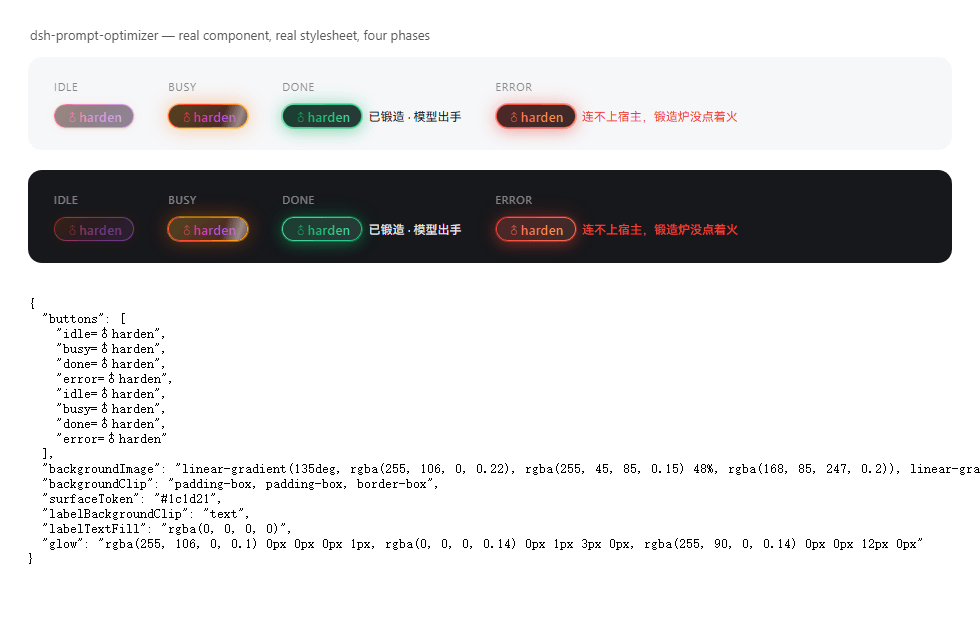
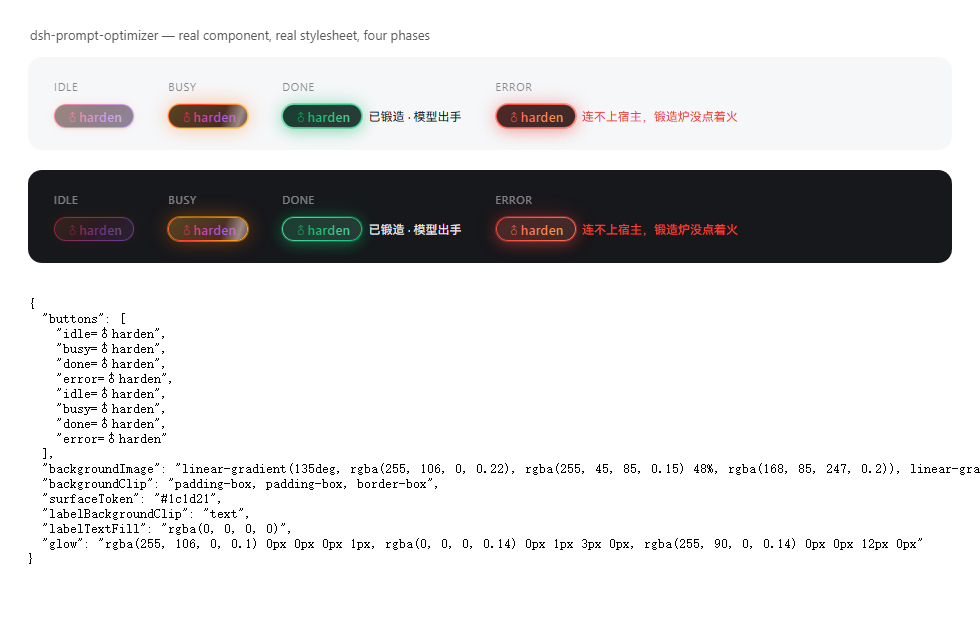
按钮状态
| 状态 | 长什么样 | 说明 |
|---|---|---|
| 输入框为空 | 胶囊降透明度 | 禁用;悬停提示「输入框是空的,先写点东西哥们」 |
| 空闲 | 流动热渐变环(橙→玫红→紫→金)+ 渐变文字 + 静态辉光 | 可点 |
| 锻造中 | 环流速拉快(1.15s)+ 呼吸辉光 + 高光扫过 + 文字渐变走字 | 禁用防连点;文字仍是 ♂harden |
| 成功 | 青绿渐变环 + 一次弹跳 + 常亮绿辉光 | 结果已写回输入框,右侧小字「已锻造 · 模型出手」 |
| 失败 | 火红渐变环 + 一次抖动 | 右侧小字写原因 |
安装
前置
| 要什么 | 怎么确认 |
|---|---|
| DSH 跑得起来(桌面版或 CLI 版) | 能打开对话界面 |
| Node ≥ 18 | node -v |
| Git(走 GitHub 直装才要) | git --version |
路子一:从 GitHub 直装(最快)
桌面版(Electron) —— 桌面版的 profile 由应用独占管理,dsh CLI 碰不得,所以走界面:
打开 DSH → 设置 → 插件
在安装框里粘这一行,确认:
github:asdnmy123/dsh-prompt-optimizer装完刷新页面(
Ctrl+R),输入框左下角就该有♂harden。
Showing the opening section of the README — the full document lives in the repository以上为 README 开头摘要,完整文档在仓库内 · View the full README on GitHub →在 GitHub 查看完整 README →
Related相关推荐
- houyanchao/chatgpt-gemini-timeline ChatGPT & Gemini:Add Folders, Timeline & Prompts. - 为 ChatGPT & Gemini 添加文件夹、提示词库和时间轴。
-
 MJorgin/dsh-agent-conductor
⚡ DSH 指挥家 / Conductor for DeepSeek Harness — in-session dispatch to 11 external agent CLIs (Codex, Claude Code, TraeCode…
MJorgin/dsh-agent-conductor
⚡ DSH 指挥家 / Conductor for DeepSeek Harness — in-session dispatch to 11 external agent CLIs (Codex, Claude Code, TraeCode…
- yaoshuo530/dsh-prompt-enhancer A prompt-enhancement plugin for DeepSeek Harness: an ✨ Enhance composer button that rewrites prompts with first-principl…
- ffyuuu/dsh-llm-longcat LongCat (LongCat-2.0) provider for DeepSeek Harness — 1M context, thinking mode, tool calling
- rxa3c/chat2skill Extracting and iterating skills from daily conversations with AI
- voyager-crew/voyager Enhancement suite for Gemini, AI Studio, Claude, ChatGPT & DeepSeek — plus a prompt manager for any website, DeepSeek Ha…
-
 freestylefly/wesight
Open-source desktop AI agent workspace with one-click Claude Code, Codex, OpenClaw, Hermes Agent setup and custom LLM mo…
freestylefly/wesight
Open-source desktop AI agent workspace with one-click Claude Code, Codex, OpenClaw, Hermes Agent setup and custom LLM mo…
-
 Finderchangchang/brewreel
精酿 BrewReel:让 DeepSeek 这类便宜模型也能做出好看的竖版宣传片。写一份产品简报,AI 挑镜头、写文案,一条命令出片。3 种配方、6 个行业、广告法校验,开源可商用。
Finderchangchang/brewreel
精酿 BrewReel:让 DeepSeek 这类便宜模型也能做出好看的竖版宣传片。写一份产品简报,AI 挑镜头、写文案,一条命令出片。3 种配方、6 个行业、广告法校验,开源可商用。