CMoyuer/dsh-cad-viewer
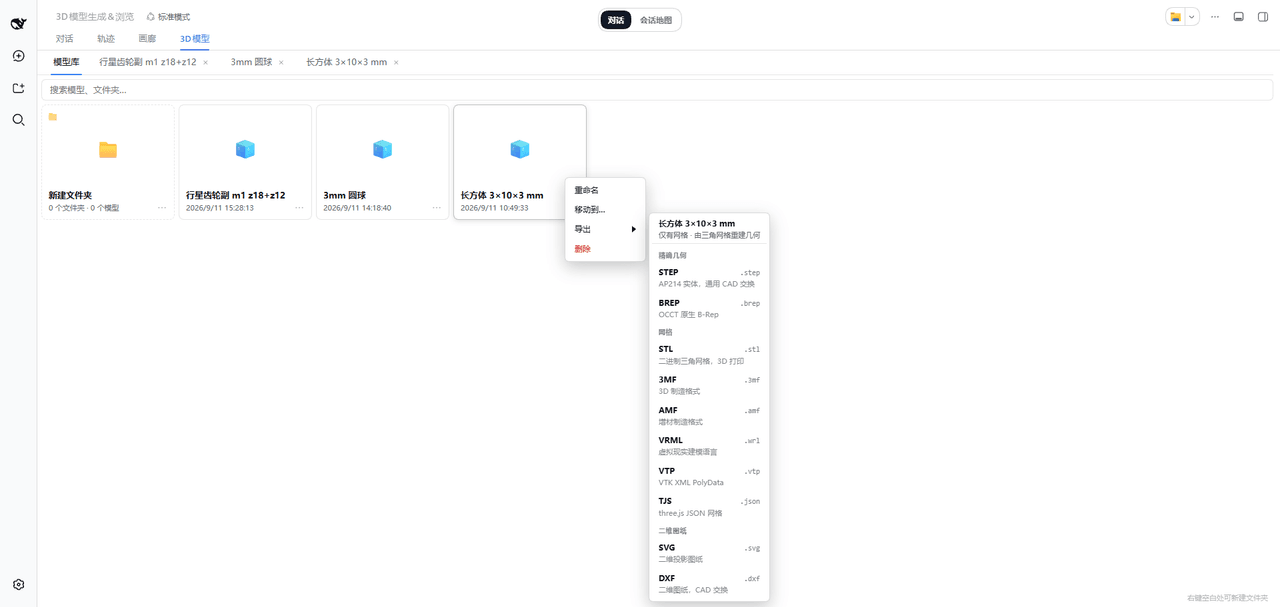
把 3D 模型库和完整的 CAD 查看器嵌入 dsh Web GUI:会话区多出一个 「3D模型」tab,agent 用 CadQuery 建好的模型直接落进库里,可在线查看、导出成 10 种 CAD / 网格 / 图纸格式。
catalog descriptioncatalog 简介 / catalog description:用于Deepseek Harness的CAD设计插件
Project Overview项目介绍
dsh-cad-viewer is a native plugin for the DSH Web GUI that embeds a 3D model library and a complete CAD viewer inside the DSH Web shell, adding a dedicated "3D 模型" tab to the conversation area. Installation is done with dsh plugin --profile web add dsh-cad-viewer (npm, github, or a local directory are all accepted), and the package is mounted at server start as a cordis plugin with the identifier cad-viewer (declared through cordis.patch.yml and the bundle manifest), with the Web server hosting two route prefixes /3dmodel/api/* and /tcv/*. The plugin ships a prebuilt three-cad-viewer bundle (three.js r184) and leaves CadQuery itself to a user-supplied Python interpreter.
The day-to-day workflow is driven by five agent tools: add_3dmodel and build_3dmodel write CadQuery output into the library, with build_3dmodel additionally storing the source script (up to 256 KB) so future exports can replay it through CadQuery's own exporters for true STEP/BREP solids; list_3dmodels returns read-only metadata including id, folder, tessellation counts, and whether the source was preserved; delete_3dmodel removes entries; and cadquery_env probes the interpreter environment. The library tab supports folders, whole-library search, drag-to-move, rename, delete (which never cascades), and an export submenu that appears on both card overflow menus and the viewer toolbar, with each entry advertising whether it has a saved CadQuery script or only a triangle mesh.
The package requires Node ≥20 and a Python interpreter configured via cadqueryPython that already has CadQuery installed (cadquery-ocp/OCCT, ezdxf, and VTK are pulled in transitively during export). Storage is plain JSON files under <dataDir> (default <plugin dir>/data), shared across devices on the same DSH instance, written directly without atomic rename so users are urged to back the directory up; the plugin's own .gitignore excludes it because it is user data. Exports run serially on the server with a configurable timeout (cadqueryExportTimeout, default 5 minutes), progress dialogs offer a "continue in background" option, and route debugging uses content-type checks because the SPA fallback would otherwise return 200 text/html. The code is AI-generated, distributed under MIT, with third-party notices covering three-cad-viewer (MIT), three.js (MIT), CadQuery (Apache-2.0, not redistributed), ezdxf (MIT), and VTK (BSD).
dsh-cad-viewer 是一个 DSH Web 端原生插件,把 3D 模型库与完整 CAD 查看器嵌入 DSH 的 Web GUI,会话区出现「3D模型」tab。它通过 dsh plugin --profile web add dsh-cad-viewer(支持 npm、GitHub 或本地目录)安装,并以 cordis 插件形式(id cad-viewer)由服务端启动时挂载。插件仅服务于 DSH 平台,依赖随包分发的 three-cad-viewer 前端构建产物,并把 CadQuery Python 留给用户自己的解释器。
安装完成后刷新 GUI 即可看到「3D模型」tab,工作流围绕 agent 调用五个工具展开:add_3dmodel 与 build_3dmodel 把 CadQuery 生成的模型入库(后者会保存脚本以便精确几何导出),list_3dmodel s 读回条目,delete_3dmodel 清理条目,cadquery_env 探测 CadQuery 环境。模型库支持文件夹、全库搜索、拖拽移动与重命名;点开任一模型即进入工作台,挂载 three-cad-viewer 完整界面,并提供 STEP/BREP/STL/3MF/AMF/VRML/VTP/TJS/SVG/DXF 十种格式导出,目标用户是需要在 DSH 对话里直接做 CAD 设计迭代的工程师与教学场景。
依赖方面,插件需要 Node ≥20,并把 DSH 指向装了 CadQuery 的 Python 解释器(cadqueryPython);服务端按 JSON 文件存到 <dataDir>(默认 <插件目录>/data),所有设备共享同一份库,但写入不做原子 rename,建议自行备份。导出在服务端串行执行,单次超时由 cadqueryExportTimeout 控制(默认 5 分钟);build_3dmodel 脚本上限 256 KB,模型库为空通常是把 dataDir 指错路径所致。代码与文档由 AI 编程助手生成,主体 MIT,三方依赖遵循各自许可证。
请帮我安装这个 DSH 插件。安装前先完成【兼容性检查 + 安全性检查】,检查通过再动手。

插件:dsh-cad-viewer(CMoyuer/dsh-cad-viewer)
仓库:https://github.com/CMoyuer/dsh-cad-viewer
本站详情页:https://www.yhbd.top/plugins/cmoyuer-dsh-cad-viewer/
本站登记:类型 plugin · 归类 原生 DSH 插件 · 许可证 MIT · ⭐ 2 · 最近提交 2026-09-18 · 主语言 JavaScript

按下面顺序执行,每步先把结论告诉我,再进入下一步:

【1 兼容性检查】
① 我这边:DSH 版本、Node 版本、操作系统、当前 profile(web / desktop)。
② 读它的 README、package.json、插件 manifest,列出它要求的 DSH 版本 / Node 版本 / 操作系统 / 外部依赖 / 需要另外先装的运行时。
③ 逐条比对,结论只写「满足 / 不满足 / 未知」三种;不满足的给出可行替代方案。
④ 检查是否和我已装的插件冲突:命令名重复、skill / tool 重名、端口占用、重复注册的 MCP server。

【2 安全性检查】
① 仓库可信度:和上面「本站登记」是否一致;star / fork 数、创建时间、最近提交,是否归档或长期停更。
② 安装脚本:逐行看 package.json 的 preinstall / install / postinstall,以及 install.sh、setup.ps1 之类脚本。出现 curl|bash、下载后直接执行、混淆代码、访问与插件功能无关的域名,立刻停下来告诉我,不要继续装。
③ 依赖:列出新增依赖,标出无人维护、或与知名包拼写近似的可疑包(typosquatting)。
④ 权限与副作用:它会读写哪些目录、访问哪些域名、需要哪些 DSH 权限(filesystem / network / shell / clipboard 等),以及怎么卸载和回滚。
⑤ 如果它要求 sudo / 管理员权限,或权限明显超出功能所需,先停下来问我。

【3 安装】
上面两步没有「不满足」和「高危项」时才执行;用官方推荐方式安装,不要自行提权。

【4 汇报】
用表格输出:检查项 / 结论 / 依据 / 是否需要我决策。拿不准的一律写「未知」并说明要我怎么确认——不要猜,也不要替我决定。
Send this message to DSH in your current session: it verifies compatibility and security first (answering met / not met / unknown item by item) and only installs once everything checks out — it will stop and ask you if it finds a high-risk item. The box scrolls; the copy is the full prompt. CLI install commands may not be accurate across systems, so DSH is the safer route.把上面这条消息直接发给当前会话里的 DSH:它会先核对兼容性与安全性(逐条给「满足 / 不满足 / 未知」),确认没问题再安装,有高危项会停下来问你。框内可滚动,复制到的是完整提示词;安装命令不一定准确,发给 DSH 更稳。
- Only 2 stars - very few users, little community feedback星标只有 2,几乎没人在用,遇到问题缺少社区反馈
DSH walks through these 9 checksDSH 会逐条核对这 9 项
Compatibility兼容性
- DSH, Node, OS and profile requirementsDSH 版本 / Node 版本 / 操作系统 / profile 是否满足要求
- External dependencies and runtimes (Electron / Python / Docker, ...)外部依赖与运行时(Electron / Python / Docker 等)是否齐备
- Conflicts with installed plugins: command names, skill / tool names, ports, duplicate MCP registration与已装插件是否冲突:命令名、skill / tool 重名、端口占用、重复 MCP 注册
Security安全性
- Repo matches the facts registered here; archived or abandoned?仓库是否与页面登记一致,是否归档或长期停更
- Safety of preinstall / install / postinstall and install.sh / setup.ps1preinstall / install / postinstall 与 install.sh、setup.ps1 是否安全
- curl|bash, download-then-execute, obfuscation, unrelated domains → stop immediatelycurl|bash、下载即执行、混淆代码、无关域名 → 立刻停止
- Typosquatting or unmaintained packages among the new dependencies新增依赖里有没有 typosquatting 或无人维护的包
- Requested permissions vs. what the feature actually needs申请了哪些权限、是否超出功能所需(filesystem / network / shell / clipboard)
- Any sudo / admin requirement, plus uninstall and rollback是否要求 sudo / 管理员权限,以及卸载与回滚方式
Anything uncertain must be marked unknown with a note on how to confirm it. This site's signal screen is a static snapshot, not a security audit.拿不准的必须标「未知」并说明要我怎么确认。本站的信号筛查是静态快照,不能替代安全审计。
Or use CLI install (for developers)或使用命令行安装(适合开发者)
CLI Install命令行安装
dsh plugin --profile web add dsh-cad-viewer把 CMoyuer/dsh-cad-viewer 加入你的 DSH 配置(web profile)即可启用。
READMEREADME
dsh-cad-viewer
把 3D 模型库和完整的 CAD 查看器嵌入 dsh Web GUI:会话区多出一个 「3D模型」tab,agent 用 CadQuery 建好的模型直接落进库里,可在线查看、导出成 10 种 CAD / 网格 / 图纸格式。






npm 包页 · 更新日志 · AI 生成声明 · MIT 许可证
截图

模型库 —— tab 的默认视图。文件夹、全库搜索、拖拽移动;卡片菜单里有重命名 / 移动到… / 导出 / 删除。图中子菜单头部显示「仅有网格 · 由三角网格重建几何」,因为该条目由 add_3dmodel 创建(没有保存 CadQuery 源码);build_3dmodel 的条目会显示「已保存 CadQuery 源码 · 导出为精确几何」。

工作台 —— 每个模型一个标签页,挂载上游 three-cad-viewer 的完整界面(工具栏 / 导航树 / 画布),文案已中文化,工具栏上多了 导出 按钮(在 ? 之前)。
这个插件是什么
- 模型库 —— 文件夹、全库搜索、拖拽移动、重命名 / 移动 / 删除,以及 10 种格式导出。
- 工作台 —— 为库中任意模型挂载 three-cad-viewer 完整界面;左 / 右键旋转、中键平移、滚轮缩放。
- 对话内嵌卡片 —— 调用过模型工具的那条消息末尾出现可折叠卡片,全屏 即以工作台打开同一模型。
- 五个 agent 工具 ——
add_3dmodel/build_3dmodel(建模入库)、list_3dmodels(读列表)、delete_3dmodel(删条目)、cadquery_env(探测 CadQuery 环境)。 - 服务端存储 —— 一个条目一个 JSON 文件,同一 dsh 实例下所有设备看到同一份库;不用 IndexedDB、不依赖外部服务、没有构建步骤。
安装
三条路等价,装完都要做启用与验证。
从 npm 安装(推荐)
dsh plugin --profile web add dsh-cad-viewer
包页 https://www.npmjs.com/package/dsh-cad-viewer。tarball 与仓库源码一致,只含运行所需的文件——lib/、assets/、docs/、cordis.patch.yml、CHANGELOG.md、THIRD-PARTY-NOTICES.md,加上 npm 必含的 package.json / README.md / LICENSE;dev/ 与 screenshots.json 不随包分发。
从 GitHub 或本地目录安装
dsh plugin --profile web add github:CMoyuer/dsh-cad-viewer

git clone https://github.com/CMoyuer/dsh-cad-viewer.git
cd dsh-cad-viewer && pnpm install
dsh plugin --profile web add .
Showing the opening section of the README — the full document lives in the repository以上为 README 开头摘要,完整文档在仓库内 · View the full README on GitHub →在 GitHub 查看完整 README →
Related相关推荐
-
 extracurricular-ai/dsh-filesnap
DSH Rewind & Redo — by FileSnap. 把对话和它改过的文件一起恢复到某一轮之前(受claude code rewind启发并改进),不需要 git 仓库,并且可以撤销恢复(redo受opencode启发并改进),…
extracurricular-ai/dsh-filesnap
DSH Rewind & Redo — by FileSnap. 把对话和它改过的文件一起恢复到某一轮之前(受claude code rewind启发并改进),不需要 git 仓库,并且可以撤销恢复(redo受opencode启发并改进),…
-
 SenmuuuuW/dsh-whale-report
深迹 DeepTrace — Your Agent, in numbers. DSH 插件:从会话事件日志生成日报/周报/月报/年报/自定义区间,确定性洞察与协作复盘,只读、不改写历史。
SenmuuuuW/dsh-whale-report
深迹 DeepTrace — Your Agent, in numbers. DSH 插件:从会话事件日志生成日报/周报/月报/年报/自定义区间,确定性洞察与协作复盘,只读、不改写历史。
-
 SnowCrescenter-tech/dsh-milestone
Git-style milestone timeline for DeepSeek Harness - hover for metadata, click to jump to any message. 会话里程碑导航条:像 Git 提交图…
SnowCrescenter-tech/dsh-milestone
Git-style milestone timeline for DeepSeek Harness - hover for metadata, click to jump to any message. 会话里程碑导航条:像 Git 提交图…
-
 PerryLink/dsh-checkpoint-rewind
Claude Code /rewind for DeepSeek Harness — git-first workspace snapshots before every mutation, turn-boundary session fo…
PerryLink/dsh-checkpoint-rewind
Claude Code /rewind for DeepSeek Harness — git-first workspace snapshots before every mutation, turn-boundary session fo…
- giter00/dsh-headroom deepSeek harness上下文压缩工具
- PerryLink/dsh-session-sync Cross-device DeepSeek Harness session sync: a dedicated git mirror with append-only keep-both conflict resolution (fork …
-
 XieZongChen/dsh-md-notes
A note-taking plugin for DeepSeek Harness (DSH). It provides a full MD notes manager and MD notes editor, letting you qu…
XieZongChen/dsh-md-notes
A note-taking plugin for DeepSeek Harness (DSH). It provides a full MD notes manager and MD notes editor, letting you qu…
-
 TencentCloud/tencentcloud-agentobs-sdk-dsh
tencentcloud-agentobs-sdk-dsh 是一个 DeepSeek Harness (DSH) 可观测插件,直接将 GenAI trace 数据上报到腾讯云日志服务 (CLS)。 它观察 DSH 原生的 session、…
TencentCloud/tencentcloud-agentobs-sdk-dsh
tencentcloud-agentobs-sdk-dsh 是一个 DeepSeek Harness (DSH) 可观测插件,直接将 GenAI trace 数据上报到腾讯云日志服务 (CLS)。 它观察 DSH 原生的 session、…