corlinniu/dsh-daily-chat
一个纯客户端 DSH 插件:不 fork DSH 本体,只往它公开的 4 个槽位注册 9 条内容(其中「更多」那一对按需注册,见下)、再加三个方法补丁(客户端两个导航方法、Host 一个预设选择),DSH 升级后不会把插件带坏。
catalog descriptioncatalog 简介 / catalog description:给DeepSeek Harness增加日常聊天功能
Project Overview项目介绍
dsh-daily-chat is a pure client-side plugin for DSH (DeepSeek Harness), distributed as a private local npm package named @local/dsh-daily-chat and installed by linking it into a web profile's dsh.profile.bundles array. It registers seven entries into DSH's four public slots (sidebar.panellist, sidebar.workspaces, shell.overlay, and main) and patches three methods — uiWorkspace.startSession and uiWorkspace.openWorkspace on the client, plus agentPresets.select on the Host — without forking the DSH core. Installation is either through the web sidebar's Plugins page by entering the repository's absolute path, or via the command line: dsh plugin --profile web add link:/path/to/dsh-daily-chat. After installation, restarting dsh web and refreshing the browser activates the plugin.
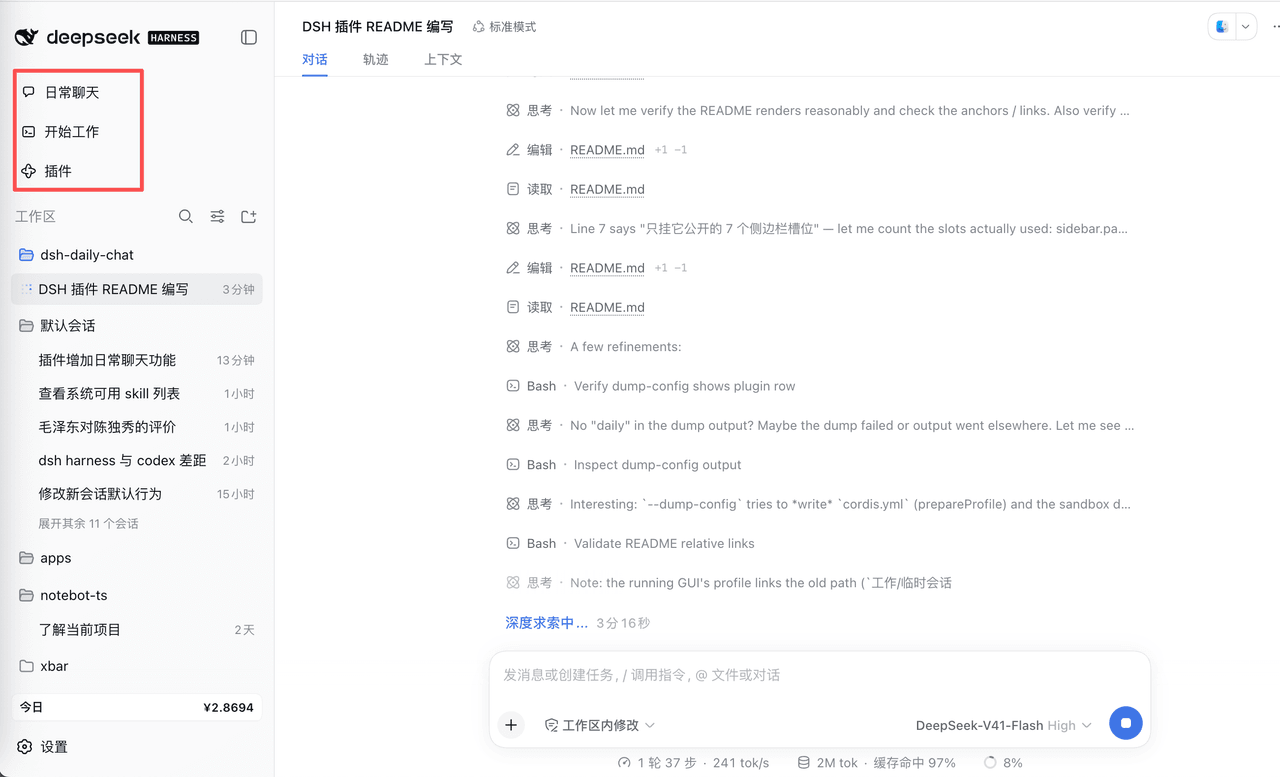
The plugin splits the sidebar top into two entries: "日常聊天" (Daily Chat, order: -20) and "开始工作" (Start Work, order: -10), while the native "New Session" button is hidden via CSS. The Daily Chat entry routes to a lightweight agent pinned to a dedicated workspace and the daily preset, exposing only a persona, web fetch/search, ask-user, and context-compaction tools. The Start Work entry uses DSH's native startSession with the profile's default standard preset, keeping full project, Agent mode, plan mode, and sub-agent capabilities intact. Because Daily Chat is a real workspace rather than a UI switch, history persists across sessions, and the intended audience is users who want casual conversation or quick lookups while working inside a coding-agent context.
Required DSH version is >= 0.1.7 (validated on 0.1.7-alpha.2 under macOS); the daily preset ships as preset/daily.patch.yml inside the bundle patch using a declaration row, so no preset directory copying is required. Only the web profile is supported, since headless / tui / sdk profiles lack the relevant slots. Known limits include CSS-selector breakage if DSH renames the new-session button class (failure mode: an extra visible button, no collateral damage), silent loss of locks if patched Host method names change, slot conflicts when another plugin claims the same single-value slot at the same priority, and the need to delete the legacy ~/.dsh/.agent-presets/daily/ directory when upgrading from 0.1.6 or earlier. The repository has not declared a license, and package.json lacks an engines.dsh field, so adding MIT (or similar) is recommended before any external release.
dsh-daily-chat 是一个面向 DSH(DeepSeek Harness)的纯客户端插件,使用 @local/dsh-daily-chat 包名以链接方式挂载到 web profile 的 dsh.profile.bundles 末尾。它向 DSH 公开的 sidebar.panellist、sidebar.workspaces、shell.overlay、main 四个槽位注册共七条内容,并对客户端的 uiWorkspace.startSession、uiWorkspace.openWorkspace 与 Host 的 agentPresets.select 三个方法打补丁,做到不 fork DSH 本体。安装可通过侧边栏插件页填写仓库绝对路径,也可执行 dsh plugin --profile web add link:/path/to/dsh-daily-chat,随后重启 dsh web 并刷新页面即可生效。
插件把侧边栏顶部拆成「日常聊天」(order: -20)与「开始工作」(order: -10)两行入口,原生「新会话」按钮以 CSS 隐藏取代。前者路由到一个钉死在「日常聊天」工作区、预设固定为 daily 的轻量 agent,只保留人格、网页检索/抓取、提问与上下文压缩工具;后者则走 DSH 原生 startSession,沿用 profile 默认 standard 预设并放开项目、Agent 模式、计划模式、子代理等完整能力。「日常」是真实工作区而非 UI 开关,因此历史会话可正常累积,适合在工程上下文中仍想闲聊或快速查询的用户,避免完整编码 Agent 工具集与提示词污染回答。
依赖 DSH 版本 ≥ 0.1.7(0.1.7-alpha.2、macOS 上验证),daily 预设由包内 preset/daily.patch.yml 通过 bundle patch 的 declaration row 注入,无需复制目录。仅服务 web profile,headless / tui / sdk 等 profile 无对应槽位。限制包括槽位/CSS 选择器改名会令隐藏失效、CSS 藏按钮失败仅多出一枚按钮、Host 方法改名后对应锁静默失效、Windows 标题栏轨道布局下入口被收起的剩余入口需留意、槽位单值同 priority 占用会抛错;从 0.1.6 或更早升级需删除 ~/.dsh/.agent-presets/daily/ 旧目录。仓库尚未声明 license,package.json 也未填 engines.dsh,对外发布前建议补齐 MIT 等协议。
请帮我安装这个 DSH 插件。安装前先完成【兼容性检查 + 安全性检查】,检查通过再动手。

插件:dsh-daily-chat(corlinniu/dsh-daily-chat)
仓库:https://github.com/corlinniu/dsh-daily-chat
本站详情页:https://www.yhbd.top/plugins/corlinniu-dsh-daily-chat/
本站登记:类型 plugin · 归类 原生 DSH 插件 · 许可证未声明 · ⭐ 3 · 最近提交 2026-10-02 · 主语言 JavaScript

按下面顺序执行,每步先把结论告诉我,再进入下一步:

【1 兼容性检查】
① 我这边:DSH 版本、Node 版本、操作系统、当前 profile(web / desktop)。
② 读它的 README、package.json、插件 manifest,列出它要求的 DSH 版本 / Node 版本 / 操作系统 / 外部依赖 / 需要另外先装的运行时。
③ 逐条比对,结论只写「满足 / 不满足 / 未知」三种;不满足的给出可行替代方案。
④ 检查是否和我已装的插件冲突:命令名重复、skill / tool 重名、端口占用、重复注册的 MCP server。

【2 安全性检查】
① 仓库可信度:和上面「本站登记」是否一致;star / fork 数、创建时间、最近提交,是否归档或长期停更。
② 安装脚本:逐行看 package.json 的 preinstall / install / postinstall,以及 install.sh、setup.ps1 之类脚本。出现 curl|bash、下载后直接执行、混淆代码、访问与插件功能无关的域名,立刻停下来告诉我,不要继续装。
③ 依赖:列出新增依赖,标出无人维护、或与知名包拼写近似的可疑包(typosquatting)。
④ 权限与副作用:它会读写哪些目录、访问哪些域名、需要哪些 DSH 权限(filesystem / network / shell / clipboard 等),以及怎么卸载和回滚。
⑤ 如果它要求 sudo / 管理员权限,或权限明显超出功能所需,先停下来问我。

【3 安装】
上面两步没有「不满足」和「高危项」时才执行;用官方推荐方式安装,不要自行提权。

【4 汇报】
用表格输出:检查项 / 结论 / 依据 / 是否需要我决策。拿不准的一律写「未知」并说明要我怎么确认——不要猜,也不要替我决定。
Send this message to DSH in your current session: it verifies compatibility and security first (answering met / not met / unknown item by item) and only installs once everything checks out — it will stop and ask you if it finds a high-risk item. The box scrolls; the copy is the full prompt. CLI install commands may not be accurate across systems, so DSH is the safer route.把上面这条消息直接发给当前会话里的 DSH:它会先核对兼容性与安全性(逐条给「满足 / 不满足 / 未知」),确认没问题再安装,有高危项会停下来问你。框内可滚动,复制到的是完整提示词;安装命令不一定准确,发给 DSH 更稳。
- No license declared - all rights reserved by default; ask the author before commercial use or redistribution未声明开源许可证 —— 默认「保留所有权利」,商用或再分发前先问作者
- Only 3 stars - very few users, little community feedback星标只有 3,几乎没人在用,遇到问题缺少社区反馈
DSH walks through these 9 checksDSH 会逐条核对这 9 项
Compatibility兼容性
- DSH, Node, OS and profile requirementsDSH 版本 / Node 版本 / 操作系统 / profile 是否满足要求
- External dependencies and runtimes (Electron / Python / Docker, ...)外部依赖与运行时(Electron / Python / Docker 等)是否齐备
- Conflicts with installed plugins: command names, skill / tool names, ports, duplicate MCP registration与已装插件是否冲突:命令名、skill / tool 重名、端口占用、重复 MCP 注册
Security安全性
- Repo matches the facts registered here; archived or abandoned?仓库是否与页面登记一致,是否归档或长期停更
- Safety of preinstall / install / postinstall and install.sh / setup.ps1preinstall / install / postinstall 与 install.sh、setup.ps1 是否安全
- curl|bash, download-then-execute, obfuscation, unrelated domains → stop immediatelycurl|bash、下载即执行、混淆代码、无关域名 → 立刻停止
- Typosquatting or unmaintained packages among the new dependencies新增依赖里有没有 typosquatting 或无人维护的包
- Requested permissions vs. what the feature actually needs申请了哪些权限、是否超出功能所需(filesystem / network / shell / clipboard)
- Any sudo / admin requirement, plus uninstall and rollback是否要求 sudo / 管理员权限,以及卸载与回滚方式
Anything uncertain must be marked unknown with a note on how to confirm it. This site's signal screen is a static snapshot, not a security audit.拿不准的必须标「未知」并说明要我怎么确认。本站的信号筛查是静态快照,不能替代安全审计。
Or use CLI install (for developers)或使用命令行安装(适合开发者)
CLI Install命令行安装
dsh plugin --profile web add github:corlinniu/dsh-daily-chat把 corlinniu/dsh-daily-chat 加入你的 DSH 配置(web profile)即可启用。
READMEREADME
dsh-daily-chat
给 DSH(DeepSeek Harness)的「新会话」加上第二重含义:日常聊天 与 开始工作。
日常模式跑一个只有对话能力的轻量 agent —— 有人格、能联网检索、能向你提问、能压缩上下文,但没有文件读写、没有 Shell、没有计划模式、没有子代理;工作模式完全沿用 DSH 原有行为,一行都不改。
一个纯客户端 DSH 插件:不 fork DSH 本体,只往它公开的 4 个槽位注册 9 条内容(其中「更多」那一对按需注册,见下)、再加三个方法补丁(客户端两个导航方法、Host 一个预设选择),DSH 升级后不会把插件带坏。
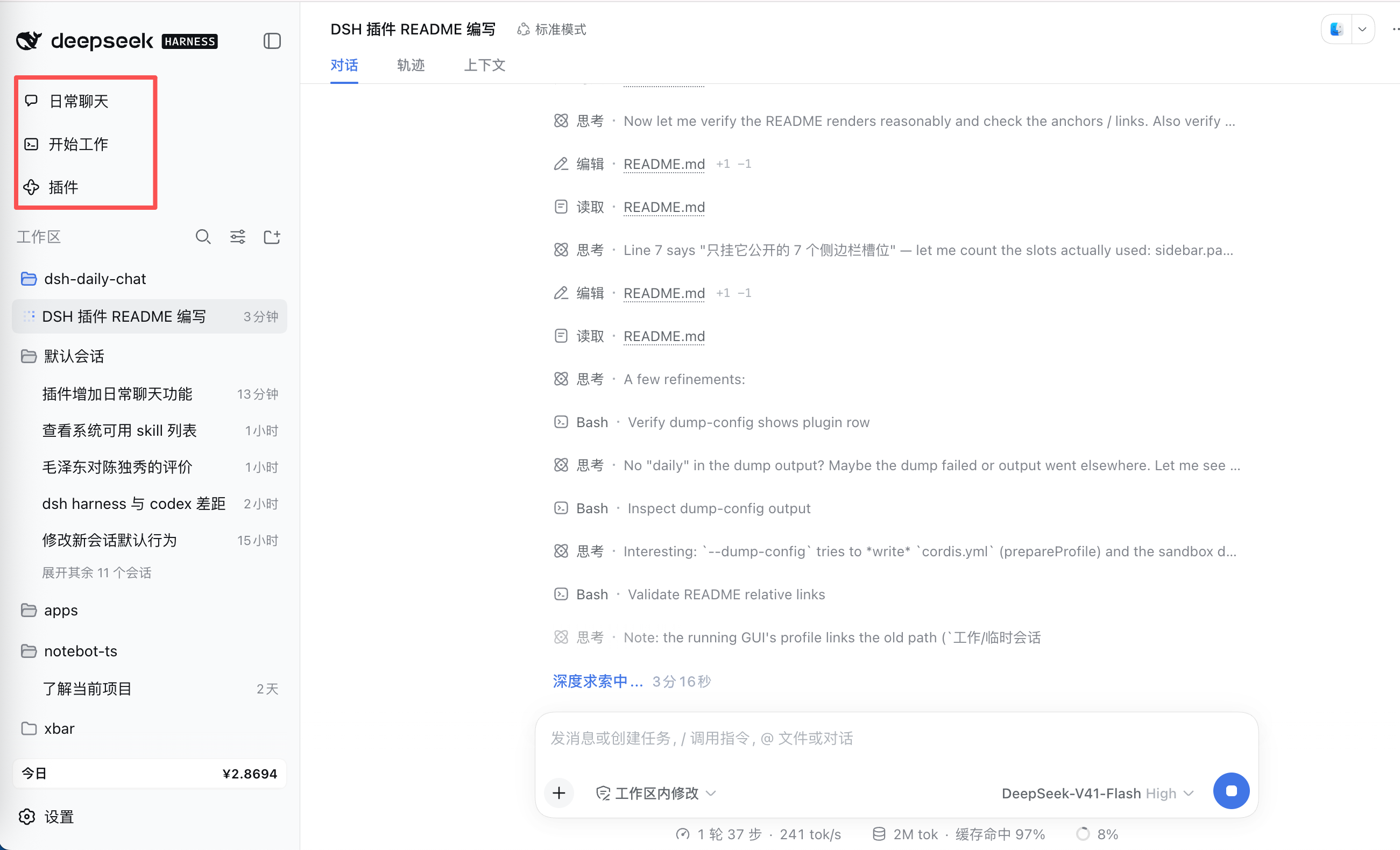
侧边栏顶部多出「日常聊天」「开始工作」两行(这张图早于「更多」开关),原生「新会话」按钮被隐藏;日常模式下工作区区域会换成日常会话列表
📑 目录
它解决什么问题
DSH 原本只有一个「新会话」,而它一定是完整的编码 Agent:带着工作目录、bash、文件读写、计划模式、子代理。用它来问一句「今天天气怎么样」或者闲聊两句,代价是模型手里攥着一整套会往仓库里动手的工具,提示词里也全是工程上下文 —— 答话的语气和边界都被带偏。
这个插件把入口拆成两个,像 ChatGPT 把 chat 和 work 分开那样:
| 日常 | 工作 | |
|---|---|---|
| 你点的是 | 侧边栏「日常聊天」 | 侧边栏「开始工作」,或其它任何「新会话」入口 |
| 跑的是哪个 agent | daily 预设 |
profile 默认预设(默认 standard) |
| 模型手里的工具 | 对话人格、网页检索/抓取、提问、上下文压缩 | 全部 |
| 侧边栏那一片 | 换成日常会话列表 | 原生工作区浏览器,且不出现「日常聊天」这一行 |
| 上下文 | 锁死:改不了项目,也换不了 Agent 模式 | 随便改 |
| 会话落在哪 | 专属工作区(标题「日常聊天」) | 原有工作区 |
| 记忆 / 图片识别 / 模型路由 | 照常可用 | 照常可用 |
「日常」是一块真实的工作区而不是一个 UI 开关,所以日常对话是正常 Session:历史留得住,列表就是记账到该工作区的会话。
两种模式
| 日常 | 工作 | |
|---|---|---|
| 侧边栏入口 | 「日常聊天」整行,order: -20 |
「开始工作」整行,order: -10 |
| 菜单折叠 | 「更多」整行(order: -5):把其余面板行折起来;只在面板列表里还有别家的行时才出现,两个模式共用同一个开关,状态记在 localStorage |
同左 |
| 预设 | daily |
profile 默认(本机为 standard) |
| 开场那一行 | 「项目」与「Agent 模式」两个 chip 都不出现 | 两个都在 |
| 能不能改上下文 | 不能:会话钉在「日常聊天」工作区上,预设钉在 daily 上 |
随便:项目、预设、计划模式、子代理 |
| 核心循环 | 用户消息 → 模型 → 工具调用(检索 / 提问)→ 回复 | 用户消息 → 模型 → 工具调用(读文件 / 改文件 / 跑命令 / 计划 / 子代理)→ 回复 |
| 会话列表 | 日常会话,按更新时间倒序,每行只有标题,运行中带绿点 | 原生分组列表 |
| 侧边栏的工作区 | 原生工作区列表整体让位给日常会话列表 | 原生列表,但不出现「日常聊天」这一行 |
三行都排在「插件」之上(该行 order: 0,槽位按 priority、order 升序排;「更多」是 -5)。原生侧边栏的「新会话」按钮会被隐藏,由「日常聊天」「开始工作」这两行取代;macOS 窗口控件等其它「新会话」入口仍然在,并按当前模式路由。
两个模式是互斥的视图,不只是换个预设:工作模式下侧边栏不列「日常聊天」—— 它不是项目,而且点一下整行就会把产品切回日常;日常模式下原生工作区列表整体让位给日常会话列表。
安装
0. 前置条件
- 一个可运行的 DSH web profile,版本 ≥
0.1.7。本版本在 DSH0.1.7-alpha.2、macOS 上验证过;依赖的槽位契约是sidebar.panellist/sidebar.workspaces/shell.overlay/main。0.1.6 及更早从用户预设根读目录(见第 1 步),本版不再往那里写任何东西。 - 插件分两半:Host 半(index.js)建工作区、锁日常会话的预设、提示老安装残留的预设目录;
daily预设由包内 patch 声明(见第 1 步);客户端半(client.js,dsh.client.platform: web)贡献全部界面。没有构建步骤。
Showing the opening section of the README — the full document lives in the repository以上为 README 开头摘要,完整文档在仓库内 · View the full README on GitHub →在 GitHub 查看完整 README →
Related相关推荐
-
 Miaotofu01/Study-Mate
你的AI学习搭档:定路线、讲知识、做项目,边学边做,学透一门科目
Miaotofu01/Study-Mate
你的AI学习搭档:定路线、讲知识、做项目,边学边做,学透一门科目
-
 Tencent-TDS/dsh-kuikly-expert
Kuikly DeepSeek Harness plugin that turns your AI agent into a Kuikly cross-platform app development expert.
Tencent-TDS/dsh-kuikly-expert
Kuikly DeepSeek Harness plugin that turns your AI agent into a Kuikly cross-platform app development expert.
- goatliamia/dsh-runtime 不要让 Model 为确定性问题反复思考,也不要让 Harness 为不确定的问题假装知道答案
- gxx950224/SapBuddy-dsh SapBuddy-dsh
- MaimoryLab/dib DSH-in-Box: A DSH runtime and plugin packager
- Asukaleo-aa/dsh-openscience
-
 titanwings/distilly
Distilly — Distill how they think into reusable Skills for any Agent or Bot. Formerly Colleague Skill(原同事 Skill).
titanwings/distilly
Distilly — Distill how they think into reusable Skills for any Agent or Bot. Formerly Colleague Skill(原同事 Skill).
-
 YuJunZhiXue/dsh-purge
DeepSeek Harness 破甲:让所有模型都能破甲,不同模型可换不同提示词;默认提示词面向国模「小码酱」。Jailbreak for every model — swap prompts per model. 求 Star 收藏 ⭐
YuJunZhiXue/dsh-purge
DeepSeek Harness 破甲:让所有模型都能破甲,不同模型可换不同提示词;默认提示词面向国模「小码酱」。Jailbreak for every model — swap prompts per model. 求 Star 收藏 ⭐