
euanguo/dsh-studio
简体中文 · English DSH Studio 下载最新版 · 使用文档 · 设计文档 左栏项目树 · 中间多标签会话区(对话 / 终端 / 浏览器)· 右栏 Git 面板 DSH Studio 基于 DeepSeek Harness runtime 构建,把 AI Agent、Workspace、本地开发工具和插件生态装进一个可安装的 Desktop / Web 工作台。模型服务仍在云端按需运行;项目、会话、终端、文件、Git Review、浏览器和插件状态全部由本地工作区统一组织。
catalog 简介 / catalog descriptioncatalog description:DSH Studio — a local development workbench for DeepSeek Harness: project tree, Git review, terminal, and plugin marketplace (Desktop + Web)
编辑导读Editor's Brief
## 核心特性
- DSH Studio 将对话、文件、Git Review、终端访问、浏览器视图和插件状态整合到一个基于 DeepSeek Harness 运行时构建的本地项目工作区中。
- 该工作区采用 Project → Worktree → Session 层级结构,支持分组、别名、持久化视图状态,并可从包元数据、PNG 资源、favicon 或 Git 平台头像自动检测项目图标。
- Git 面板区分已暂存、未暂存和未跟踪的变更,展示提交历史,可在居中页签中打开已暂存文件,并提供支持行级差异、图片差异、冲突查看和内联评论目标的差异查看器。
- 项目级终端以居中页签形式打开,支持原生 PTY、统一 shell 解析、限定范围的项目上下文、流式输出和回放,同时对话与浏览器页签仍可继续使用。
- 插件市场可从多个来源浏览并安装插件,并提供候选预览、审批、来源锁定、包校验、应用和恢复等工作流。
## 使用场景
- 它可作为本地工作台,用于运行 DeepSeek Harness agent、session 和 worktree 的编码项目,无需在多个独立窗口之间切换项目上下文。
- 它支持变更审查:并列展示已暂存、未暂存和未跟踪修改及差异,并允许在提交已暂存变更前编辑自动生成的提交信息。
- 它通过同一工作区内持久化的项目组、别名、终端会话、文件预览和浏览器页签,管理多项目与多分支开发。
- 它提供插件管理界面,用于从多个已配置来源发现、预览、审批、安装和恢复 DSH 插件。
## 技术细节
- 该应用是 hust-open-atom-club/oh-dsh 的下游 fork,运行于固定版本的 DeepSeek Harness 运行时、Profile、Session、Workspace 和插件契约之上。
- 分发版本包含完整的 Desktop 与 Web 包,内置 Node 运行时和内置插件;另提供仅 Web 包,不包含 Electron,并通过 ./bin/dsh-studio web 启动。
- 左侧栏是官方 packages/client/ui-workspace 的 fork,已适配 Project → Worktree → Session 结构;右侧宿主来自 DSH-better-sidebar 的 vendor 版本,文件、Git Review、Center Surface 和桌面布局组件由 DSH Studio 实现。
- 已安装的 Desktop 和 Web 实例默认共享 ~/.dsh-studio,用于缓存、配置、会话、凭据和插件状态,并支持 DSH_STUDIO_HOME 以及 stable/dev 通道控制。
## 注意事项
- 模型服务仍基于云端,按需调用,而不是作为本地推理能力打包内置。
- Source Control 的 AI 提交信息生成功能标记为实验性,支持配置模型、思考强度和提示词模板,但不属于稳定发布承诺。
- 第三方运行时、引用项、固定版本及适配边界受 THIRD_PARTY_NOTICES 和上游项目许可证约束。
## Core Features
- DSH Studio organizes conversations, files, Git Review, terminal access, browser views, and plugin state inside a local project workspace built on the DeepSeek Harness runtime.
- The workspace uses a Project → Worktree → Session hierarchy with grouping, aliases, persisted view state, and automatic project icon detection from package metadata, PNG assets, favicons, or Git platform avatars.
- The Git panel separates staged, unstaged, and untracked changes, shows commit history, opens staged files in a centered tab, and provides a diff viewer with line-level diffs, image diffs, conflict viewing, and inline comment targets.
- Project-level terminals open as center tabs with native PTY support, unified shell parsing, scoped project context, streaming output, and replay while conversation and browser tabs remain available.
- The plugin marketplace browses and installs plugins from multiple sources with candidate preview, approval, source locking, bundle validation, application, and recovery workflows.
## Use Cases
- It serves as a local workbench for coding projects that run DeepSeek Harness agents, sessions, and worktrees without moving project context between separate windows.
- It supports change review by displaying staged, unstaged, and untracked modifications alongside diffs and by allowing generated commit messages to be edited before committing staged changes.
- It manages multi-project and multi-branch development through persisted project groups, aliases, terminal sessions, file previews, and browser tabs within the same workspace.
- It provides a plugin management surface for discovering, previewing, approving, installing, and recovering DSH plugins from multiple configured sources.
## Technical Details
- The application is a downstream fork of hust-open-atom-club/oh-dsh and runs on the pinned DeepSeek Harness runtime, Profile, Session, Workspace, and plugin contracts.
- Distribution includes a full Desktop and Web package with a Node runtime and built-in plugins, plus a Web-only package that omits Electron and starts with ./bin/dsh-studio web.
- The left rail is a fork of the official packages/client/ui-workspace adapted to Project → Worktree → Session, while the right-side host is vendored from DSH-better-sidebar and the file, Git Review, Center Surface, and desktop layout components are implemented by DSH Studio.
- Installed Desktop and Web instances share ~/.dsh-studio by default for cache, configuration, sessions, credentials, and plugin state, with DSH_STUDIO_HOME and stable/dev channel controls available.
## Notes
- Model services remain cloud-based and are invoked as needed rather than being bundled as local inference.
- Source Control AI commit generation is marked experimental, with configurable model, thinking strength, and prompt templates, but it is not a stable release commitment.
- Third-party runtimes, references, fixed versions, and adaptation boundaries are governed by THIRD_PARTY_NOTICES and upstream project licenses.
安装Install
dsh plugin --profile web add github:euanguo/dsh-studio把 euanguo/dsh-studio 加入你的 DSH 配置(web profile)即可启用。
READMEREADME
简体中文 · English

DSH Studio
面向 DeepSeek Harness 的本地开发工作台
对话、文件、Git Review、终端与插件,都在同一个项目工作区里。




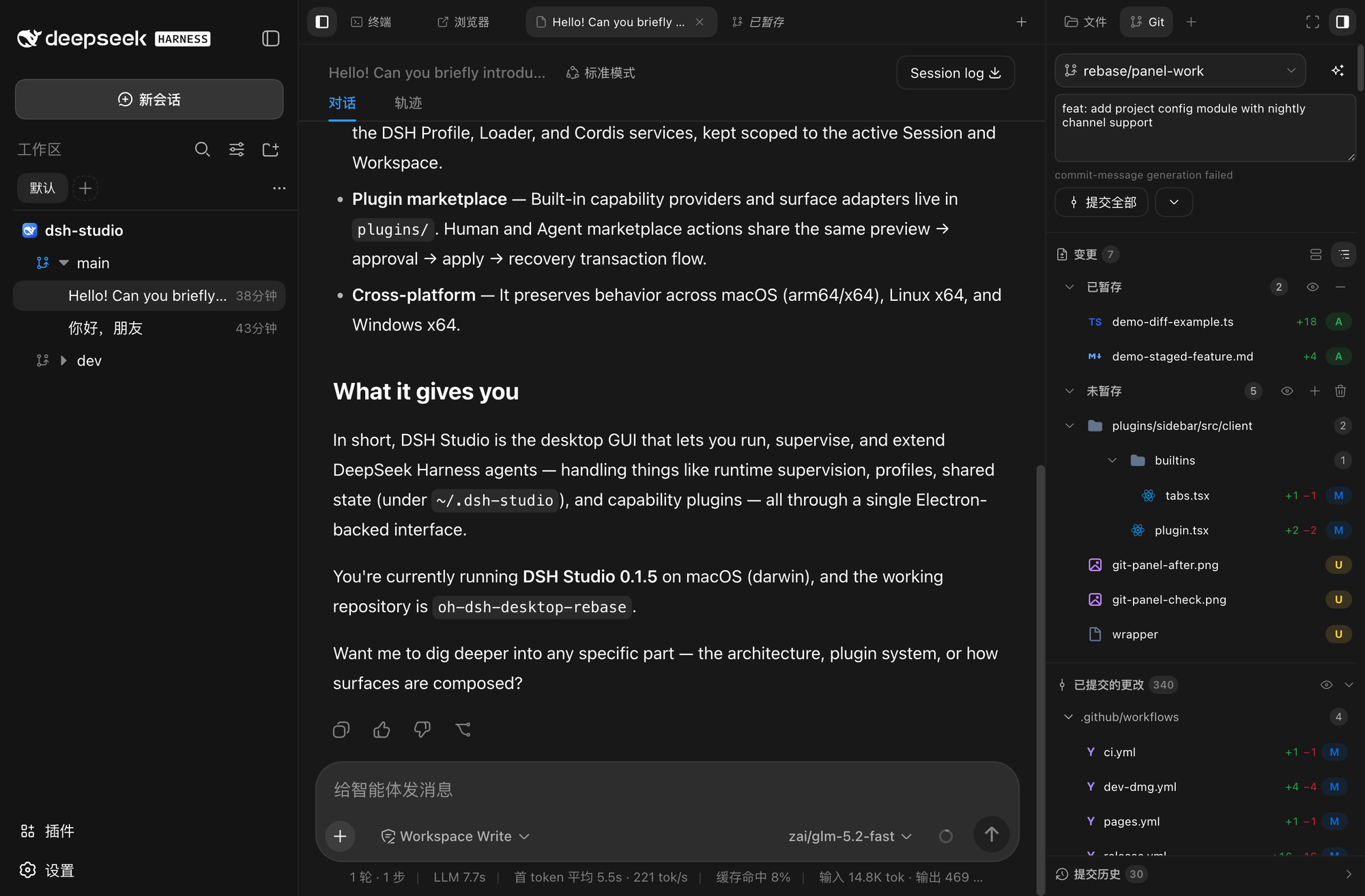
左栏项目树 · 中间多标签会话区(对话 / 终端 / 浏览器)· 右栏 Git 面板
DSH Studio 基于 DeepSeek Harness runtime 构建,把 AI Agent、Workspace、本地开发工具和插件生态装进一个可安装的 Desktop / Web 工作台。模型服务仍在云端按需运行;项目、会话、终端、文件、Git Review、浏览器和插件状态全部由本地工作区统一组织。
核心特性
| 🗂️ 多项目工作区 Project → Worktree → Session 三层组织,支持分组、别名与项目图标自动探测。 |
🧰 一站式工具区 项目级 PTY、文件浏览与预览、浏览器、Subagent,不用在多个窗口间切换。 |
| 🔍 Git Review staged / unstaged / untracked 分区、提交历史、commit 文件树与行级审阅目标。 |
🤖 智能提交 根据当前变更一键生成提交信息,模型与思考强度可配置。 |
| 🖥️ Desktop + Web 同构 同一套 runtime、Profile、插件与数据边界,Desktop 提供原生窗口与 PTY。 |
🧩 插件市场 多来源插件浏览与安装,候选预览、审批、来源锁定与恢复流程完整。 |
界面预览
🗂️ 项目树与自动图标
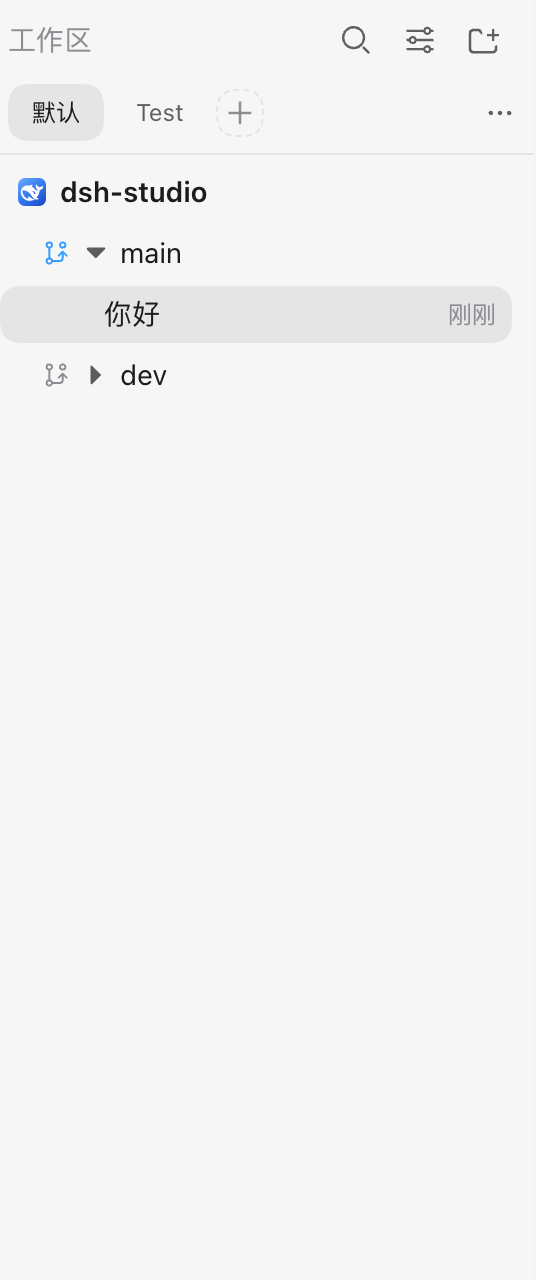
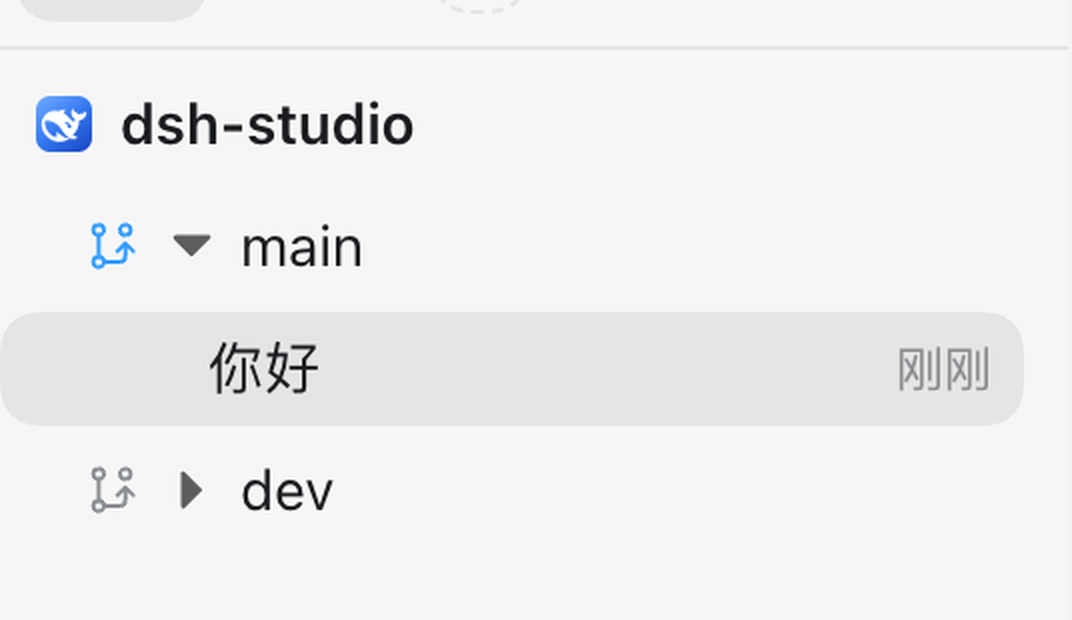
左栏按 Project → Worktree → Session 三层组织工作上下文。每个项目的图标从项目目录的静态资源自动探测——优先读取 package.json 声明的 icon 字段,其次搜索项目内的 PNG 文件,也可以取项目主页 favicon 或 Git 平台头像——不需要手动配置就能显示项目专属图标。
|
|
| 项目树:dsh-studio 项目下挂 main / dev 两个分支 | 项目图标:自动读取自项目静态资源 |
自动探测不理想时,右键项目即可换用内置图标或上传自定义 PNG。多项目、多分支、项目分组、别名、搜索和视图状态都会持久化保存。
🔍 Git Review 与智能提交
右栏 Git 面板把暂存区、未暂存、未跟踪分区和提交历史集中在同一个面板。点击「生成提交信息」,模型会根据当前变更自动写出提交标题和正文;生成后可以直接在输入框里修改,确认后一键提交全部暂存变更。
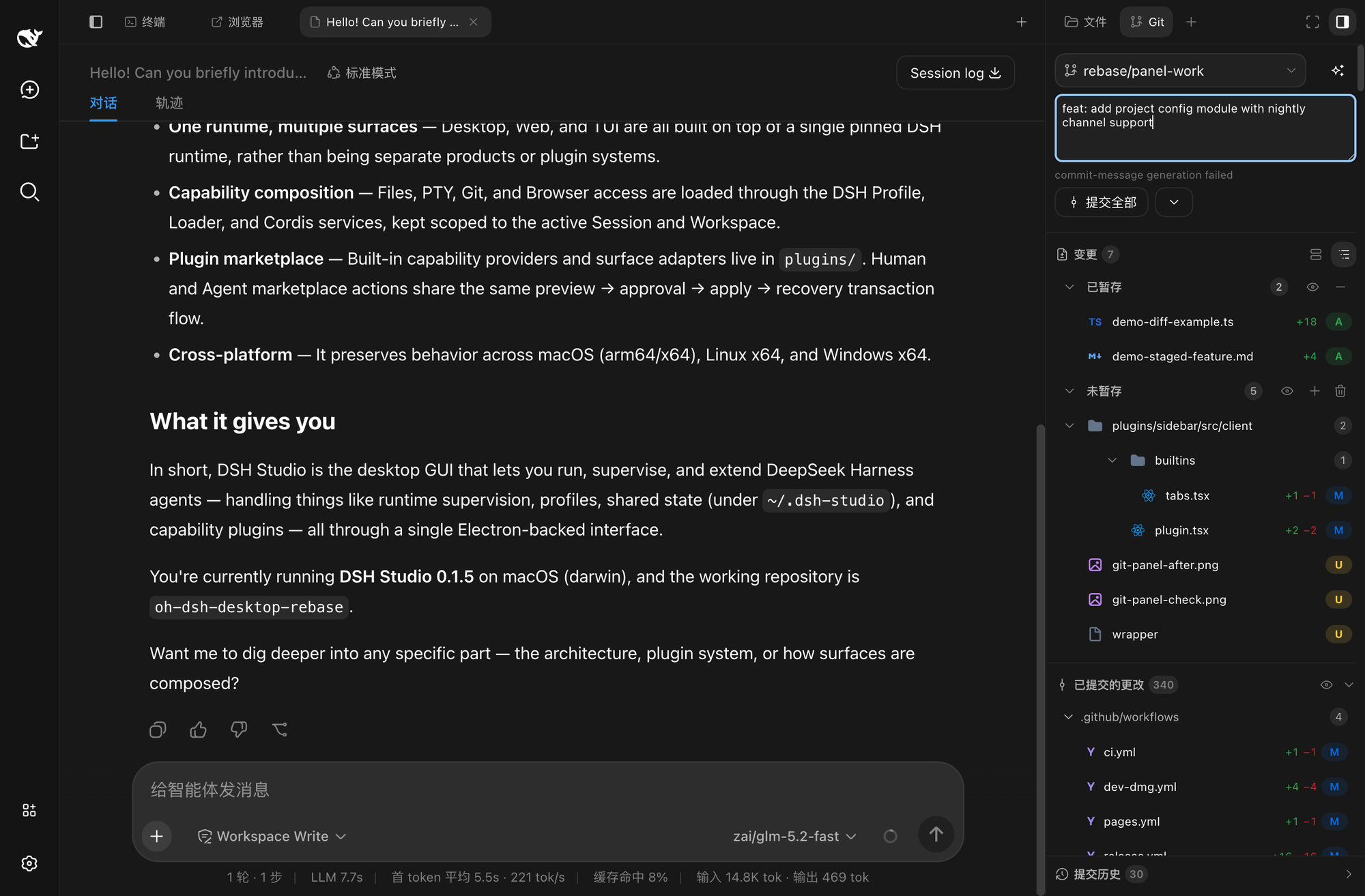
已暂存 2 个文件,提交信息由模型根据变更内容生成
每个分区都有「查看全部」:点击后暂存文件会展开为中心区域的独立标签页,左侧保留文件树导航,对照代码和 diff 更直观。
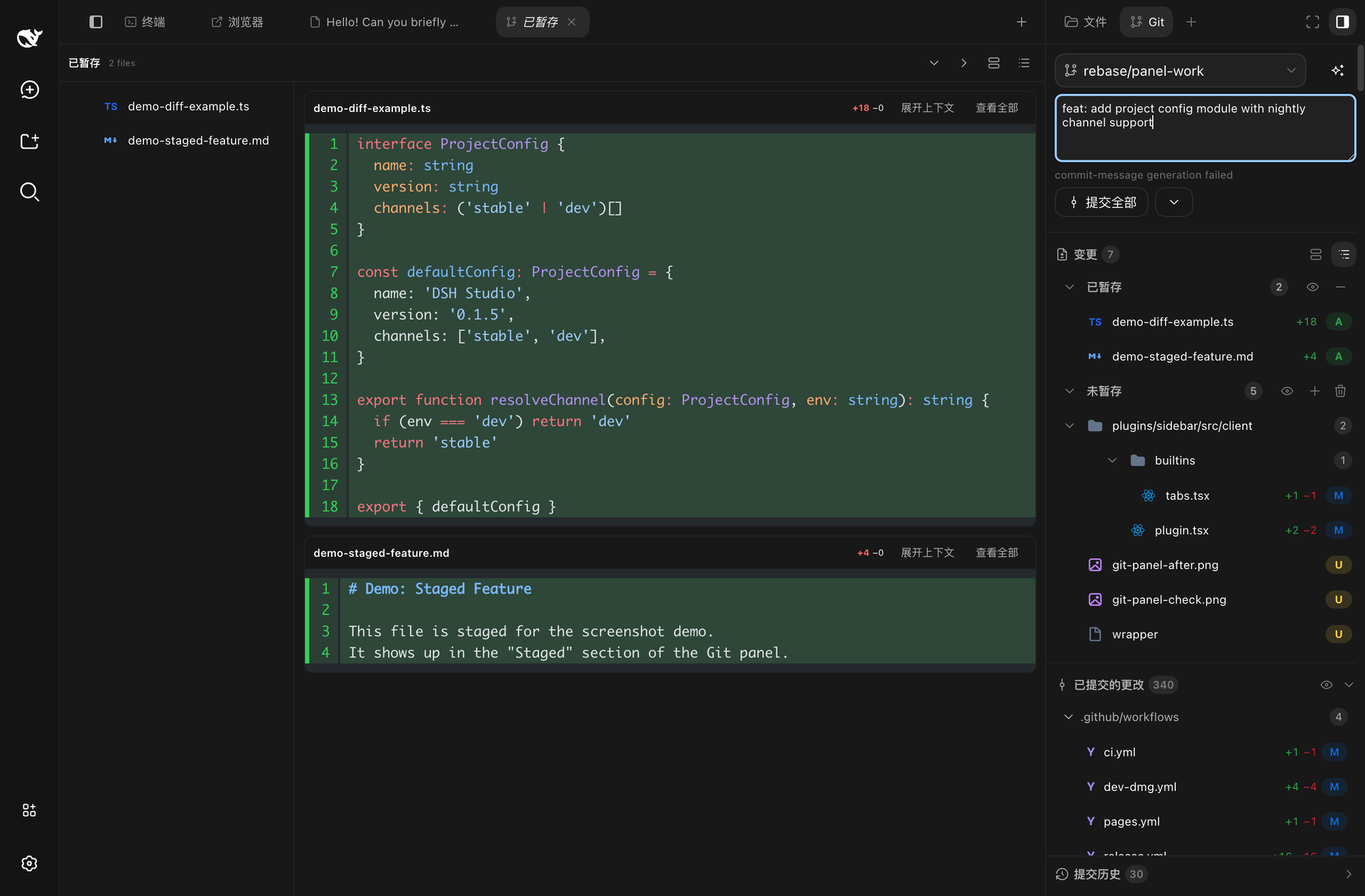
「查看全部」打开的暂存文件标签页,左侧为文件树
📄 Diff 查看器
点击 Git 面板中的任意文件,右栏即打开 diff 查看器:行级 diff、图片 diff、冲突查看、行内评论目标一应俱全,committed 与 unpushed 变更都可以对比。
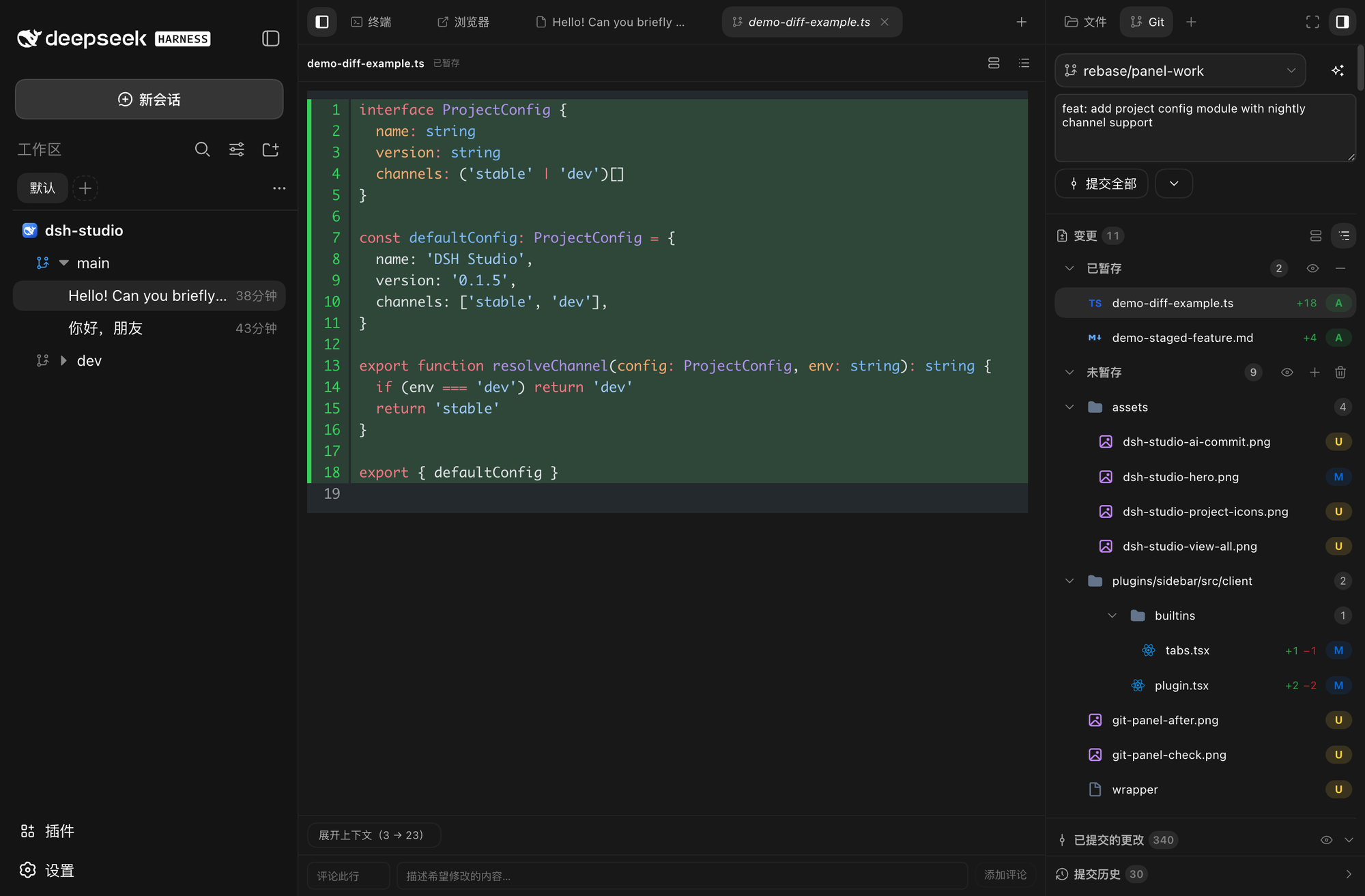
行级 diff,新增 / 删除行高亮,支持行内评论
📁 文件浏览
右栏切到文件标签即可浏览项目级文件树并预览文件,支持搜索、排序和快速跳转。中心区域的对话标签保持打开,看文件不打断对话。
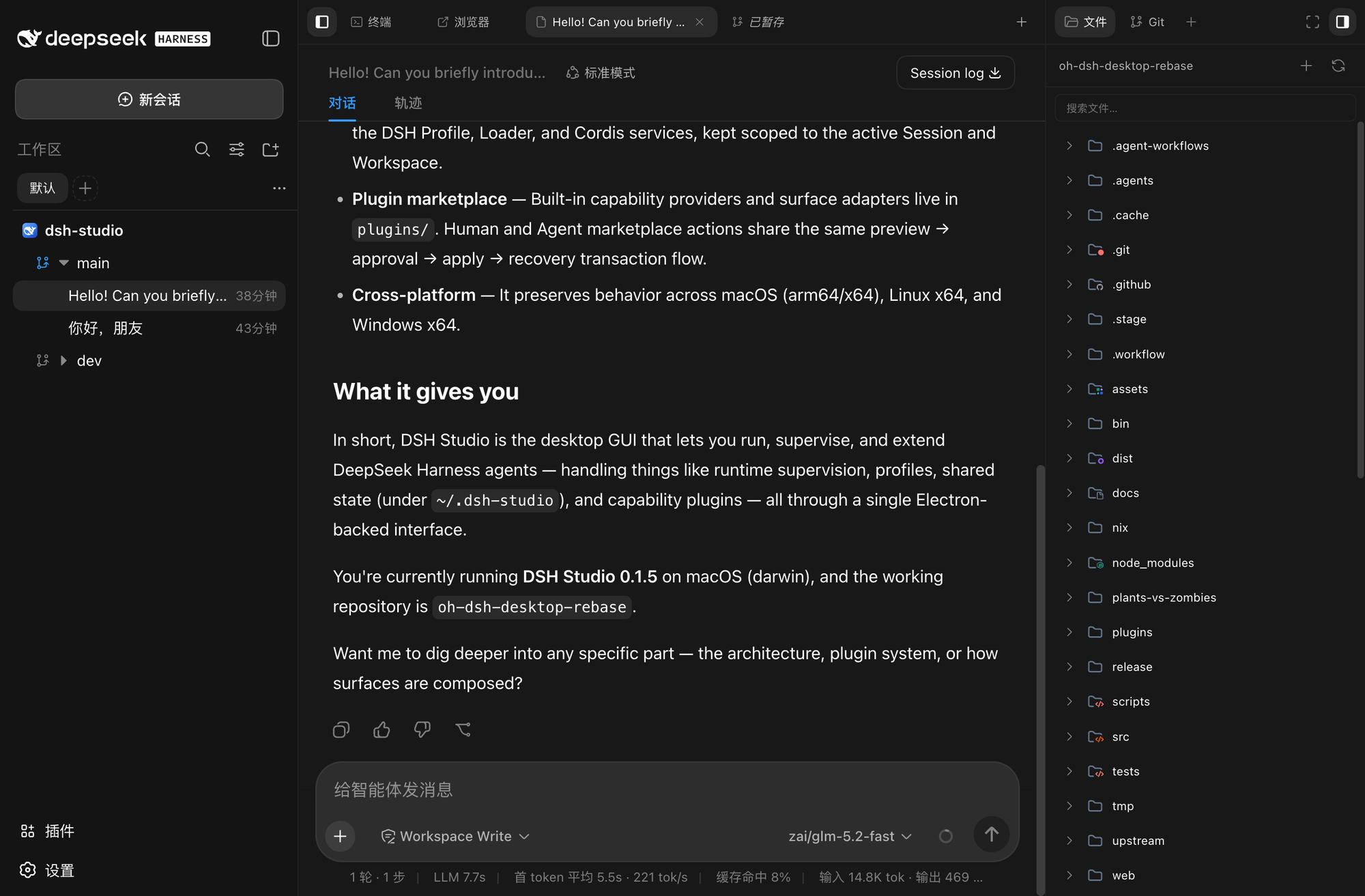
项目文件树与文件预览,对话标签同时保持打开
🖥️ 项目级终端
终端作为中心标签页打开:原生 PTY、统一的 shell 解析链、项目级作用域、流式输出与重放。对话和浏览器标签同时挂在标签栏,随时切换。
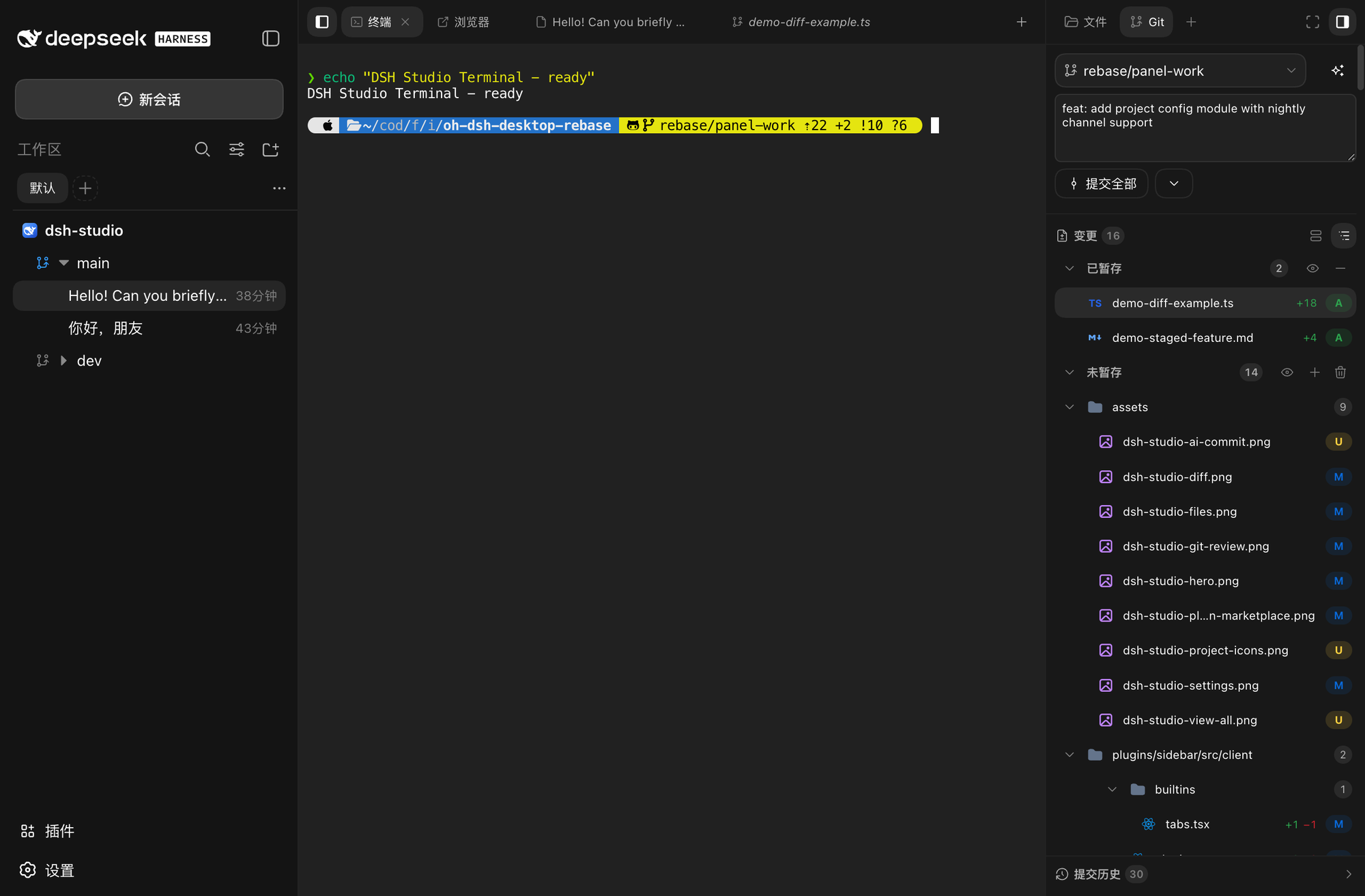
中心区域的终端标签,与对话、浏览器标签并列
⚙️ 设置面板
通用设置、模型配置、Agent 预设、侧边栏选项和皮肤切换集中在一个面板,Desktop 与 Web 共享同一套配置。
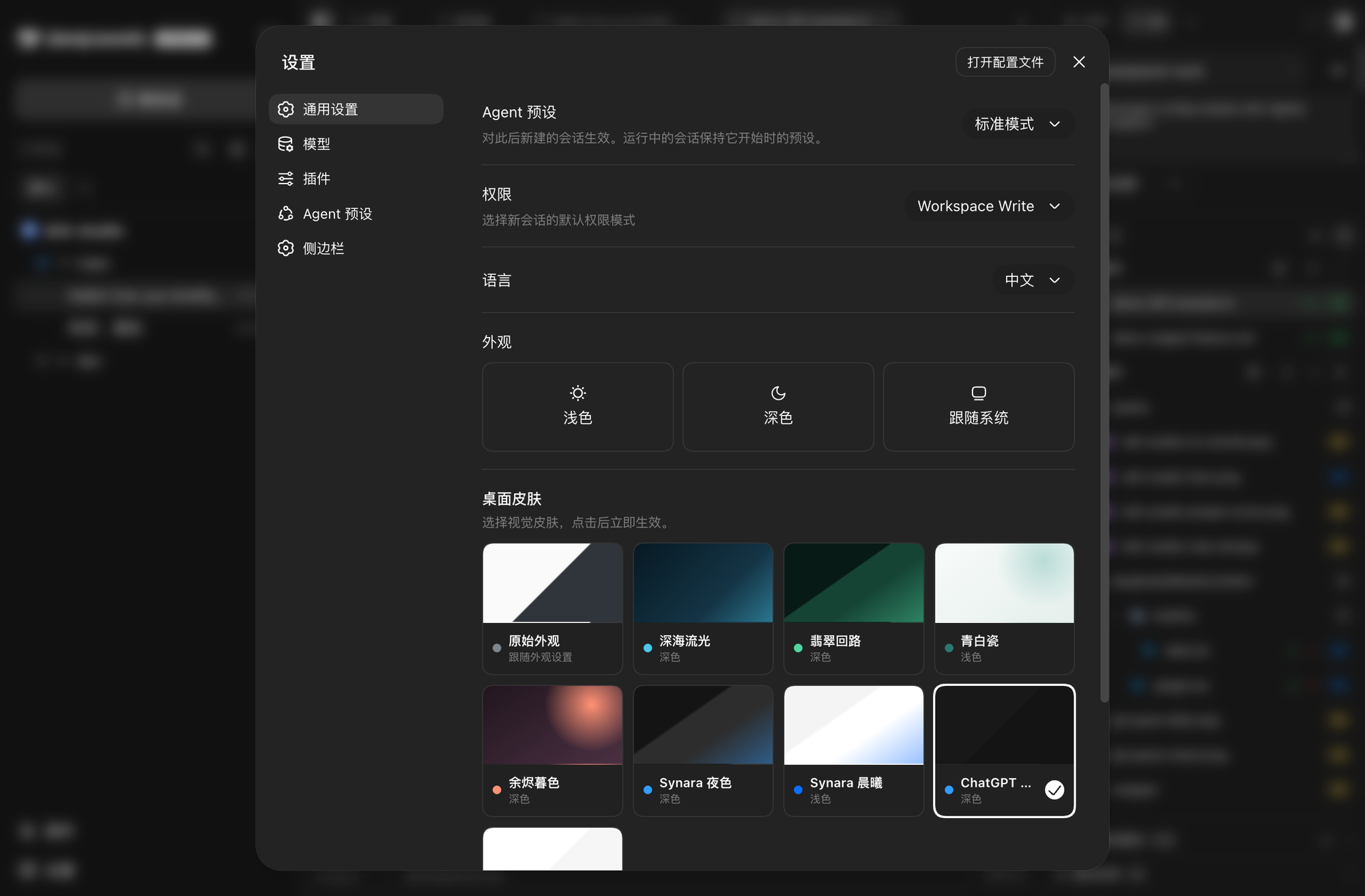
设置面板:通用设置 / 模型 / 插件 / Agent 预设 / 侧边栏 / 主题皮肤
🧩 插件市场
浏览和管理来自多个来源的 DSH 插件。安装前经过候选预览与审批,保留来源锁定、bundle 校验、应用和恢复流程。
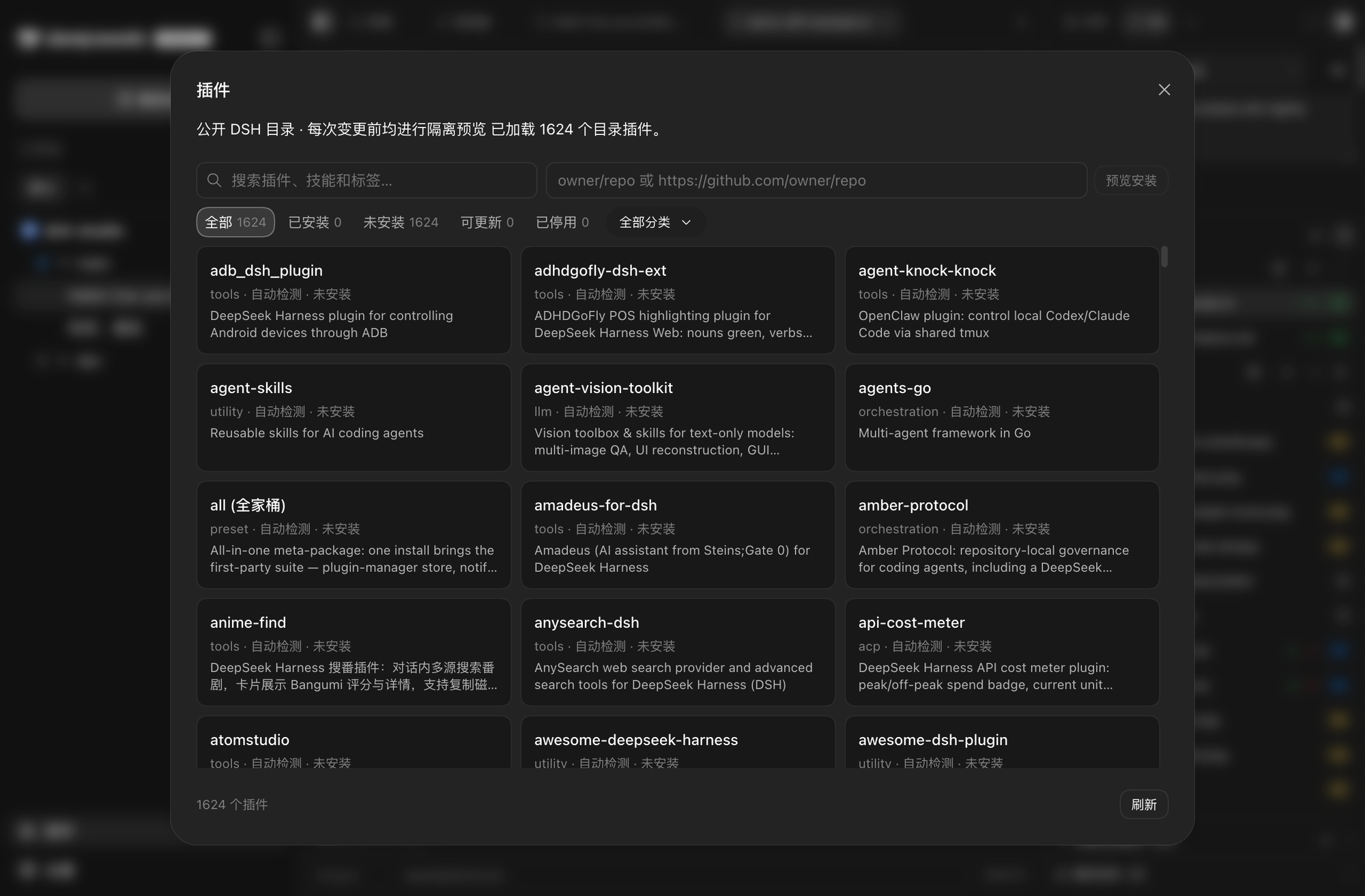
插件市场:已安装 / 未安装分类,支持搜索与来源筛选
实验性功能 · Source Control AI 正在开发中:根据项目变更生成提交信息,支持模型、思考强度和提示词模板配置。该能力尚未作为稳定发行承诺。
下载与安装
从 DSH Studio Releases 选择发行形态:
| 发行形态 | 包含内容 | 适合场景 |
|---|---|---|
| 完整版 | DSH Studio、Web、Node runtime 和内置插件 | 本地开发工作台 |
| Web-only | DSH Studio Web、Node runtime 和 Web 插件,不含 Electron | 浏览器、服务器或轻量安装 |
各平台安装步骤
- macOS: 打开 DMG,将 DSH Studio 拖入 Applications。
- Windows: 运行安装包,或解压便携版后启动。
- Linux: 直接运行 AppImage,或使用
apt安装 deb。
Web-only 包解压后即可运行:
# Web UI,默认监听 http://127.0.0.1:3080
./bin/dsh-studio web
安装统一命令(可选)
macOS 完整版可将应用内的启动器加入 PATH:
sudo ln -sf \
  "/Applications/DSH Studio.app/Contents/Resources/bin/dsh-studio" \
  /usr/local/bin/dsh-studio
Web-only 包可直接运行 ./bin/dsh-studio,也可以把它加入 PATH。
使用
dsh-studio desktop          # 启动 DSH Studio
dsh-studio gui              # Desktop 的启动别名
dsh-studio web              # 启动 DSH Studio Web
dsh-studio web --port 3080  # 指定 Web 端口
数据目录: 已安装的 Desktop 和 Web 默认共同使用 ~/.dsh-studio 存放缓存、配置、会话、凭据与插件状态。源码里的 pnpm start / pnpm dev 默认改用 ~/.dsh-studio-dev,正式版和验证实例可以同时开、互不抢数据。设置 DSH_STUDIO_HOME 可统一更换数据目录;--channel stable|dev 或 DSH_STUDIO_CHANNEL 在默认根目录之间切换。
我们基于什么构建
DSH Studio 是 hust-open-atom-club/oh-dsh 的下游 fork,并继续使用 DeepSeek Harness 提供的 DSH runtime、Profile、Session、Workspace 和插件契约。
| 区域 | 来源与边界 |
|---|---|
| DSH runtime | 基于 deepseek-ai/deepseek-harness 的 pinned runtime 运行 |
| 项目来源 | 基于 hust-open-atom-club/oh-dsh 继续开发 |
| 左栏 | fork 官方 packages/client/ui-workspace,改造成 Project → Worktree → Session;官方 row 被禁用,DSH Studio 使用自己的 desktop-left-rail |
| 右栏 Host | 基于 omdsh-dev/DSH-better-sidebar 的 Host 能力改造并 vendor 到仓库内 |
| 右栏 client/UI | 不是上游 UI 的原样复制;文件、Git Review、Center Surface、项目级作用域、插件注册和桌面布局由 DSH Studio 自己实现或重写 |
| Diff / terminal 参考 | 分别参考 pierre 与 orca 的公开实现和算法,保留对应归属 |
DSH Studio 不是简单换皮,也不是完全复制 Better Sidebar:我们复用明确标注的 runtime、Host、协议和第三方基础,在其上构建自己的项目工作区、Git Review、Center Surface、插件市场和 Desktop/Web 发行层。
文档与生态
- 安装、操作与排错 · 架构设计与插件边界
- DeepSeek Harness — DSH runtime、会话与插件加载器
- DSH-better-sidebar — 右栏 Host 的文件、Git 与 PTY 能力来源
- dshfind — DSH 插件超市与生态社区
- LINUX DO — 真实的开发者社区
更多参考项目
- plugin-registry:插件来源、锁定和生命周期参考
- dsh-hub:插件聚合、信任与候选预览参考
- dsh-suite:插件分类与管理参考
- pierre:diff、行内注释与虚拟化渲染参考
- orca:终端滚动和提交生成思路参考
完整的第三方许可、固定版本与适配边界见 THIRD_PARTY_NOTICES。
License
相关推荐Related
-
 anywhere-labs/deepseek-harness-desktop
为 DeepSeek Harness (DSH) 插件生态打造的现代化桌面端解决方案。万物皆「插件」,桌面本身也是「插件」。
anywhere-labs/deepseek-harness-desktop
为 DeepSeek Harness (DSH) 插件生态打造的现代化桌面端解决方案。万物皆「插件」,桌面本身也是「插件」。
-
 tt-a1i/archify
Agent skill for beautiful, verifiable architecture, workflow, sequence, data-flow, and lifecycle diagrams—self-contained…
tt-a1i/archify
Agent skill for beautiful, verifiable architecture, workflow, sequence, data-flow, and lifecycle diagrams—self-contained…
-
 zhu1090093659/dsh-web-ui
Plugin and skin collection for DeepSeek Harness (DSH) Web UI - task board, git graph, right-side panel, remote mobile UI…
zhu1090093659/dsh-web-ui
Plugin and skin collection for DeepSeek Harness (DSH) Web UI - task board, git graph, right-side panel, remote mobile UI…
-
 liustack/modlens
The first vision plugin for DeepSeek Harness, and the vision bridge for every text-only coding agent. Paste an image, ge…
liustack/modlens
The first vision plugin for DeepSeek Harness, and the vision bridge for every text-only coding agent. Paste an image, ge…
-
 omdsh-dev/DSH-better-sidebar
开放的侧边栏底座,支持三方拓展注册新侧边栏页面。内置文件渲染编辑/终端/Git/子代理页面 | Open sidebar foundation, supports third-party extensions to register new…
omdsh-dev/DSH-better-sidebar
开放的侧边栏底座,支持三方拓展注册新侧边栏页面。内置文件渲染编辑/终端/Git/子代理页面 | Open sidebar foundation, supports third-party extensions to register new…
-
 ccch1mneyyy/dsh-TUI
DSH 官方公众号收录的 TUI 补位插件:Claude Code 风,鲸鱼顶栏/实时状态/流式思考/双击 Esc 回滚/上下文进度+TPS。npm 一键装。 DSH official WeChat featured TUI plugin…
ccch1mneyyy/dsh-TUI
DSH 官方公众号收录的 TUI 补位插件:Claude Code 风,鲸鱼顶栏/实时状态/流式思考/双击 Esc 回滚/上下文进度+TPS。npm 一键装。 DSH official WeChat featured TUI plugin…
-
 dsh-market/dsh-market
The plugin market inside DeepSeek Harness — browse, search, one-click install · DSH 可视化插件市场
dsh-market/dsh-market
The plugin market inside DeepSeek Harness — browse, search, one-click install · DSH 可视化插件市场
-
 alvinunreal/openpets
Local first, desktop companion platform with animated pets, plugin SDK and coding-agent integrations.
alvinunreal/openpets
Local first, desktop companion platform with animated pets, plugin SDK and coding-agent integrations.