GHJIVHIDD/dsh-plugin-usage
A real-time token & cost dashboard tab for the current session, placed next to Chat / Trajectory in the conversation view ring. It records input / output / cache-hit tokens and prices every model call with both the DeepSeek official peak/off-peak rate card and the OpenCode Go plan rate card, refreshes every second, shows animated gradient-blue status bars, supports a fully editable custom price table (persisted across restarts) and CSV/JSON export.
catalog descriptioncatalog 简介 / catalog description:DeepSeek Harness 的用量(Usage)部署级插件:会话视图环新增「用量」页签,实时跟踪输入/输出/缓存命中 tokens 与费用(DeepSeek 官方峰谷价 + OpenCode Go 套餐价),动态渐变蓝状态条、自定义价格表、CSV/JSON 导出。原生UI界面
Project Overview项目介绍
This is a native DSH plugin that adds a real-time token usage and cost tracking dashboard tab to the DeepSeek Harness conversation view. It is installed directly into DSH's web profile, and the recommended installation method is running dsh plugin --profile web add github:GHJIVHIDD/dsh-plugin-usage from the command line. It tracks input, output, and cache-hit tokens for every model call, supports both DeepSeek's official peak/off-peak pricing and OpenCode Go plan pricing, updates the dashboard every second, allows users to export full usage data as CSV or JSON, and includes an animated gradient status bar that shows token distribution.
This plugin is designed for DSH users who want clear visibility into their model call costs and better control over their overall LLM usage budget. Every time a new model call starts, the plugin immediately creates a new record and updates estimated token counts in real time as the response streams in. Once the call completes, it replaces the estimate with the exact token count provided by the DSH adapter, and when you open an existing session, it automatically preloads all historical usage data. It also matches new calls to existing records within a 15-second window to avoid accidental duplicates.
This plugin is released under the permissive Apache 2.0 open source license, and all processing happens locally on your machine. It never sends any data to external servers, does not store any conversation content, and only keeps token counts, model names, and timestamps in memory during your active session. Custom prices you set are saved to a local file in your workspace root and do not include any sensitive information. You must register the plugin exactly once in your DSH web profile; if you register it twice, DSH will throw a duplicate entry error and fail to start.
这是一个专为DeepSeek Harness(DSH)开发的原生部署级用量统计插件,它会在DSH的对话界面视图环中添加一个实时的token用量与调用成本仪表盘标签页,位置在Chat和Trajectory标签之间。插件会记录每次模型调用的输入、输出、缓存命中token数量,同时支持DeepSeek官方峰谷定价和OpenCode Go套餐定价两种不同计价模式,每秒刷新数据,支持自定义价格表与CSV/JSON导出。
该插件适合需要清晰掌握每次模型调用成本、控制大模型使用整体预算的DSH开发者和日常用户使用。使用流程中,每次发起新的模型调用后,插件会立刻生成一条对应的记录,实时更新token估算数值,等到调用结束后会保存适配器返回的精确用量数据,还会在会话打开时预加载历史会话的用量数据,全程自动去重无重复记录。
该插件遵循Apache 2.0开源协议,所有计算全程在本地完成,不会向外发送任何用户数据,也不会存储对话内容,仅保存token数量、模型名称和调用时间戳,自定义价格会持久化存储在工作区的配置文件中。安装需要提前初始化DSH的web配置文件,推荐通过dsh plugin add命令从GitHub仓库安装,注意不要重复注册,否则DSH会启动失败。
请帮我安装这个 DSH 插件。安装前先完成【兼容性检查 + 安全性检查】,检查通过再动手。

插件:dsh-plugin-usage(GHJIVHIDD/dsh-plugin-usage)
仓库:https://github.com/GHJIVHIDD/dsh-plugin-usage
本站详情页:https://www.yhbd.top/plugins/ghjivhidd-dsh-plugin-usage/
本站登记:类型 bundle · 归类 原生 DSH 插件 · 许可证 Apache-2.0 · ⭐ 2 · 最近提交 2026-08-20 · 主语言 JavaScript

按下面顺序执行,每步先把结论告诉我,再进入下一步:

【1 兼容性检查】
① 我这边:DSH 版本、Node 版本、操作系统、当前 profile(web / desktop)。
② 读它的 README、package.json、插件 manifest,列出它要求的 DSH 版本 / Node 版本 / 操作系统 / 外部依赖 / 需要另外先装的运行时。
③ 逐条比对,结论只写「满足 / 不满足 / 未知」三种;不满足的给出可行替代方案。
④ 检查是否和我已装的插件冲突:命令名重复、skill / tool 重名、端口占用、重复注册的 MCP server。

【2 安全性检查】
① 仓库可信度:和上面「本站登记」是否一致;star / fork 数、创建时间、最近提交,是否归档或长期停更。
② 安装脚本:逐行看 package.json 的 preinstall / install / postinstall,以及 install.sh、setup.ps1 之类脚本。出现 curl|bash、下载后直接执行、混淆代码、访问与插件功能无关的域名,立刻停下来告诉我,不要继续装。
③ 依赖:列出新增依赖,标出无人维护、或与知名包拼写近似的可疑包(typosquatting)。
④ 权限与副作用:它会读写哪些目录、访问哪些域名、需要哪些 DSH 权限(filesystem / network / shell / clipboard 等),以及怎么卸载和回滚。
⑤ 如果它要求 sudo / 管理员权限,或权限明显超出功能所需,先停下来问我。

【3 安装】
上面两步没有「不满足」和「高危项」时才执行;用官方推荐方式安装,不要自行提权。

【4 汇报】
用表格输出:检查项 / 结论 / 依据 / 是否需要我决策。拿不准的一律写「未知」并说明要我怎么确认——不要猜,也不要替我决定。
Send this message to DSH in your current session: it verifies compatibility and security first (answering met / not met / unknown item by item) and only installs once everything checks out — it will stop and ask you if it finds a high-risk item. The box scrolls; the copy is the full prompt. CLI install commands may not be accurate across systems, so DSH is the safer route.把上面这条消息直接发给当前会话里的 DSH:它会先核对兼容性与安全性(逐条给「满足 / 不满足 / 未知」),确认没问题再安装,有高危项会停下来问你。框内可滚动,复制到的是完整提示词;安装命令不一定准确,发给 DSH 更稳。
- Only 2 stars - very few users, little community feedback星标只有 2,几乎没人在用,遇到问题缺少社区反馈
- Desktop client: installation downloads an executable - verify the publisher and checksums桌面客户端:安装会下载可执行文件,请核对发布者与校验和
DSH walks through these 9 checksDSH 会逐条核对这 9 项
Compatibility兼容性
- DSH, Node, OS and profile requirementsDSH 版本 / Node 版本 / 操作系统 / profile 是否满足要求
- External dependencies and runtimes (Electron / Python / Docker, ...)外部依赖与运行时(Electron / Python / Docker 等)是否齐备
- Conflicts with installed plugins: command names, skill / tool names, ports, duplicate MCP registration与已装插件是否冲突:命令名、skill / tool 重名、端口占用、重复 MCP 注册
Security安全性
- Repo matches the facts registered here; archived or abandoned?仓库是否与页面登记一致,是否归档或长期停更
- Safety of preinstall / install / postinstall and install.sh / setup.ps1preinstall / install / postinstall 与 install.sh、setup.ps1 是否安全
- curl|bash, download-then-execute, obfuscation, unrelated domains → stop immediatelycurl|bash、下载即执行、混淆代码、无关域名 → 立刻停止
- Typosquatting or unmaintained packages among the new dependencies新增依赖里有没有 typosquatting 或无人维护的包
- Requested permissions vs. what the feature actually needs申请了哪些权限、是否超出功能所需(filesystem / network / shell / clipboard)
- Any sudo / admin requirement, plus uninstall and rollback是否要求 sudo / 管理员权限,以及卸载与回滚方式
Anything uncertain must be marked unknown with a note on how to confirm it. This site's signal screen is a static snapshot, not a security audit.拿不准的必须标「未知」并说明要我怎么确认。本站的信号筛查是静态快照,不能替代安全审计。
Or use CLI install (for developers)或使用命令行安装(适合开发者)
CLI Install命令行安装
dsh plugin --profile web add github:GHJIVHIDD/dsh-plugin-usage把 GHJIVHIDD/dsh-plugin-usage 加入你的 DSH 配置(web profile)即可启用。
READMEREADME
dsh-plugin-usage
Deployment-level 用量 / Usage plugin for DeepSeek Harness (DSH).
A real-time token & cost dashboard tab for the current session, placed next to Chat / Trajectory in the conversation view ring. It records input / output / cache-hit tokens and prices every model call with both the DeepSeek official peak/off-peak rate card and the OpenCode Go plan rate card, refreshes every second, shows animated gradient-blue status bars, supports a fully editable custom price table (persisted across restarts) and CSV/JSON export.
中文文档见 README.zh.md(Chinese documentation is in README.zh.md)。
✨ Features
- New "用量" tab in the conversation view ring — sits right after Trajectory (
order: 11), native DSH UI style (theme tokens, compact toolbar, card sections). - Real-time live tracking — wraps every
llm/streammodel call: a "generating" row appears the moment a call starts, output/reasoning tokens are estimated per chunk and updated every second, then replaced by the adapter's exact usage; the committedassistant/messagefinalizes the record (15s match window, no duplicates). - Per-session accounting — input (cache miss), output (incl. reasoning), cache hit, cache write; totals and per-call details with timestamps.
- History preload — the first time a session is opened, the full history is rebuilt from the persisted session log (seq-level dedup against live collection).
- Dual pricing, auto-adjusted — every call is priced by its own timestamp:
- DeepSeek official (CNY / 1M tokens, effective 2026-08-17): peak hours (Beijing 09:00–12:00, 14:00–18:00) are 2× off-peak. V4 Pro: peak 9/0.3/27, off 4.5/0.15/13.5 (in/cache/out); V4 Flash: peak 3/0.1/9, off 1.5/0.05/4.5.
- OpenCode Go plan (USD / 1M tokens + monthly quota): 20 built-in models (DeepSeek V4 Pro/Flash, Grok 4.5, GPT 5.6 Luna, GLM, Kimi, MiMo, MiniMax, Qwen3, Hy3), e.g. V4 Flash off-peak 0.22/0.007/0.66 and peak 0.44/0.014/1.32 with $15/month quota (DeepSeek plan models are billed in two peak tiers); plan is $10/month ≈ 6× usage value.
- Three display modes: Auto (both), Official only, Plan only.
- Animated gradient-blue status bars — input / output / cache-hit distribution, smooth width transitions refreshed every second.
- OpenCode Go official quota — reads the official account quota (rolling 5h / weekly / monthly windows with reset times) straight from the
opencode.ai/zen/go/v1/usageAPI, matching the console numbers. - Custom price table — add, edit or remove prices for any model (official peak/off + plan prices + quota). Custom entries override the built-in cards, are persisted to
<workspaceRoot>/.dsh-usage-prices.json, and historical costs are re-priced immediately after a change. - CSV / JSON export — one-click download links (60s validity) for the full call detail list with per-call prices and totals.
- Peak/off-peak indicator — the toolbar shows whether the current Beijing time is peak or off-peak.
Showing the opening section of the README — the full document lives in the repository以上为 README 开头摘要,完整文档在仓库内 · View the full README on GitHub →在 GitHub 查看完整 README →
Related相关推荐
- vinyumao/dsh-opencode-usage DSH plugin: OpenCode Go 套餐用量显示(滚动/每周/每月用量百分比与重置倒计时 + Agent 工具 opencode_go_usage)。官方 bundle 插件,安装: dsh plugin --profile w…
-
 WestFox-AwA/dsh-prompt-optimizer
DSH 插件 · 注入式优化器 0.7(主线):你照常说话,它在你发送后,AI接收前把"这一轮到底要什么"理清楚,再把这份理解交给工作 AI(上下文注入) —— 原话不改写,条条带逐字依据。含控制界面(档位/权限/模型/上下文/只读工具)、…
WestFox-AwA/dsh-prompt-optimizer
DSH 插件 · 注入式优化器 0.7(主线):你照常说话,它在你发送后,AI接收前把"这一轮到底要什么"理清楚,再把这份理解交给工作 AI(上下文注入) —— 原话不改写,条条带逐字依据。含控制界面(档位/权限/模型/上下文/只读工具)、…
-
 feibi-mochi/deepseek-harness-control-center
DeepSeek Harness control center for balance, usage, peak/off-peak pricing, encrypted multi-account switching, health che…
feibi-mochi/deepseek-harness-control-center
DeepSeek Harness control center for balance, usage, peak/off-peak pricing, encrypted multi-account switching, health che…
-
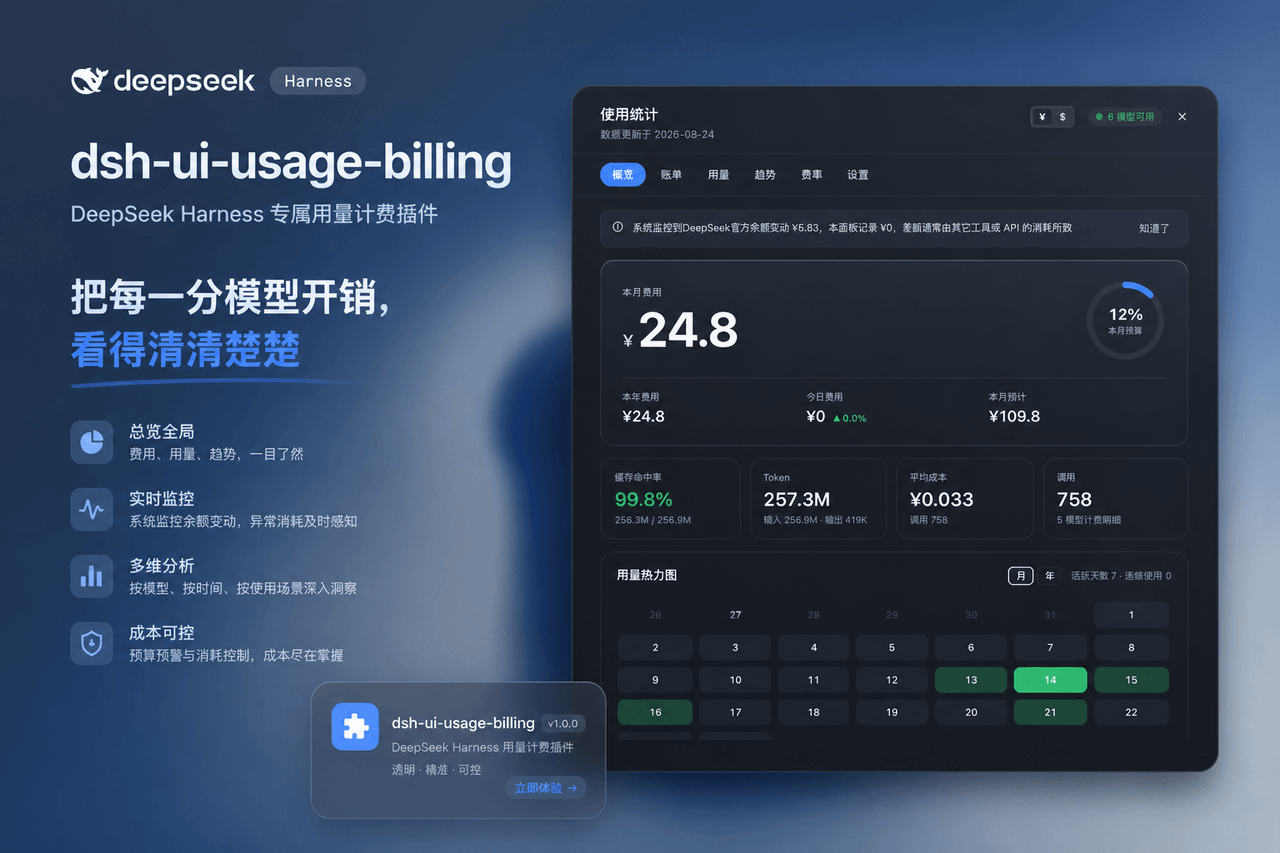 kenz1117/dsh-ui-usage-billing
Usage billing dashboard plugin for DeepSeek Harness: sidebar cost metrics, real usage aggregation from session logs, cur…
kenz1117/dsh-ui-usage-billing
Usage billing dashboard plugin for DeepSeek Harness: sidebar cost metrics, real usage aggregation from session logs, cur…
-
 yannicksong0106/dsh-550c-boot
550C 开机动画 for DeepSeek Harness — 首帧由宿主半边注入,DSH 的 Loading 卡片不露脸;桌面原生标题栏按钮收编成终端配色 | 550C boot splash plugin for DSH
yannicksong0106/dsh-550c-boot
550C 开机动画 for DeepSeek Harness — 首帧由宿主半边注入,DSH 的 Loading 卡片不露脸;桌面原生标题栏按钮收编成终端配色 | 550C boot splash plugin for DSH
-
 Zhenyu98/dsh-context-doctor
DSH 上下文注入审计插件:统计 AGENTS.md 指令链/技能目录/工具 schema 的 token 成本,检测重复与冲突;Web UI 圆环面板 + context_audit 工具。Context Doctor for DeepS…
Zhenyu98/dsh-context-doctor
DSH 上下文注入审计插件:统计 AGENTS.md 指令链/技能目录/工具 schema 的 token 成本,检测重复与冲突;Web UI 圆环面板 + context_audit 工具。Context Doctor for DeepS…
-
 omdsh-dev/dsh-advisor
Advisor - Pair a second model that passively reviews each turn and injects notes. 搭配一个会在每轮对话被动注入见解和审查的副模型。
omdsh-dev/dsh-advisor
Advisor - Pair a second model that passively reviews each turn and injects notes. 搭配一个会在每轮对话被动注入见解和审查的副模型。
-
 shuguang1994/project-blueprint
Make any project AI-agent-ready in one command. Adaptive tech stack detection (7 languages × 14 frameworks × 61 componen…
shuguang1994/project-blueprint
Make any project AI-agent-ready in one command. Adaptive tech stack detection (7 languages × 14 frameworks × 61 componen…