Jiyr0119/dsh-workspace-explorer
DeepSeek Harness 工作区文件资源管理器:用于 DeepSeek Harness 的工作区文件资源管理器插件,提供右侧文件树面板,支持点击或拖拽文件引用至输入框,界面与 DSH 原生风格一致。
Project Overview项目介绍
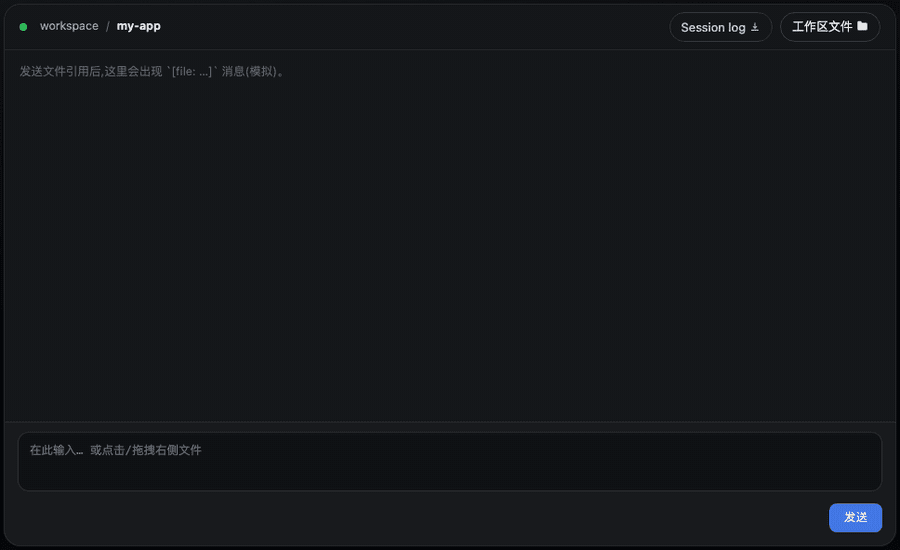
This is a native plugin built exclusively for DeepSeek Harness (DSH), extending DSH's web UI with a dedicated workspace file explorer. It adds a "Workspace Files" capsule button with a folder icon to the right of the native session log button in the conversation header. Clicking this button opens an animated floating popup that displays the full directory tree of the active DSH workspace. Users can click individual files or drag files and folders directly into the DSH composer to insert their references for the model to access. It positions the popup intentionally between the session header and composer to avoid covering the input textarea.
This plugin addresses a missing core feature after DSH introduced workspace support, taking design inspiration from the project tree UI in VS Code and Cursor. It includes a wide range of usability-focused features beyond basic directory listing, such as lazy loading for large directories, automatic hiding of noise directories like node_modules, .git and __pycache__, color-coded file icons per extension, and support for multi-select batch insertion of file references. Drag-and-drop is supported anywhere in the composer, dropping folders inserts a compact depth-limited directory tree. Additional features include name-based search filtering, paginated preview for large text files and a split-view preview panel.
The plugin fully integrates with DSH's native system, including support for DSH's i18n service for both Chinese and English, and automatically adapts to DSH's active light or dark theme using DSH's native design tokens. All configuration options can be adjusted live in the plugin's own settings tab, and changes are synced to DSH's global settings menu. It is released under the permissive MIT open source license, and can be installed with a single dsh plugin add command, no extra build steps or manual configuration are required to use it. After installation, the button appears immediately in the session header and is ready for use.
这是一款专为 DeepSeek Harness (DSH) 开发的原生插件,为 DSH 的 Web 界面新增了工作区文件浏览器功能。它会在会话标题栏的会话日志按钮旁添加一个带文件夹图标的「工作区文件」胶囊按钮,点击可打开带动画效果的弹窗,展示当前工作区的目录树,用户可点击或拖拽文件向模型发送文件引用。
它填补了 DSH 新增工作区功能后缺少目录视图的空白,设计灵感来自 VS Code 和 Cursor 的项目树。核心功能包括懒加载目录树、自动隐藏 node_modules、.git 等常见噪音目录、带文件类型区分的彩色图标、支持多选批量插入文件、拖拽操作、搜索过滤、分页预览、分栏预览和直连编辑文件等。
该插件支持中英双语国际化,适配 DSH 的浅色/深色主题,所有配置都可在插件自身的设置面板调整,且设置会同步到 DSH 的全局设置面板。它以 MIT 协议开源,可直接通过 dsh plugin add 命令一键安装,无需额外的构建步骤或配置修改,就能直接使用全部功能。
请帮我安装这个 DSH 插件。安装前先完成【兼容性检查 + 安全性检查】,检查通过再动手。

插件:dsh-workspace-explorer(Jiyr0119/dsh-workspace-explorer)
仓库:https://github.com/Jiyr0119/dsh-workspace-explorer
本站详情页:https://www.yhbd.top/plugins/jiyr0119-dsh-workspace-explorer/
本站登记:类型 plugin · 归类 原生 DSH 插件 · 许可证 MIT · ⭐ 33 · 最近提交 2026-09-30 · 主语言 JavaScript

按下面顺序执行,每步先把结论告诉我,再进入下一步:

【1 兼容性检查】
① 我这边:DSH 版本、Node 版本、操作系统、当前 profile(web / desktop)。
② 读它的 README、package.json、插件 manifest,列出它要求的 DSH 版本 / Node 版本 / 操作系统 / 外部依赖 / 需要另外先装的运行时。
③ 逐条比对,结论只写「满足 / 不满足 / 未知」三种;不满足的给出可行替代方案。
④ 检查是否和我已装的插件冲突:命令名重复、skill / tool 重名、端口占用、重复注册的 MCP server。

【2 安全性检查】
① 仓库可信度:和上面「本站登记」是否一致;star / fork 数、创建时间、最近提交,是否归档或长期停更。
② 安装脚本:逐行看 package.json 的 preinstall / install / postinstall,以及 install.sh、setup.ps1 之类脚本。出现 curl|bash、下载后直接执行、混淆代码、访问与插件功能无关的域名,立刻停下来告诉我,不要继续装。
③ 依赖:列出新增依赖,标出无人维护、或与知名包拼写近似的可疑包(typosquatting)。
④ 权限与副作用:它会读写哪些目录、访问哪些域名、需要哪些 DSH 权限(filesystem / network / shell / clipboard 等),以及怎么卸载和回滚。
⑤ 如果它要求 sudo / 管理员权限,或权限明显超出功能所需,先停下来问我。

【3 安装】
上面两步没有「不满足」和「高危项」时才执行;用官方推荐方式安装,不要自行提权。

【4 汇报】
用表格输出:检查项 / 结论 / 依据 / 是否需要我决策。拿不准的一律写「未知」并说明要我怎么确认——不要猜,也不要替我决定。
Send this message to DSH in your current session: it verifies compatibility and security first (answering met / not met / unknown item by item) and only installs once everything checks out — it will stop and ask you if it finds a high-risk item. The box scrolls; the copy is the full prompt. CLI install commands may not be accurate across systems, so DSH is the safer route.把上面这条消息直接发给当前会话里的 DSH:它会先核对兼容性与安全性(逐条给「满足 / 不满足 / 未知」),确认没问题再安装,有高危项会停下来问你。框内可滚动,复制到的是完整提示词;安装命令不一定准确,发给 DSH 更稳。
- 33 stars - an early-stage project星标 33,属于早期项目
DSH walks through these 9 checksDSH 会逐条核对这 9 项
Compatibility兼容性
- DSH, Node, OS and profile requirementsDSH 版本 / Node 版本 / 操作系统 / profile 是否满足要求
- External dependencies and runtimes (Electron / Python / Docker, ...)外部依赖与运行时(Electron / Python / Docker 等)是否齐备
- Conflicts with installed plugins: command names, skill / tool names, ports, duplicate MCP registration与已装插件是否冲突:命令名、skill / tool 重名、端口占用、重复 MCP 注册
Security安全性
- Repo matches the facts registered here; archived or abandoned?仓库是否与页面登记一致,是否归档或长期停更
- Safety of preinstall / install / postinstall and install.sh / setup.ps1preinstall / install / postinstall 与 install.sh、setup.ps1 是否安全
- curl|bash, download-then-execute, obfuscation, unrelated domains → stop immediatelycurl|bash、下载即执行、混淆代码、无关域名 → 立刻停止
- Typosquatting or unmaintained packages among the new dependencies新增依赖里有没有 typosquatting 或无人维护的包
- Requested permissions vs. what the feature actually needs申请了哪些权限、是否超出功能所需(filesystem / network / shell / clipboard)
- Any sudo / admin requirement, plus uninstall and rollback是否要求 sudo / 管理员权限,以及卸载与回滚方式
Anything uncertain must be marked unknown with a note on how to confirm it. This site's signal screen is a static snapshot, not a security audit.拿不准的必须标「未知」并说明要我怎么确认。本站的信号筛查是静态快照,不能替代安全审计。
Or use CLI install (for developers)或使用命令行安装(适合开发者)
CLI Install命令行安装
dsh plugin --profile web add -w @jiyr0119/dsh-workspace-explorer@latest把 Jiyr0119/dsh-workspace-explorer 加入你的 DSH 配置(web profile)即可启用。
READMEREADME
dsh-workspace-explorer






⭐ If you find this useful, give it a Star — it makes the author's day · ★ Give a Star
A workspace file explorer for the DeepSeek Harness Web UI: a “Workspace Files” capsule button in the session header (feature name + folder icon, beside the Session log button) opens an animated popup showing the current workspace's directory tree — click or drag a file to send its reference to the model.
Inspired by the VS Code / Cursor project tree, filling the gap of a missing directory view in DSH after workspaces are added.
🖥 Demo
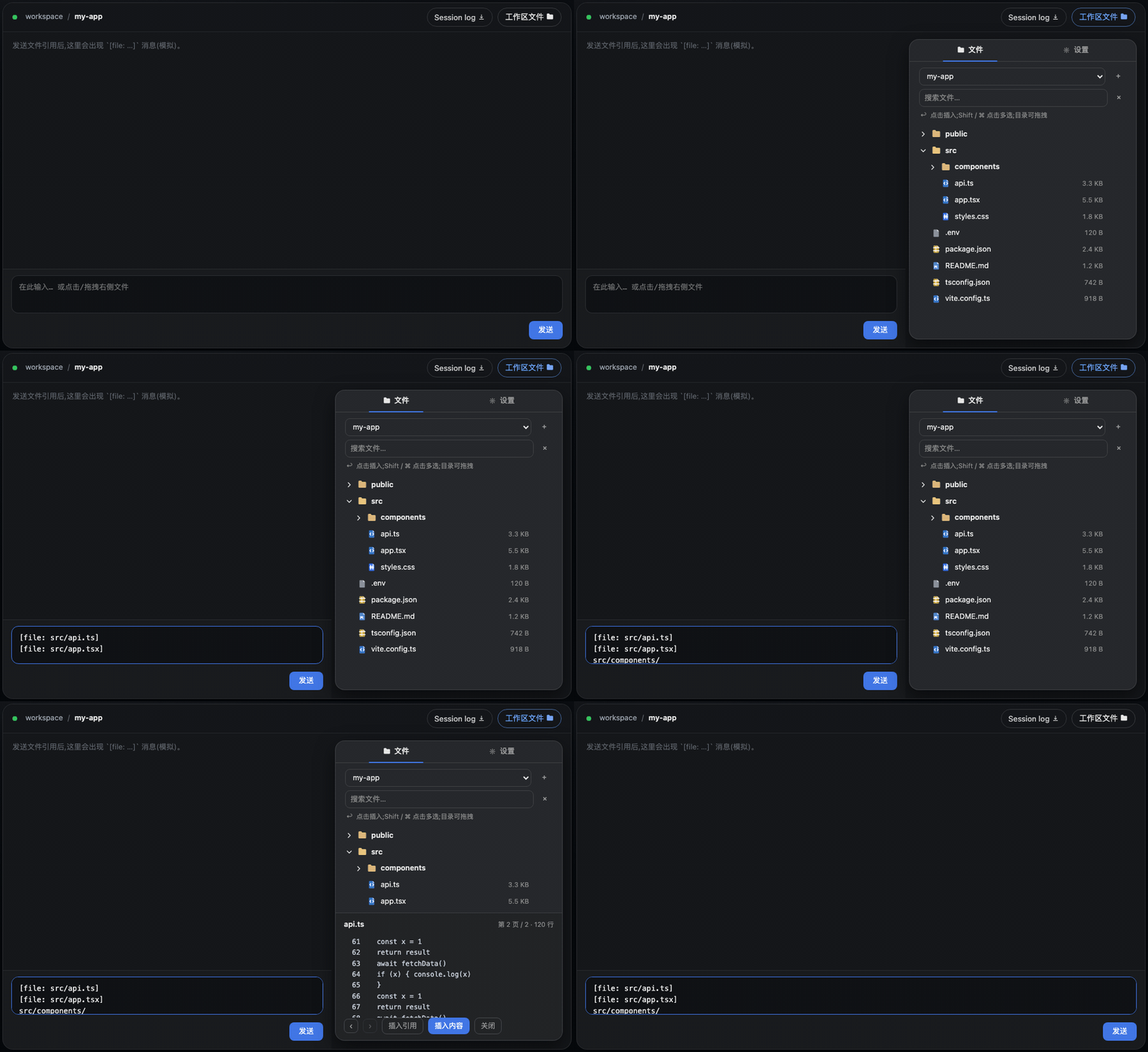
Demo GIF (recorded at v0.5.1): the “Workspace Files” pill entry, multi-select batch insert, folder drag → compact tree text, paginated preview, and the settings tab. The v0.6.0 split-view preview and file editing are shown in the screenshots below.
Screenshots · 截图
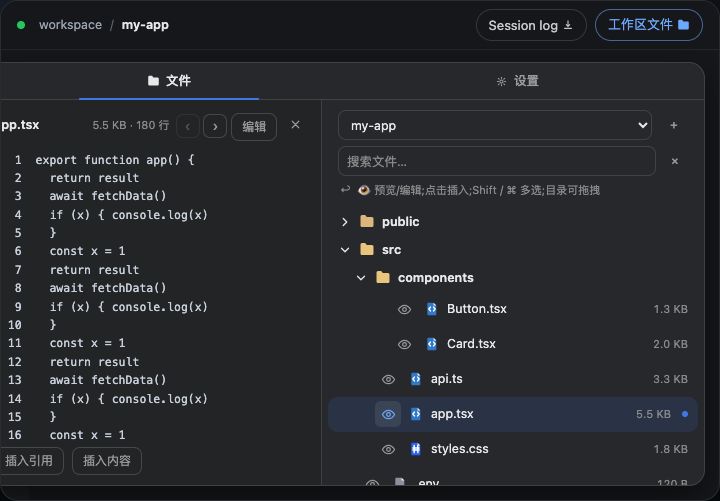
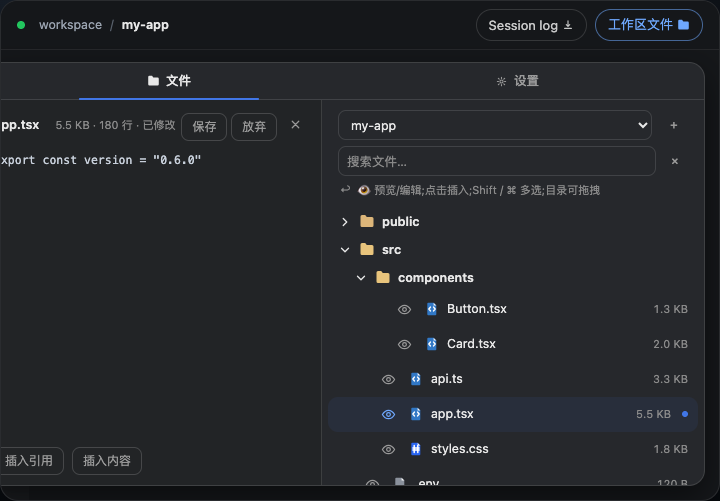
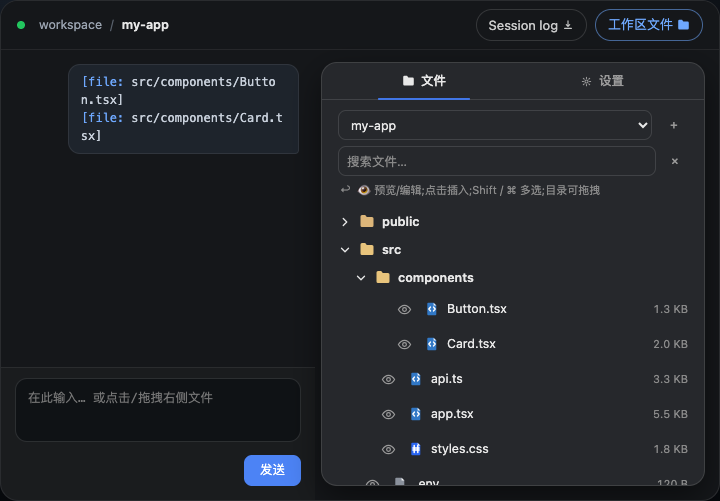
Features
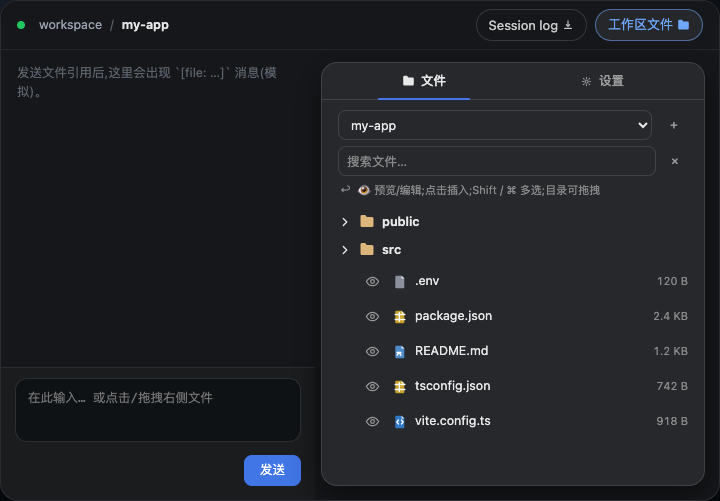
- 📂 Animated popup — a “Workspace Files” capsule button (feature name + folder icon, same style as the native Session log download button) sits in the session header and opens a floating panel with a spring-like fade/scale-in animation; the popup is measured live to sit between the session header and the composer (the chat area's right side), so it never covers the input box
- 🗂 Top tab bar — click at the top of the panel to switch between Files and Settings; the Settings page tunes behavior live (hide noise dirs, show sizes, reference format, preview lines, panel width) and mirrors into DSH Settings → Workspace Explorer
- 🗂 Lazy-loading tree — directories load on demand; noise dirs (
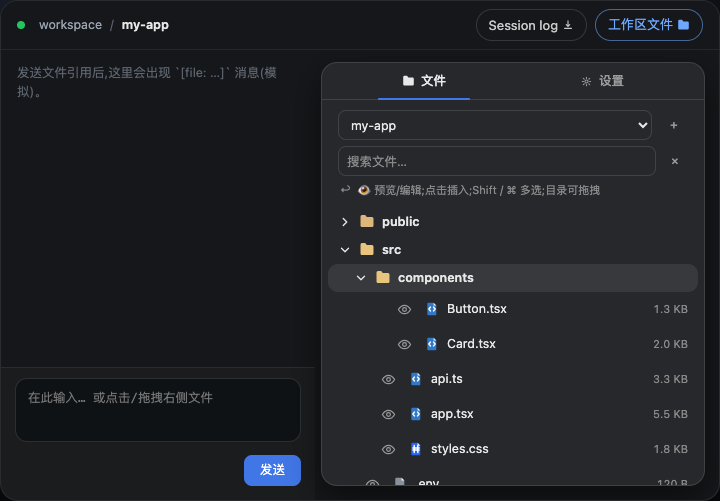
node_modules,.git,dist,__pycache__, …) are hidden automatically - 🎨 File-type icons — filled, color-coded document badges per extension (TS / JS / Python / JSON / Markdown / image / config / shell, …); amber folders that brighten when expanded
- 🖱 Click to insert — click a file row to append a
[file: relative-path]reference to the composer; after sending, the model resolves it with itsreadtool - 🖱 Drag & drop — drop a file into the composer to insert at the caret (fullscreen dashed hint); dropping elsewhere appends to the end. Folders are draggable too — dropping a directory inserts a depth-limited compact tree listing
- 🖱 Multi-select & batch insert — Shift / ⌘ click to select multiple rows, then insert all of them at once (files → references, folders → tree listings)
- 🌓 Theme-aware — built entirely on DSH's
--dsw-alias-*design tokens; adapts to light/dark with a native dialog look (16px radius, lv3 shadow) - 🔍 Search & filter — filter files by name across loaded directories (flat result list with a match count)
- 👁 Paginated preview — preview any text file with prev/next line paging (total lines & current page shown); insert the reference, or paste the full content for small files (≤ 32 KB)
- ✏️ Split view preview — click the 👁 icon before any file to open a 340px left-side preview panel; the file tree stays visible on the right for easy navigation
- 📝 File editing — click "Edit" in the preview panel to enter textarea mode; save writes directly to disk with change detection (warns if the file was modified externally)
- 🌐 i18n — zh/en dictionaries registered through DSH's locale service; the panel follows the DSH UI language
Showing the opening section of the README — the full document lives in the repository以上为 README 开头摘要,完整文档在仓库内 · View the full README on GitHub →在 GitHub 查看完整 README →
Related相关推荐
-
 reactive-resume/reactive-resume
A one-of-a-kind resume builder that keeps your privacy in mind. Completely secure, customizable, portable, open-source a…
reactive-resume/reactive-resume
A one-of-a-kind resume builder that keeps your privacy in mind. Completely secure, customizable, portable, open-source a…
-
 anywhere-labs/dsh-desktop
为 DeepSeek Harness (DSH) 插件生态打造的现代化桌面端解决方案。万物皆「插件」,桌面本身也是「插件」。
anywhere-labs/dsh-desktop
为 DeepSeek Harness (DSH) 插件生态打造的现代化桌面端解决方案。万物皆「插件」,桌面本身也是「插件」。
-
 dataelement/dsh-desktop
DSHDesktop:DeepSeek Harness Desktop / DeepSeek Harness 桌面版
dataelement/dsh-desktop
DSHDesktop:DeepSeek Harness Desktop / DeepSeek Harness 桌面版
-
 ccch1mneyyy/dsh-TUI
DSH's officially top-recommended TUI plugin — high performance, low overhead, cute pixel whale, smooth mouse interaction…
ccch1mneyyy/dsh-TUI
DSH's officially top-recommended TUI plugin — high performance, low overhead, cute pixel whale, smooth mouse interaction…
- dsh-tauri/deepseek-harness-desktop DeepSeek Harness Tauri 桌面版 | Only 5mb installer, zero environment setup, preset plugins, Windows / macOS / Linux.
-
 DSH-EAC/DSH-Desktop-EAC
Embracing All Creation — A plugin suite for harmonious coexistence of hundreds of plugins / 揽尽万象 —— 致力于让数百个插件和谐共存的插件整合包
DSH-EAC/DSH-Desktop-EAC
Embracing All Creation — A plugin suite for harmonious coexistence of hundreds of plugins / 揽尽万象 —— 致力于让数百个插件和谐共存的插件整合包
-
 shaobeichen/dsh-pocket
把 DeepSeek Harness 装进你的口袋:电脑上跑 dsh web,手机扫码即同步访问(局域网 + 公网,实时同屏)Put DeepSeek Harness in your pocket: run dsh web on your …
shaobeichen/dsh-pocket
把 DeepSeek Harness 装进你的口袋:电脑上跑 dsh web,手机扫码即同步访问(局域网 + 公网,实时同屏)Put DeepSeek Harness in your pocket: run dsh web on your …
-
 xyTom/coding-tools-mcp
Give any AI agent the ability to code
xyTom/coding-tools-mcp
Give any AI agent the ability to code