kevin-luo/dsh-org-panel
DeepSeek harness 纯牛马 —— 多智能体数字员工指挥台插件
Project Overview项目介绍
This is a native panel plugin built exclusively for DeepSeek Harness, designed to turn a vanilla DSH instance into a persistent digital employee collaboration runtime called Cyber Company. Each digital employee gets independent persistent storage for long-term memory, verified skill evidence, full task history, growth trajectories, custom model bindings, and plugin association records. It leverages DSH's native provider system to map custom employee model bindings to pre-registered DSH model routes. To install, first run the npm install dsh-org-panel command in your DSH environment, then add the configuration entry to your Cordis config file to mount the plugin.
When a user submits a task request, the built-in Work Orchestrator automatically matches the right digital employees for the required roles and forms a dedicated workgroup. Employees can use @ mentions to invite additional colleagues to join the collaboration dynamically, and all work session context is persistently stored so it can be recovered after DSH restarts. It supports receiving messages from WeChat, QQ, and Feishu via the separate dsh-im plugin, with all messages processed through the same orchestration pipeline and results returned to the original channel it originated from. This tool is ideal for users that need long-term management of multiple specialized agent roles for ongoing collaborative work.
The project is currently licensed under the PolyForm Noncommercial License 1.0.0, which allows personal non-commercial use but prohibits any commercial usage without explicit written authorization from the author. All persistent data is stored locally in the user's ~/.dsh-org-panel directory, with support for secret references instead of plaintext key storage, and corrupted data files trigger automatic backups to avoid permanent data loss. All new feature development and bug fixes are now happening in the new dsh-cyber repository, which continues the evolution of the Cyber Company persistent digital employee runtime for DeepSeek Harness.
这是一个专为 DeepSeek Harness 开发的原生面板插件,可将 DSH 改造为支持持久化数字员工协作的「赛博公司」运行时。它支持每个数字员工独立存储长期记忆、技能证据、工作履历和成长轨迹,能由任务编排器按需求自动组队协作。你可以通过 npm 命令安装,在 Cordis 配置中添加对应条目即可在 DSH 内挂载使用。
典型工作流是用户输入需求后,编排器自动匹配对应岗位的数字员工组成工作组,员工可以通过 @ 邀请其他同事动态加入,所有协作上下文会持久化存储,重启后也能恢复。支持从微信、QQ、飞书等渠道接入消息,所有外部消息统一进入赛博公司的协作流程,结果原路返回。适合需要长期管理多智能体角色、开展分工协作的用户使用。
本项目当前采用 PolyForm 非商业许可 1.0.0,允许个人非商业使用,禁止未授权的商业用途,商业使用需要获取作者单独书面授权。所有配置数据默认持久化存储在用户本地目录,仅支持密钥引用不存储明文,故障时自动备份原数据避免丢失。本项目核心功能后续开发已转移到新仓库 DSH Cyber。
请帮我安装这个 DSH 插件。安装前先完成【兼容性检查 + 安全性检查】,检查通过再动手。

插件:dsh-org-panel(kevin-luo/dsh-org-panel)
仓库:https://github.com/kevin-luo/dsh-org-panel
本站详情页:https://www.yhbd.top/plugins/kevin-luo-dsh-org-panel/
本站登记:类型 plugin · 归类 原生 DSH 插件 · 许可证 NOASSERTION · ⭐ 5 · 最近提交 2026-08-25 · 主语言 TypeScript

按下面顺序执行,每步先把结论告诉我,再进入下一步:

【1 兼容性检查】
① 我这边:DSH 版本、Node 版本、操作系统、当前 profile(web / desktop)。
② 读它的 README、package.json、插件 manifest,列出它要求的 DSH 版本 / Node 版本 / 操作系统 / 外部依赖 / 需要另外先装的运行时。
③ 逐条比对,结论只写「满足 / 不满足 / 未知」三种;不满足的给出可行替代方案。
④ 检查是否和我已装的插件冲突:命令名重复、skill / tool 重名、端口占用、重复注册的 MCP server。

【2 安全性检查】
① 仓库可信度:和上面「本站登记」是否一致;star / fork 数、创建时间、最近提交,是否归档或长期停更。
② 安装脚本:逐行看 package.json 的 preinstall / install / postinstall,以及 install.sh、setup.ps1 之类脚本。出现 curl|bash、下载后直接执行、混淆代码、访问与插件功能无关的域名,立刻停下来告诉我,不要继续装。
③ 依赖:列出新增依赖,标出无人维护、或与知名包拼写近似的可疑包(typosquatting)。
④ 权限与副作用:它会读写哪些目录、访问哪些域名、需要哪些 DSH 权限(filesystem / network / shell / clipboard 等),以及怎么卸载和回滚。
⑤ 如果它要求 sudo / 管理员权限,或权限明显超出功能所需,先停下来问我。

【3 安装】
上面两步没有「不满足」和「高危项」时才执行;用官方推荐方式安装,不要自行提权。

【4 汇报】
用表格输出:检查项 / 结论 / 依据 / 是否需要我决策。拿不准的一律写「未知」并说明要我怎么确认——不要猜,也不要替我决定。
Send this message to DSH in your current session: it verifies compatibility and security first (answering met / not met / unknown item by item) and only installs once everything checks out — it will stop and ask you if it finds a high-risk item. The box scrolls; the copy is the full prompt. CLI install commands may not be accurate across systems, so DSH is the safer route.把上面这条消息直接发给当前会话里的 DSH:它会先核对兼容性与安全性(逐条给「满足 / 不满足 / 未知」),确认没问题再安装,有高危项会停下来问你。框内可滚动,复制到的是完整提示词;安装命令不一定准确,发给 DSH 更稳。
- Only 5 stars - very few users, little community feedback星标只有 5,几乎没人在用,遇到问题缺少社区反馈
DSH walks through these 9 checksDSH 会逐条核对这 9 项
Compatibility兼容性
- DSH, Node, OS and profile requirementsDSH 版本 / Node 版本 / 操作系统 / profile 是否满足要求
- External dependencies and runtimes (Electron / Python / Docker, ...)外部依赖与运行时(Electron / Python / Docker 等)是否齐备
- Conflicts with installed plugins: command names, skill / tool names, ports, duplicate MCP registration与已装插件是否冲突:命令名、skill / tool 重名、端口占用、重复 MCP 注册
Security安全性
- Repo matches the facts registered here; archived or abandoned?仓库是否与页面登记一致,是否归档或长期停更
- Safety of preinstall / install / postinstall and install.sh / setup.ps1preinstall / install / postinstall 与 install.sh、setup.ps1 是否安全
- curl|bash, download-then-execute, obfuscation, unrelated domains → stop immediatelycurl|bash、下载即执行、混淆代码、无关域名 → 立刻停止
- Typosquatting or unmaintained packages among the new dependencies新增依赖里有没有 typosquatting 或无人维护的包
- Requested permissions vs. what the feature actually needs申请了哪些权限、是否超出功能所需(filesystem / network / shell / clipboard)
- Any sudo / admin requirement, plus uninstall and rollback是否要求 sudo / 管理员权限,以及卸载与回滚方式
Anything uncertain must be marked unknown with a note on how to confirm it. This site's signal screen is a static snapshot, not a security audit.拿不准的必须标「未知」并说明要我怎么确认。本站的信号筛查是静态快照,不能替代安全审计。
Or use CLI install (for developers)或使用命令行安装(适合开发者)
CLI Install命令行安装
dsh plugin --profile web add @xmanrui/dsh-im把 kevin-luo/dsh-org-panel 加入你的 DSH 配置(web profile)即可启用。
READMEREADME
项目演进说明
基于本项目的产品思路与工程实践,已经独立升级为新的项目仓库:DSH Cyber。
DSH Cyber 面向本地优先的 AI 角色、数字员工与可视化世界运行时,持续建设持久化员工、世界与会话,角色和插件生态,Skill 安全治理、审批与审计,以及可共创的扩展市场。它承接了本项目在数字员工、工作组协作和 DSH 运行时方向上的探索,并将后续核心能力放在更完整的产品架构中持续演进。
欢迎前往 cyber-ai-agent/dsh-cyber 体验、反馈、提交 Issue 和 Pull Request,参与功能建设、问题修复与产品共创。
赛博公司 · DSH 数字员工运行时 2.0
把 DeepSeek Harness 变成一家公司:员工长期存在、各自成长,任务会自动组队,Web / 微信 / QQ / 飞书进入同一套协作运行时。
dsh-org-panel 2.0 的核心不是“多几个 Agent 卡片”,而是一套 Persistent Cyber Company Runtime。
每位数字员工都有自己的长期记忆、技能证据、工作履历、插件绑定、模型绑定和成长轨迹;公司任务由 Work Orchestrator 自动选择合适员工组成临时或持续工作组,员工之间可以直接协作、互相 @ 拉同事入场。秘书只是总裁办的一名普通员工,只会在行政、日程、会议安排等任务命中她的岗位时参与。
⚠️ 许可与商业使用
本项目当前使用 PolyForm Noncommercial License 1.0.0。
- ✅ 允许个人学习、研究、实验、非商业项目和其他许可证明确允许的非商业用途。
- ❌ 不允许商业使用,包括将本项目或其修改版用于收费产品、SaaS、商业服务、商业交付、转售,或由商业组织用于生产经营等商业目的。
- 💼 如需商业使用,请先取得作者的单独书面商业授权,可通过 GitHub Issue 联系。
- 📜 此前已经明确以 MIT License 发布的历史版本继续保留当时仓库中的许可文本;本次变更不追溯修改历史版本的许可文件。
完整条款见 LICENSE。本项目源码公开,但由于包含非商业限制,不属于 OSI 定义下的开源软件许可。
架构
Web / 微信 / QQ / 飞书 / 其他 DSH IM
                │
                ▼
         Work Orchestrator
         任务理解 / 自动组队
         显式 @ / 动态邀请
                │
                ▼
       Persistent WorkSession
   来源 / 会话 / 成员 / 历史交付
                │
      ┌─────────┼─────────┐
      ▼         ▼         ▼
    小刘       小画       阿明   ...
   程序员     设计师     产品经理
      │         │         │
      └─────────┼─────────┘
                ▼
        Employee Runtime
                │
  ┌─────────────┼─────────────┐
  ▼             ▼             ▼
长期记忆      SkillEvidence   TaskHistory
插件/工具      自动成长       真实模型路由
                │
                ▼
         evolution.json
DSH root session 只承担不可见的执行根职责,不代表任何员工,也不会以“主 Agent”身份向用户汇报。
2.0 真实能力
持久数字员工
每位员工独立持久化:
- 长期记忆与复盘
- 技能与真实
SkillEvidence - XP / Level / 成长轨迹
- TaskHistory
- 插件绑定与健康状态
- 模型绑定
- 统计数据与最近活动
刷新页面或重启面板不会把员工重置成一份新 Prompt。
动态工作组
老板可以直接输入:
帮我重新设计 App 首页,同时评估实现成本和后续推广。
Work Orchestrator 会根据岗位和任务语义自动拉合适的员工,例如产品、视觉、开发、增长组成工作组。明确 @小刘 会锁定小刘,复杂任务仍可以补充相关同事;员工公开回复里写 @小麦 帮我评估传播策略,小麦会动态加入同一个工作组。
员工看到同一份原始任务以及前序同事真实公开输出,可以补充、质疑和接棒。业务输出直接来自具体员工,不经过秘书二次转述。
Showing the opening section of the README — the full document lives in the repository以上为 README 开头摘要,完整文档在仓库内 · View the full README on GitHub →在 GitHub 查看完整 README →
Related相关推荐
-
 tt-a1i/archify
Agent skill for beautiful, verifiable architecture, workflow, sequence, data-flow, and lifecycle diagrams—self-contained…
tt-a1i/archify
Agent skill for beautiful, verifiable architecture, workflow, sequence, data-flow, and lifecycle diagrams—self-contained…
-
 dream-num/dsh-univer-office
Give DeepSeek Harness a real office environment. Univer Office Plugin brings spreadsheets, docs, slides, canvases, rela…
dream-num/dsh-univer-office
Give DeepSeek Harness a real office environment. Univer Office Plugin brings spreadsheets, docs, slides, canvases, rela…
-
 kanghelyu/dsh-deepseek-flow
-
 ChongCyrus/Vibe-Mathematics
Vibe Mathematics —— 多代理数学问题求解与形式化验证框架
ChongCyrus/Vibe-Mathematics
Vibe Mathematics —— 多代理数学问题求解与形式化验证框架
-
 alib8b8/aflare
Local-first automation Agent & deterministic workflow engine — the secure control layer between AI and your data. Data s…
alib8b8/aflare
Local-first automation Agent & deterministic workflow engine — the secure control layer between AI and your data. Data s…
-
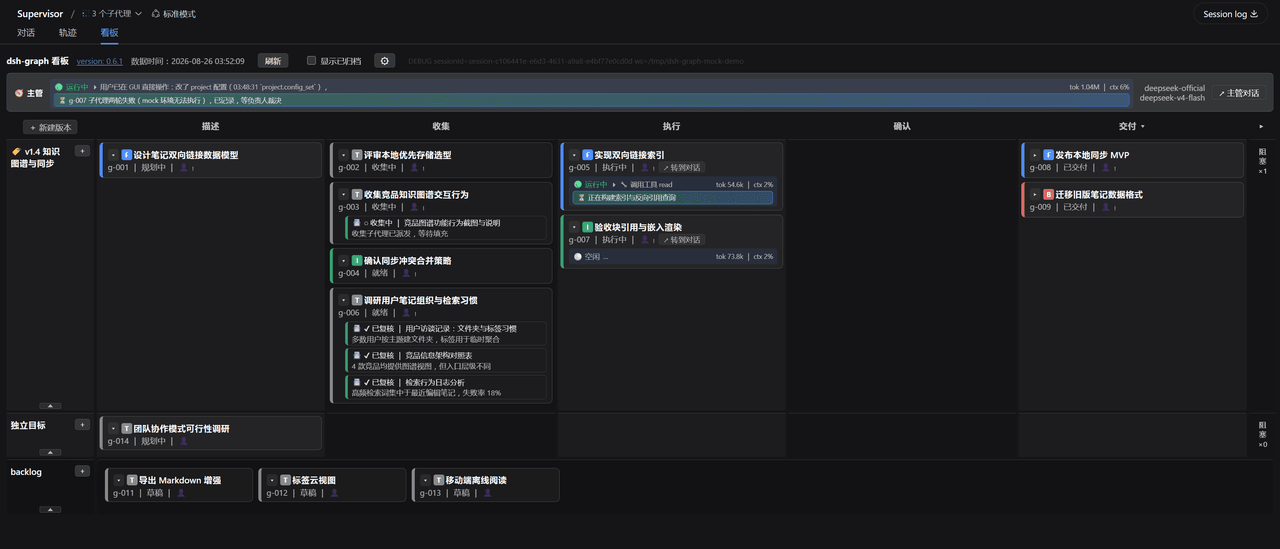 miuzel/dsh-graph
把工作组织成目标看板的 DeepSeek Harness (dsh) 插件:目标 / 判据 / 上下文卡片 / 执行 attempt 的二维泳道看板,数据以文件+事件流落在 .dsh-graph · Goal-kanban plugin f…
miuzel/dsh-graph
把工作组织成目标看板的 DeepSeek Harness (dsh) 插件:目标 / 判据 / 上下文卡片 / 执行 attempt 的二维泳道看板,数据以文件+事件流落在 .dsh-graph · Goal-kanban plugin f…
-
 havingautism/dsh-deepresearch
@deepseek-ai/dsh-deepresearch 把证据优先的 Codemini 研究工作区带到 DSH。它提供持久工作流状态、模型工具、生成的 deepResearch Remote namespace 和“深度研究”Web 工…
havingautism/dsh-deepresearch
@deepseek-ai/dsh-deepresearch 把证据优先的 Codemini 研究工作区带到 DSH。它提供持久工作流状态、模型工具、生成的 deepResearch Remote namespace 和“深度研究”Web 工…
-
 LeemanCheung/dsh-task-dag
Persistent live DAG visualization for DeepSeek Harness subagents and workflows
LeemanCheung/dsh-task-dag
Persistent live DAG visualization for DeepSeek Harness subagents and workflows