lovaxi/Rubato_Plugins
Make your AI's working state visible on a physical desk device - one Rubato plugin per coding agent.
Project Overview项目介绍
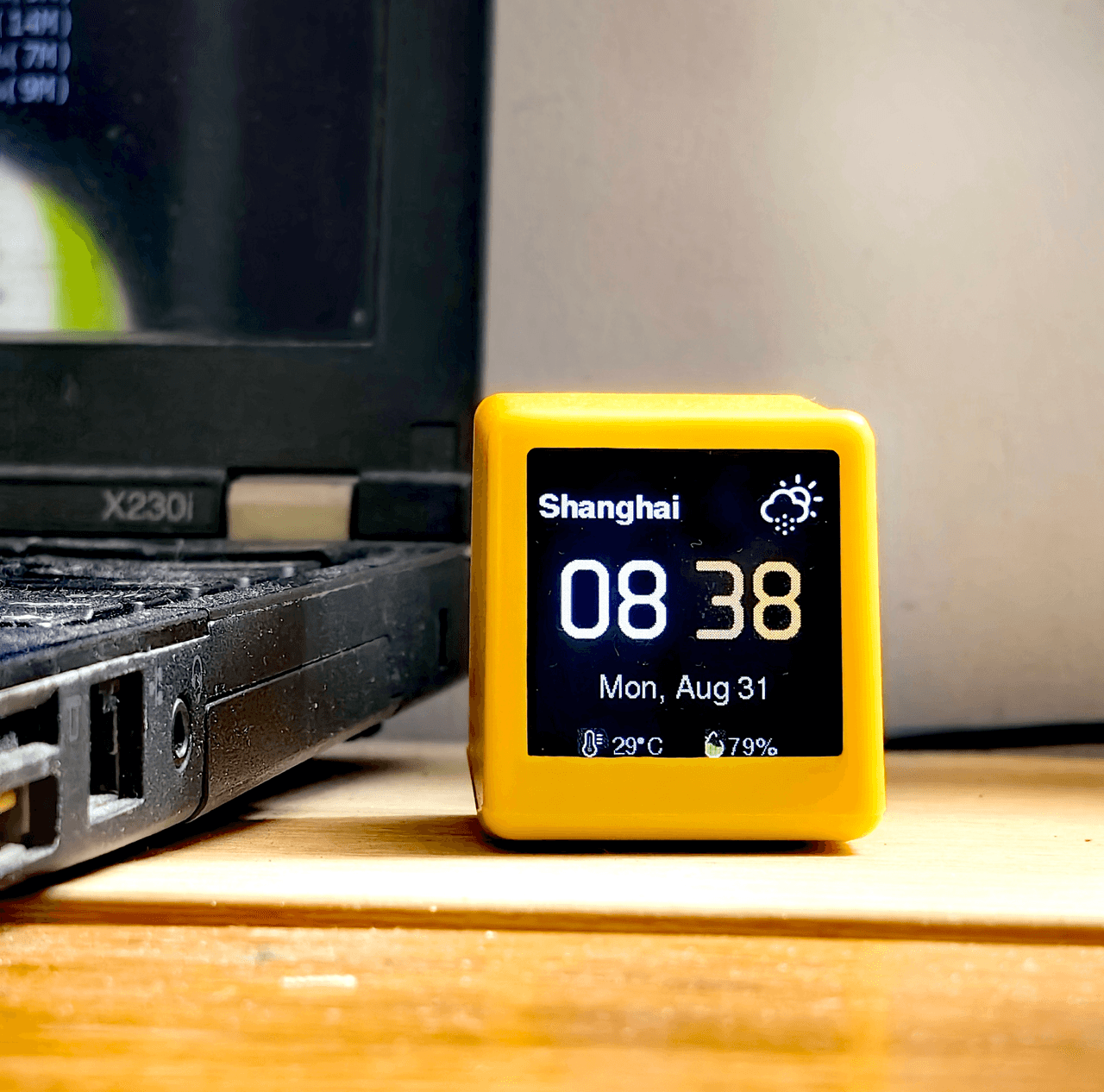
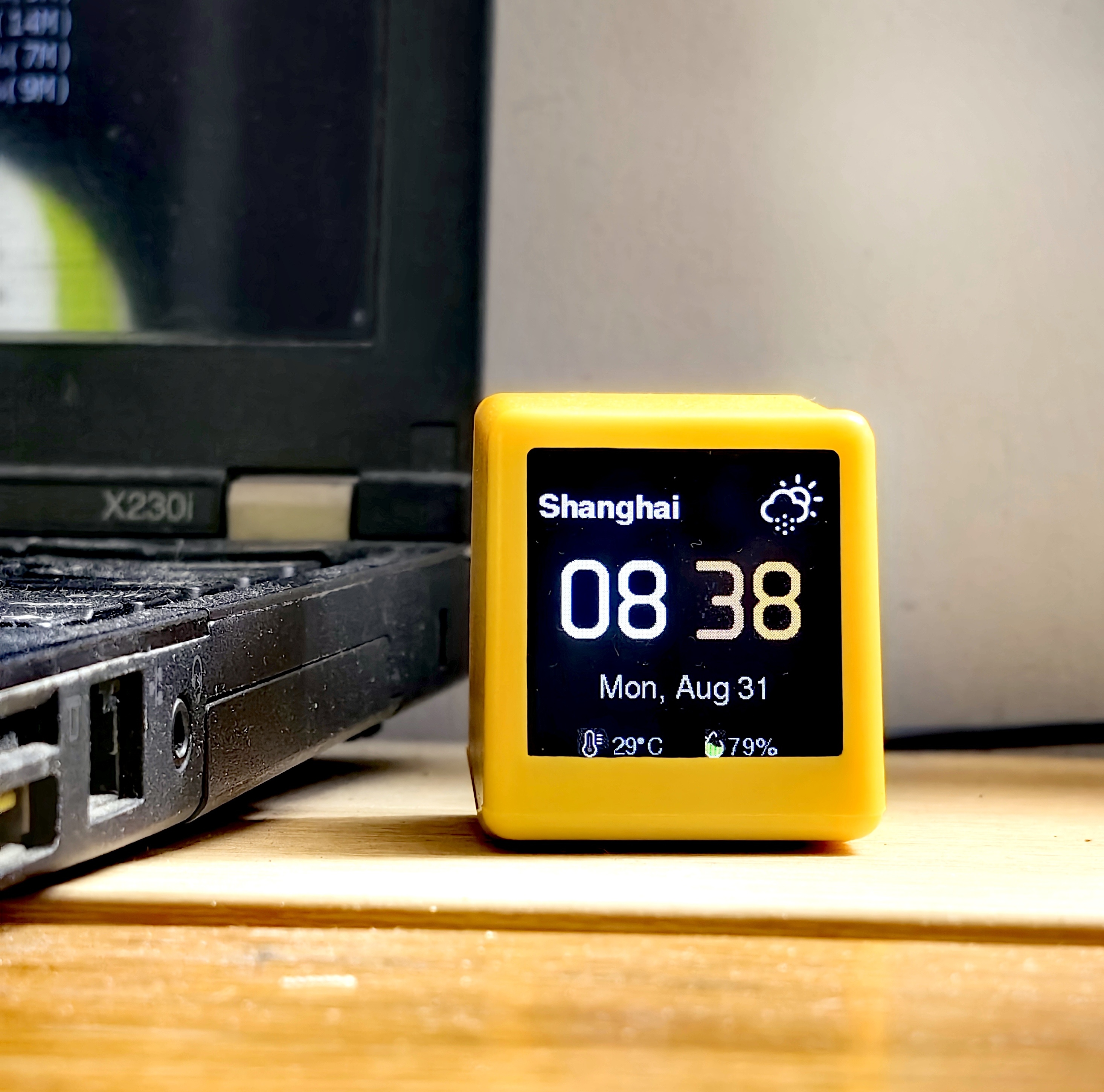
This repository hosts Rubato plugins for multiple popular AI coding agents, including DeepSeek Harness, Claude Code, Codex, Cursor, OpenClaw, and OpenCode. Rubato is a system that syncs an AI agent’s working state to a physical desktop device with a small TFT display, letting you see at a glance what phase the AI is in without switching focus back to your code editor window. When an AI run is predicted to take 30 seconds or longer, Rubato will automatically trigger a mid-task health reminder on the device to prompt you to drink water or stand up and rest.
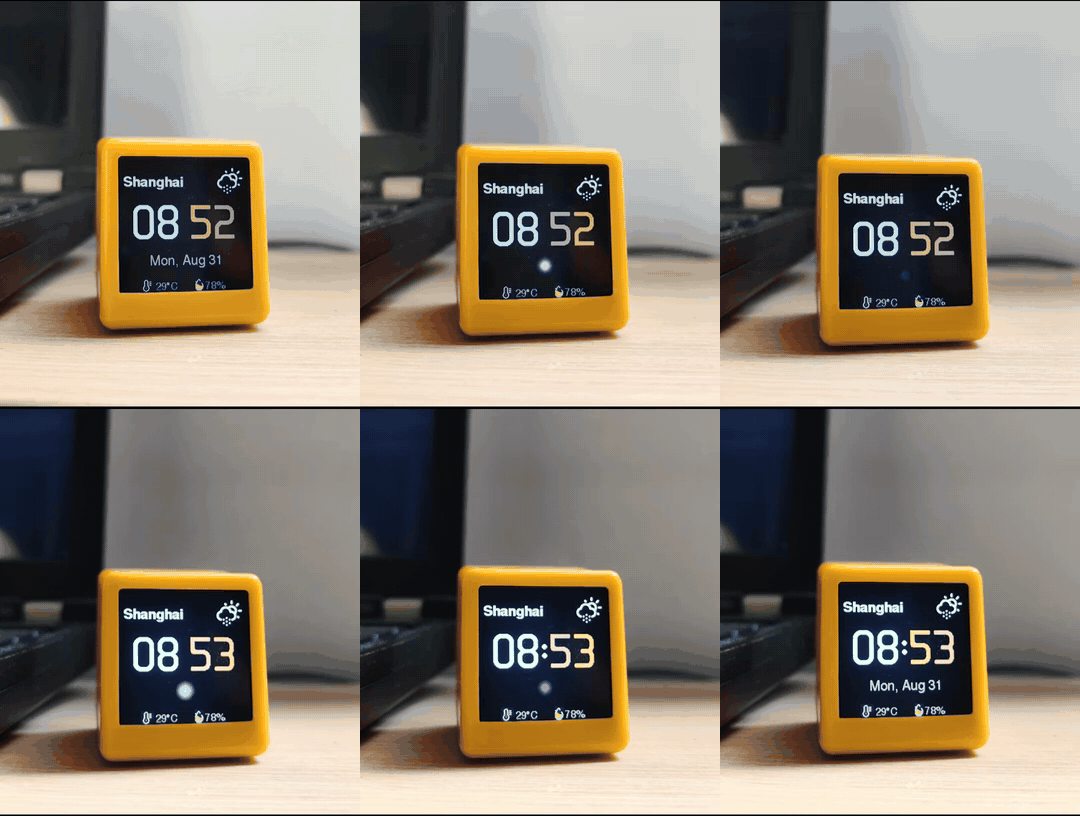
All plugins follow the same MQTT messaging contract to send state updates to the physical Rubato device, which connects to your local network over MQTT 3.1.1 TLS on port 8883. The device shows a breathing orb that changes color based on the current AI phase: slow cream when the AI is thinking, faster ice-blue while the AI generates output, and a green flash when the task is done. This repository is meant for users who already own or have purchased the physical Rubato device, which is available for purchase from the official Tindie product marketplace.
Each supported agent has its own plugin directory in this repository, and installation steps are tailored to each platform. For DeepSeek Harness, you can complete the entire install just by pasting a single line of text into a DSH chat, and the assistant will handle copying files and registering the plugin automatically. After installation, you just need to add the device ID and token from your device’s sticker to the configuration, and the plugin will activate immediately. The entire project is released under the open-source GPL-3.0 license, and only the Cursor version remains untested on live AI sessions.
本仓库存储了适用于多种AI编码代理的Rubato插件,支持DeepSeek Harness、Claude Code、Codex、Cursor、OpenClaw、OpenCode等多个平台。Rubato的核心功能是将AI代理的工作状态同步到一台实体桌面设备,通过设备的TFT显示屏显示当前AI的工作阶段,当AI任务预计时长超过30秒时,还会触发健康提醒,提示用户起身喝水或休息。
插件会在AI进入思考、生成内容、完成任务等不同阶段时,通过MQTT协议向实体设备发送状态消息,设备通过变色呼吸灯效展示不同状态:思考时是缓慢的奶黄色,生成时是较快的冰蓝色,完成时闪烁绿色。对于习惯用AI编码且希望获得脱离软件界面的实体状态提示的用户,这款插件能提供比弹窗通知更直观醒目的状态感知。
本仓库为每个支持的AI代理提供了单独的插件目录,安装方式各适配对应平台:在DSH中只需在对话内粘贴指定安装指令即可自动完成部署,其他平台也有对应一键或两步简易安装流程。安装后只需填写设备贴纸提供的设备ID和访问令牌即可完成配置。本插件采用GPL-3.0协议开源,其中仅Cursor版本尚未经过实际在线测试。
请帮我安装这个 DSH 插件。安装前先完成【兼容性检查 + 安全性检查】,检查通过再动手。

插件:Rubato_Plugins(lovaxi/Rubato_Plugins)
仓库:https://github.com/lovaxi/Rubato_Plugins
本站详情页:https://www.yhbd.top/plugins/lovaxi-rubato-plugins/
本站登记:类型 plugin · 归类 多平台兼容工具(非 DSH 原生) · 许可证 GPL-3.0 · ⭐ 2 · 最近提交 2026-09-03 · 主语言 JavaScript · 未检测到 DSH 插件清单

按下面顺序执行,每步先把结论告诉我,再进入下一步:

【1 兼容性检查】
① 我这边:DSH 版本、Node 版本、操作系统、当前 profile(web / desktop)。
② 读它的 README、package.json、插件 manifest,列出它要求的 DSH 版本 / Node 版本 / 操作系统 / 外部依赖 / 需要另外先装的运行时。
③ 逐条比对,结论只写「满足 / 不满足 / 未知」三种;不满足的给出可行替代方案。
④ 检查是否和我已装的插件冲突:命令名重复、skill / tool 重名、端口占用、重复注册的 MCP server。

【2 安全性检查】
① 仓库可信度:和上面「本站登记」是否一致;star / fork 数、创建时间、最近提交,是否归档或长期停更。
② 安装脚本:逐行看 package.json 的 preinstall / install / postinstall,以及 install.sh、setup.ps1 之类脚本。出现 curl|bash、下载后直接执行、混淆代码、访问与插件功能无关的域名,立刻停下来告诉我,不要继续装。
③ 依赖:列出新增依赖,标出无人维护、或与知名包拼写近似的可疑包(typosquatting)。
④ 权限与副作用:它会读写哪些目录、访问哪些域名、需要哪些 DSH 权限(filesystem / network / shell / clipboard 等),以及怎么卸载和回滚。
⑤ 如果它要求 sudo / 管理员权限,或权限明显超出功能所需,先停下来问我。

【3 安装】
上面两步没有「不满足」和「高危项」时才执行;用官方推荐方式安装,不要自行提权。

【4 汇报】
用表格输出:检查项 / 结论 / 依据 / 是否需要我决策。拿不准的一律写「未知」并说明要我怎么确认——不要猜,也不要替我决定。
Send this message to DSH in your current session: it verifies compatibility and security first (answering met / not met / unknown item by item) and only installs once everything checks out — it will stop and ask you if it finds a high-risk item. The box scrolls; the copy is the full prompt. CLI install commands may not be accurate across systems, so DSH is the safer route.把上面这条消息直接发给当前会话里的 DSH:它会先核对兼容性与安全性(逐条给「满足 / 不满足 / 未知」),确认没问题再安装,有高危项会停下来问你。框内可滚动,复制到的是完整提示词;安装命令不一定准确,发给 DSH 更稳。
- Only 2 stars - very few users, little community feedback星标只有 2,几乎没人在用,遇到问题缺少社区反馈
- No DSH plugin manifest detected - it may only carry the dsh-plugin topic, so the install method must be confirmed on the spot未检测到 DSH 插件清单:可能只是打了 dsh-plugin 话题,安装方式要现场确认
- Not DSH-native: a multi-platform tool that may require Node / Electron or another runtime first非 DSH 原生,是多平台兼容工具:可能要先装 Node / Electron 等运行时
DSH walks through these 9 checksDSH 会逐条核对这 9 项
Compatibility兼容性
- DSH, Node, OS and profile requirementsDSH 版本 / Node 版本 / 操作系统 / profile 是否满足要求
- External dependencies and runtimes (Electron / Python / Docker, ...)外部依赖与运行时(Electron / Python / Docker 等)是否齐备
- Conflicts with installed plugins: command names, skill / tool names, ports, duplicate MCP registration与已装插件是否冲突:命令名、skill / tool 重名、端口占用、重复 MCP 注册
Security安全性
- Repo matches the facts registered here; archived or abandoned?仓库是否与页面登记一致,是否归档或长期停更
- Safety of preinstall / install / postinstall and install.sh / setup.ps1preinstall / install / postinstall 与 install.sh、setup.ps1 是否安全
- curl|bash, download-then-execute, obfuscation, unrelated domains → stop immediatelycurl|bash、下载即执行、混淆代码、无关域名 → 立刻停止
- Typosquatting or unmaintained packages among the new dependencies新增依赖里有没有 typosquatting 或无人维护的包
- Requested permissions vs. what the feature actually needs申请了哪些权限、是否超出功能所需(filesystem / network / shell / clipboard)
- Any sudo / admin requirement, plus uninstall and rollback是否要求 sudo / 管理员权限,以及卸载与回滚方式
Anything uncertain must be marked unknown with a note on how to confirm it. This site's signal screen is a static snapshot, not a security audit.拿不准的必须标「未知」并说明要我怎么确认。本站的信号筛查是静态快照,不能替代安全审计。
Or use CLI install (for developers)或使用命令行安装(适合开发者)
CLI Install命令行安装
dsh plugin --profile web add github:lovaxi/Rubato_Plugins把 lovaxi/Rubato_Plugins 加入你的 DSH 配置(web profile)即可启用。
READMEREADME
Rubato
English | 简体中文
Rubato makes your AI's working state visible — on a physical desk device. This repository hosts a Rubato plugin for every supported coding agent, one directory each. The device firmware lives at Rubato_Device. The desk device itself is available now on Tindie — the official store.
model call ──> Rubato plugin ──> EMQX broker ──> Rubato device (TFT display)
| Directory | Agent | Status |
|---|---|---|
| dsh/ | DeepSeek Harness | available |
| openclaw/ | OpenClaw | available |
| codex/ | Codex | available |
| claude-code/ | Claude Code | available |
| cursor/ | Cursor | available — untested |
| opencode/ | OpenCode | available |
MQTT contract
All plugins publish the same messages on rubato/<deviceId>/state —
one topic per device. Auth mirrors the device firmware: username = deviceId
(RUBATO-xxxxxx), password = its token. MQTT 3.1.1 over TLS (8883), one
persistent connection.
| Message | Payload | Notes |
|---|---|---|
Estimate |
{ model, state, ts, estSec? } |
predicted duration in seconds — carried by the DSH plugin only (user-side plugins omit it) |
Thinking |
{ model, state, ts } |
first reasoning chunk |
Generating |
{ model, state, ts } |
first answer/tool chunk |
Done |
{ model, state, ts } |
intermediate tool-call steps do not emit Done |
The device shows the model name and a breathing orb that changes color per phase — slow cream while thinking, faster ice-blue while generating, a green flash when done. When the estimate predicts a long run (estSec ≥ 30), the device shows a full-screen health reminder mid-task — at most one every 30 minutes (time to drink water / rest).
Install
DeepSeek Harness
Paste this into a DSH chat:
Install the Rubato plugin for DSH from https://github.com/lovaxi/Rubato_Plugins/dsh
That is the whole install. The assistant copies the plugin package into place, registers it, and reminds you to restart. After the restart:
Showing the opening section of the README — the full document lives in the repository以上为 README 开头摘要,完整文档在仓库内 · View the full README on GitHub →在 GitHub 查看完整 README →
Related相关推荐
-
 GanyuanRan/Aegis
Make AI coding agents architecture-aware: baseline-first, evidence-verified, drift-checked, and safe across long tasks.
GanyuanRan/Aegis
Make AI coding agents architecture-aware: baseline-first, evidence-verified, drift-checked, and safe across long tasks.
-
 wecode-ai/Wegent
Plan, build, and deliver with an open-source, self-hostable AI workspace for coding, collaboration, and automation.
wecode-ai/Wegent
Plan, build, and deliver with an open-source, self-hostable AI workspace for coding, collaboration, and automation.
-
 shengsheng90/DSH-taskboard
Native local Taskboard plugin for DeepSeek Harness. SQLite-backed projects, Agent claim/review, and a native Web UI — no…
shengsheng90/DSH-taskboard
Native local Taskboard plugin for DeepSeek Harness. SQLite-backed projects, Agent claim/review, and a native Web UI — no…
-
 Nwflower/dsh-chat-import
Import conversation history from 25+ AI coding agents into DeepSeek Harness as resumable sessions — tool calls, reasonin…
Nwflower/dsh-chat-import
Import conversation history from 25+ AI coding agents into DeepSeek Harness as resumable sessions — tool calls, reasonin…
-
 shanliuling/skills-link
Sync your local skills across 41+ AI coding agents with a single command.
shanliuling/skills-link
Sync your local skills across 41+ AI coding agents with a single command.
-
 pengyue-polaron/deepseek-harness-genui
Task-specific React apps for DeepSeek Harness with state carried into the next Agent turn
pengyue-polaron/deepseek-harness-genui
Task-specific React apps for DeepSeek Harness with state carried into the next Agent turn
- aa2246740/dsh-better-display A calmer reading view for DeepSeek Harness: native process details, live reasoning, and clean final answers.
-
 Jayden-X-L/forkprobe
Compare multiple skills on the same task and pick the winner.
Jayden-X-L/forkprobe
Compare multiple skills on the same task and pick the winner.