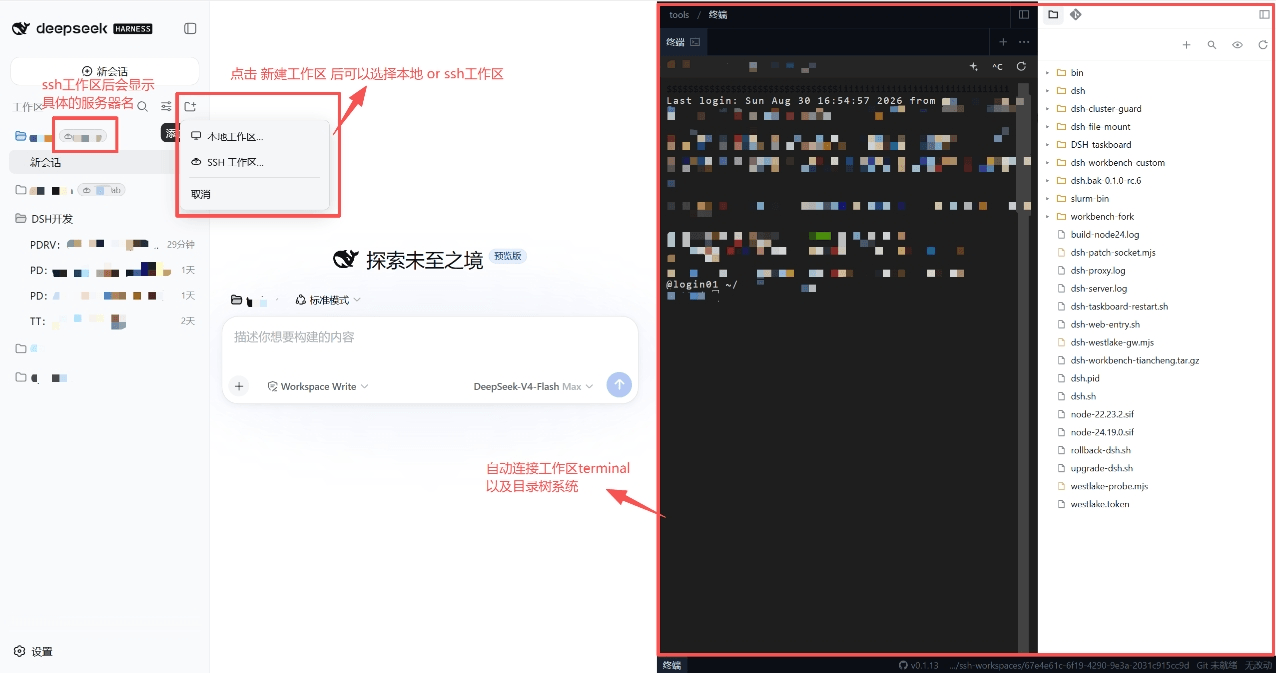
tiphareth0/dsh-sshworkspaces
Workspace-level SSH remote development plugin for DeepSeek Harness: transparent seam-routed fs, git & terminal across multiple hosts and workspaces, with a built-in 4-column IDE and SSH ops toolkit. 提供工作区级 SSH 远程开发的Deepseek Harness插件:文件/Git/终端按工作区透明路由,支持多服务器多工作区并行开发,内置四列 IDE 与 SSH 运维工具。
Project Overview项目介绍
dsh-sshworkspaces is a DSH plugin for remote SSH development that binds each workspace to a specific machine, either local or remote, letting you manage development across multiple servers from one desktop. Its core capability: files, Git operations, and shell commands inside an SSH workspace run transparently on the remote host, paired with a four-pane IDE (chat, editor, files, terminal). Best for developers juggling multiple servers simultaneously. Note: currently stable on Windows; Linux/macOS may have bugs, and remote grep/glob have depth and result limits.
dsh-sshworkspaces 是 DSH 远程 SSH 开发插件,把工作区与具体机器(本机或 SSH 远端)绑定,单一桌面可并行管理多台服务器开发任务。核心能力:SSH 工作区内文件、Git、命令全程在远程执行,配合四列 IDE(聊天/编辑器/文件与终端)。适用于需同时维护多台服务器的开发者。需注意:当前 Windows 平台稳定,Linux/macOS 可能有 bug,远程 grep/glob 有深度与条数上限。
请帮我了解并安装插件:【dsh-sshworkspaces】【https://github.com/tiphareth0/dsh-sshworkspaces】Send this message to DSH in your current session. CLI install commands may not be accurate across systems — DSH will figure it out for you.把上面这条消息直接发给当前会话里的 DSH,让它帮你了解并安装。安装命令不一定准确,发给 DSH 更稳。
Or use CLI install (for developers)或使用命令行安装(适合开发者)
CLI Install命令行安装
npx @deepseek-ai/dsh plugin --profile web add "@tiphareth/dsh-hardssh"把 tiphareth0/dsh-sshworkspaces 加入你的 DSH 配置(web profile)即可启用。
READMEREADME
dsh-sshworkspaces — 模块化 SSH 工作区与开发工作台
为更好地适配新版 DeepSeek Harness(DSH),原有功能已按职责拆分为两个可独立安装、组合使用的插件:通用远程工作区底座
dsh-hardssh与适配原生右侧 Sidebar 的dsh-workbench。目前两部分均已发布到 npm,可按需分别安装。
功能模块
1. dsh-hardssh:通用远程工作区底座
- GitHub:tiphareth0/dsh-hardssh
- npm:
@tiphareth/dsh-hardssh
dsh-hardssh 是面向新版 DSH 的通用工作区底座。它提供本地/远程工作区 Provider、按工作区和会话路由文件系统与命令执行的能力,并以 SSH 作为远程 Provider 的具体实现。它可以让兼容 DSH 原生工作区协议的其他插件透明地运行在远程服务器上。
2. dsh-workbench:新版原生右侧 Sidebar 工作台
- GitHub:tiphareth0/dsh-workbench
- npm:
@tiphareth/dsh-workbench
dsh-workbench 已适配新版 DSH 的原生右侧 Sidebar,提供增强文件树、Git 面板、CodeMirror 文档编辑器、Jupyter/Markdown/PDF/表格等预览能力,以及 xterm 终端标签。它既可独立用于本地工作区,也可与 dsh-hardssh 配合操作 SSH 远程工作区。
安装
推荐通过 DSH 插件命令直接从 npm 安装:
npx @deepseek-ai/dsh plugin --profile web add "@tiphareth/dsh-hardssh"
npx @deepseek-ai/dsh plugin --profile web add "@tiphareth/dsh-workbench"
安装或升级后,重启 DSH Web:
npx @deepseek-ai/dsh web
如果只需要本地工作台,可以只安装 @tiphareth/dsh-workbench;如需 SSH 远程工作区,请同时安装两个插件。
也可使用 npm 获取包:
npm install @tiphareth/dsh-hardssh @tiphareth/dsh-workbench
实际运行在 DSH Web profile 中时,优先使用上面的
dsh plugin --profile web add命令,以便 DSH 正确写入插件清单和补丁配置。
模块化说明
原 dsh-sshworkspaces 的两部分能力现已分别由上述项目提供。两者均针对新版 DSH 持续迭代:
- 仅需要本地右侧工作台:安装
@tiphareth/dsh-workbench - 仅需要通用 SSH 远程工作区底座:安装
@tiphareth/dsh-hardssh - 需要完整的远程开发体验:同时安装两个插件
本仓库保留 CHANGELOG.md、许可证、历史说明和 Git 提交,方便了解两部分功能的演进过程。最新源码、文档、问题反馈与版本发布请前往各自项目。
License
历史版本使用 BSD-3-Clause;第三方许可说明见 NOTICE。拆分后的项目请分别参阅其仓库中的许可证。
Related相关推荐
-
 crafter-station/petdex
A public gallery of animated pets for Codex, Claude Code, DeepSeek Harness, Hermes, OpenCode, Gemini CLI, and more.
crafter-station/petdex
A public gallery of animated pets for Codex, Claude Code, DeepSeek Harness, Hermes, OpenCode, Gemini CLI, and more.
-
 edison7009/EchoBird
One-click install + model switch:Claude Code,Codex CLI (OpenAI), Grok Build (xAI), DeepSeek Harness, Kimi Code (Moonshot…
edison7009/EchoBird
One-click install + model switch:Claude Code,Codex CLI (OpenAI), Grok Build (xAI), DeepSeek Harness, Kimi Code (Moonshot…
-
 Nwflower/dsh-chat-import
Import 14+ external agent chat histories (Claude Code, Codex, ChatGPT, Cursor, Gemini, Reasonix, opencode, ZCode, Grok B…
Nwflower/dsh-chat-import
Import 14+ external agent chat histories (Claude Code, Codex, ChatGPT, Cursor, Gemini, Reasonix, opencode, ZCode, Grok B…
-
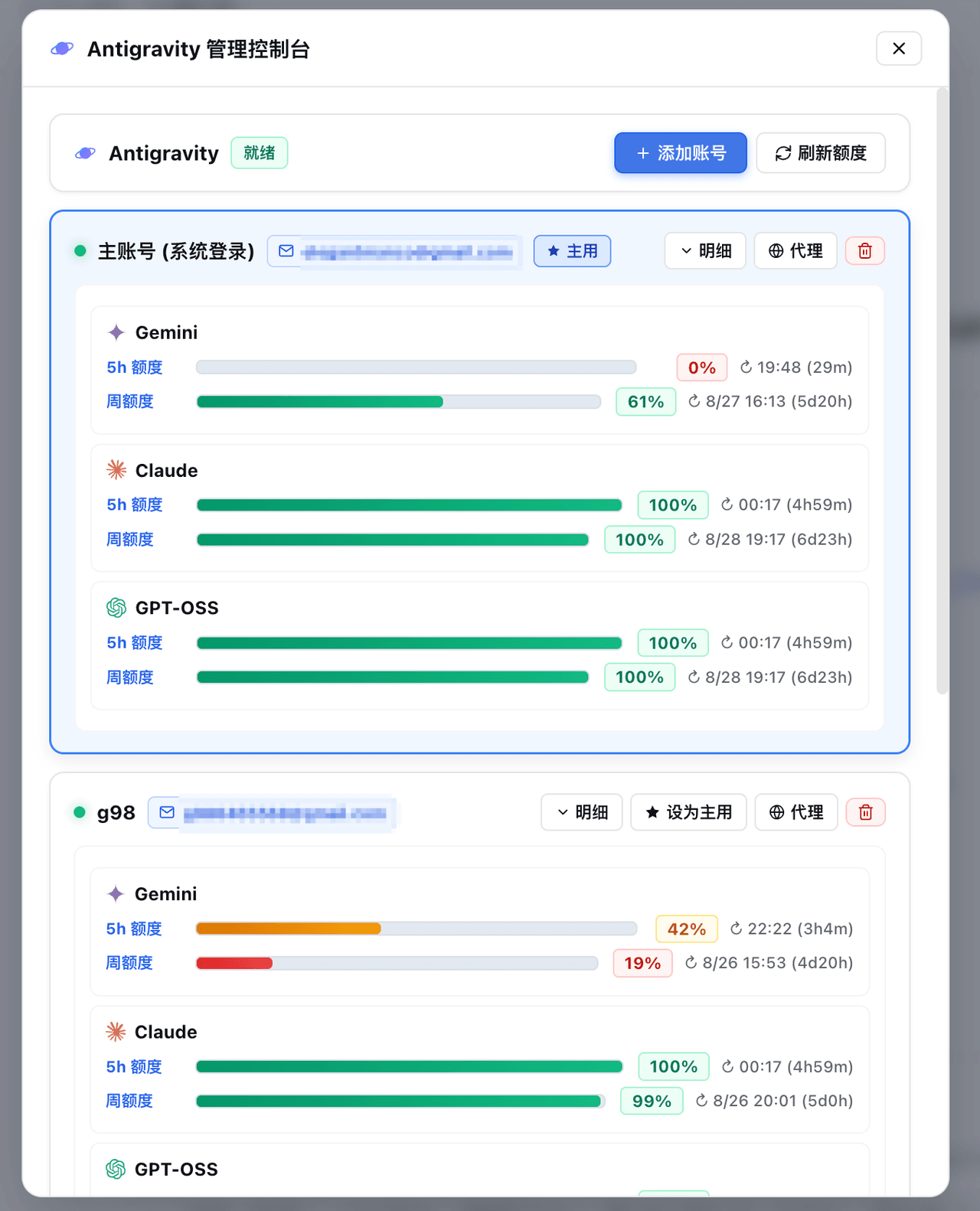 amlyczz/dsh-agy-link
Google Antigravity (agy CLI) models for DeepSeek Harness — streaming chat, thinking, tool activity, usage, in-GUI Google…
amlyczz/dsh-agy-link
Google Antigravity (agy CLI) models for DeepSeek Harness — streaming chat, thinking, tool activity, usage, in-GUI Google…
-
 opencues/opencues
The open standard for omnipresent AI. Claude Code, OpenCode, Gemini CLI, Shell, Chrome, DeepSeek Harness. Model-agnostic
opencues/opencues
The open standard for omnipresent AI. Claude Code, OpenCode, Gemini CLI, Shell, Chrome, DeepSeek Harness. Model-agnostic
-
 skyf0xx/hedgehog
HEDGEHOG codes Cleaner, Faster and with Fewer Tokens. Hedgehog's AI-driven development builds a task dependency graph fr…
skyf0xx/hedgehog
HEDGEHOG codes Cleaner, Faster and with Fewer Tokens. Hedgehog's AI-driven development builds a task dependency graph fr…
-
 chaos-03x/dsh-agy
Google Antigravity (agy) OAuth auth + model access plugin for DeepSeek Harness: multi-account pool, 429 rotation, device…
chaos-03x/dsh-agy
Google Antigravity (agy) OAuth auth + model access plugin for DeepSeek Harness: multi-account pool, 429 rotation, device…
-
 AnkoCD/dsh-server-deployment
DeepSeek Harness 多用户服务器部署:登录门户 / 每用户独立实例与 OS 级隔离 / 独立 API Key / 交付文件抽屉;文件访问经 sudo 助手降权执行(修复 issue #1 TOCTOU)。非本机工具。
AnkoCD/dsh-server-deployment
DeepSeek Harness 多用户服务器部署:登录门户 / 每用户独立实例与 OS 级隔离 / 独立 API Key / 交付文件抽屉;文件访问经 sudo 助手降权执行(修复 issue #1 TOCTOU)。非本机工具。