用 AI 做 YouTube 内容Creating YouTube Content With AI
对多数创作者来说,策划和写稿吃掉的时间远多于拍摄。把资料搜集、写脚本、做封面、做 SEO 这些苦活交给 AI,留给你的就是真正能推动频道的那部分:出镜,以及与观众建立联系。
For most creators, planning and writing swallow far more hours than filming ever does. Hand the grind of research, scripting, thumbnails and SEO to AI, and what is left for you is the part that genuinely shifts the needle: being on camera and building a relationship with the people watching.
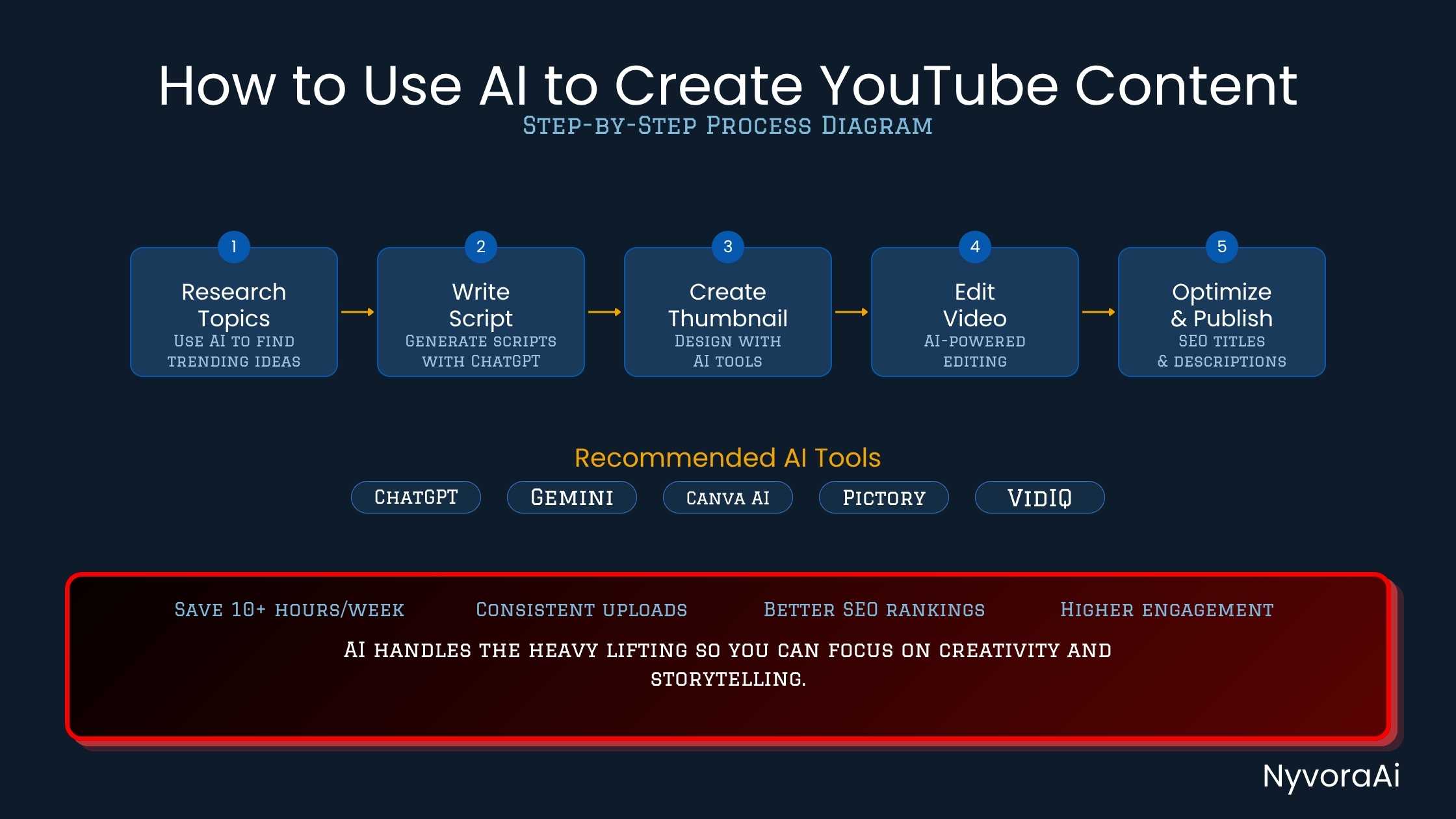
先说实话。做内容做得久了就会明白:拖慢你的几乎从来不是摄像机,也不是剪辑软件。真正的堵点在开始录制之前那段时光——对着空白文档憋选题,认认真真查资料,写出不像机器人的脚本,最后还要想封面该放什么。多数人的动力就是在这一步被磨掉的。
AI 替代不了你的声音、你的面孔,也替代不了当初让观众点下订阅的那个理由。它真正能攻下的是前期制作那道墙。下文会逐段说明 AI 在整个流程中该怎么用——从冒出第一个想法,到点下发布按钮,用到的都是现在就能注册、且不会让小创作者预算吃紧的工具。
如果你的工作除了 YouTube,还包括博客文章或社交媒体,可以看看我们这两篇:用 AI 更快写出博客文章 和 用 AI 做社交媒体的分步指南——这里讲的大部分内容都能直接套用。
01为什么 AI 适合 YouTube 这类工作
在很多细分领域,YouTube 拼的就是产量。稳定更新、标题到位、内容真有用的频道,收益会随时间复利。难点在于:按老办法做出一条像样的 10 分钟视频——查资料、写脚本、拍摄、剪辑、写简介、做封面——要占满一整个工作日。对于还要上班或照顾家庭的人来说,这种节奏很快就会把人拖垮。
这正是 AI 的位置所在:人做起来最慢的那些活,它做得最快——初稿、选题清单、资料摘要、封面文案、带关键词的标题和简介。这些都不是决定频道气质的创作判断,而是承托其余一切的机械骨架。把骨架交给机器,并不会让频道变得廉价。反过来才对:不用再被第八份脚本耗干,你出镜时的状态会更好。
下文描述的整套流程,是把 AI 当成一个能干的助理——负责准备工作,而不是替你全部代笔的枪手。
02第一步:选题与调研提速
好视频的起点,是既有观众兴趣、又有搜索需求的选题。手工做这件事,意味着在 Google Trends、YouTube 搜索下拉、竞品频道和关键词工具之间来回跳上一个小时,文档还没打开。AI 能把这个小时压缩掉。
有一条提示词能顶不少活:「我运营一个关于[你的领域]的 YouTube 频道,面向[目标受众]。请给出 15 个适合在 2026 年做搜索型内容的视频选题。每个选题配一个有点击欲的标题,以及一句开场钩子。」 好用的工具不到一分钟就能给出一份可用清单。挑出两三个顺眼的,再用第二条提示词往下深挖资料。
调研阶段,让模型先梳理某个话题当下的主流说法,再拿这些说法去比对你自己的信源。这里要留意:准确率没有保证,模型给出的东西只是训练数据中的模式映射。如果视频涉及事实性论断,就把 AI 摘要当作起点的脚手架,具体细节另做核实。我们在 AI 生成内容的事实核查 里给了一套可靠流程,发布前可以照着走。
03第二步:用 AI 写脚本
省时间最多的地方就在这里。从零写一份 1,500 词的 YouTube 脚本,可能要 90 分钟以上。用 AI,10 分钟就有可用的初稿,之后再花 15-20 分钟把它改造成你自己的语气。
最好用的提示词结构是有层次、够具体的。可以从这样一条开始:「请为我写一份 10 分钟视频的脚本,标题是[你的标题]。频道调性是[口语化/专业/热情],观众是[描述他们]。开场钩子要落在前 30 秒内,正文分三个主要板块,结尾给一个明确的行动号召,并附上可以直接放进简介的时间戳。」
初稿不能拿到就用。通读一遍,把所有读起来像机器、而不是像你的句子换掉。加入你自己的例子、你的经历、你的观点。频道是显得机械,还是显得像一个值得关注的人,差别就出在这一遍编辑上。
如果你的视频旁边还配着博客内容——这本身就是聪明的 SEO 打法——同一套写稿流程可以直接搬过去。我们在 用 AI 工具搭建日常工作流 这篇里讲了这个环节,AI 辅助写稿只是整套内容系统中的一环。
04第三步:配音与 B-roll 素材
不少创作者并不想每条视频都出镜。YouTube 上增长最快的一批频道里,有的从头到尾没有露过脸,靠的是录屏、幻灯片或图库素材,配上一段清晰有吸引力的旁白。AI 配音的质量近年提升很快,做得讲究的话,日常听下来很难与真人分辨。
用 ElevenLabs 或 Murf,你可以选择克隆自己的声音——需要先录一次样音——也可以从一批听起来很自然的音色库里挑。把脚本贴进去,它就会生成一段 MP3,直接拖进时间线即可。再配上图库 B-roll 或 AI 生成的画面,全程不开摄像头也能做出成片。
对于出镜的创作者,AI 同样有用:Descript 支持通过编辑文字稿来剪视频——在文本里删掉一个词,视频里对应的画面也跟着剪掉;一键清除口头语;甚至能把在嘈杂房间里录的音修复成录音棚水准。
05第四步:用 AI 设计封面
封面就是成交现场。视频还没播一秒,它就已经在说服观众了。道理人人都懂,可创作者依旧在 Canva 或 Photoshop 里反复挪版式,耗掉大量时间。
这里有两个着力点。Adobe Firefly、Midjourney 或 Canva 的 AI 背景生成器能快速产出定制画面,你再把自己的照片或文字叠上去。另一方面,封面文案也可以交给 AI 出主意:让它给五个 4-7 词、够抓眼的选项,挑最能勾起好奇心的那个。
无论生成结果如何,三条原则不变:主体与背景对比要强;文字在手机尺寸下仍然看得清——多数人就是在手机上看 YouTube;画面只能有一个明确焦点。信息塞得太满,点击就没了。
06第五步:借助 AI 做 YouTube SEO
被搜到这件事,从三个字段开始:标题、简介、标签。而这类结构化写作,恰恰是 AI 最拿手的。
标题方面,让 AI 给你现有的工作标题出五个变体,再挑那个既贴合搜索意图、又足够有趣能换来点击的版本。好用的标题通常在回答一个问题,或者承诺一个收益。最容易踩的坑,就是该清楚的时候去抖机灵。
简介的话,可以这样写:「请为一条题为[标题]的视频起草一份 200 词的 YouTube 简介。前两句里必须出现主关键词[关键词],再自然融入三个相关的次要关键词,加上一句订阅号召,最后附五个相关话题标签。」 大约 30 秒就能完成,而手工写一份多数人要花 15-20 分钟。
章节标记也很简单:把脚本里的板块标题贴进去,让模型按 00:00 的格式排成 YouTube 时间戳。易于跳转的视频,YouTube 往往会视为积极的互动信号。
07动手算算:你能省回多少时间
勾选你目前仍手工完成的任务,看看 AI 实际能帮你每条视频省回多少小时。
08值得一用的工具
号称能自动化整个 YouTube 频道的产品满大街都是。下面只列真正能在实际制作流程里站住脚的那些:
| 工具 | 最擅长 | 价格 |
|---|---|---|
| ChatGPT / Claude | 选题、调研、脚本、简介、标题 | 免费 + 付费 |
| VidIQ / TubeBuddy | 关键词研究、SEO 打分、竞品追踪 | 免费 + 付费 |
| ElevenLabs | AI 配音,为不出镜频道做声音克隆 | 免费 + 付费 |
| Descript | 基于文字稿剪辑、去除口头语、AI 音频修复 | 免费 + 付费 |
| Canva AI | 封面设计、抠图去背景、AI 生成图片 | 免费 + 付费 |
| OpusClip | 把长视频自动重排成 Shorts | 免费 + 付费 |
| Adobe Podcast Enhance | 任何麦克风都能出录音棚级音质,免费 | 免费 |
脚本写作
配音
封面
SEO
09创作者用 AI 时最常踩的坑
AI 让内容生产更快,同时也带来几种新的翻车方式——不留神就会伤到频道。
另一个陷阱是原样发布机器写出来的字。YouTube 本身并不会因此直接降权,注意到的是观众。一份没有个人例子、没有故事、任何地方都不表达观点的脚本,只会被看一次,然后再也不会被推荐。算法衡量的是观看时长和回访观众,而泛泛的内容两者都拿不到。
在为自由职业或商单做内容时过度依赖 AI,风险更大:客户和品牌方很容易察觉模板化的措辞和前后不一致的语气。如果你的客户项目涉及 YouTube 脚本或视频内容,我们这篇 用 AI 做自由撰稿工作 讲了值得了解的职业边界。
还有一点。YouTube 现在要求创作者披露逼真的合成媒体——包括 AI 生成的人脸、声音,或可能被观众误认为真实画面的事件。这条规则针对的是写实内容本身,而不是把 AI 当写作助手使用。拿不准的话,在简介或置顶评论里简短说明一句,既稳妥,也有利于维系观众信任。
10常见问题
怎么用 AI 制作 YouTube 内容?
AI 能替我写 YouTube 脚本吗?
做 YouTube 内容最好的 AI 工具是哪个?
用 AI 做内容会违反 YouTube 规则吗?
AI 实际能省下多少时间?
Shorts 可以自动生成吗?
Honesty first: after enough years of publishing, one thing becomes obvious, the camera and the editing suite are almost never the obstacle. The obstacle is the stretch before recording, when you sit with an empty document trying to land on an idea, research it properly, write a script that does not read like a manual, and then work out what the thumbnail should even show. Momentum dies right there for most people.
AI is not a stand-in for your voice, your face, or whatever made people subscribe in the first place. What it does handle well is that pre-production wall. Everything below walks through how AI fits at each stage of the workflow, from the first spark of an idea through to pressing publish, using tools you can sign up for today without straining a small creator's budget.
If blog posts or social channels run alongside your YouTube work, our guides on writing blog posts faster with AI and the step-by-step approach to AI for social media are worth a look, since much of what follows carries straight over.
01Why AI Suits YouTube Work
In plenty of niches YouTube rewards volume. Channels that publish steadily, with strong titles and content people actually want, tend to compound their gains. The difficulty is that a single decent 10-minute video, research, script, shoot, edit, description, thumbnail, consumes an entire working day the old way. For anyone running a channel around a job or family, that cadence burns people out fast.
That is where AI earns its place: it moves quickly on precisely the work humans find slow, first drafts, idea lists, research digests, thumbnail copy, keyword-rich titles and descriptions. None of these are the creative calls that define a channel; they are the mechanical scaffolding everything else rests on. Passing that scaffolding to a machine does not cheapen a channel. If anything the reverse holds: with script number eight no longer draining you, you turn up on camera with more to give.
Everything I outline below treats AI as a capable assistant doing the prep, never as a ghostwriter taking over.
02Step 1 — Ideas and research, sped up
Strong videos are built on ideas that carry both audience appetite and search demand. Finding those by hand means an hour of hopping between Google Trends, YouTube's autocomplete, rival channels and keyword tools before you write a single word. AI squeezes that hour down.
One prompt does a lot of work here: "My YouTube channel covers [your niche] and speaks to [target audience]. Suggest 15 video ideas that would perform as search-driven content in 2026. Alongside each idea, propose a title with click appeal and a single-sentence hook to open the video." A capable tool returns a usable list inside a minute. Pick the two or three that feel right, then follow up with a second prompt to dig into the research.
During research, have the model summarise the current conversation around a topic, then check those claims against sources of your own. Accuracy is not guaranteed: what a model produces mirrors patterns in its training data. Where a video rests on factual claims, use AI summaries as scaffolding and confirm the specifics yourself. Our guide on fact-checking AI-generated content lays out a dependable process for doing that before anything goes live.
03Step 2 — Drafting the script with AI
The biggest time saving sits right here. A 1,500-word YouTube script written from nothing can run past 90 minutes. With AI you get a workable draft in 10 minutes, and then spend another 15-20 minutes reshaping it into something that sounds like you.
The prompt structure that works best is layered and specific. Start from something like: "Produce a script for a 10-minute video called [your title]. The tone of my channel is [conversational / professional / enthusiastic], and the people watching are [describe them]. Open with a hook that lands inside the first 30 seconds, build three main sections, close on a clear call to action, and give me timestamps ready for the description."
Do not publish the draft as delivered. Read it end to end and swap out every line that reads like a machine rather than like you. Bring in your own examples, your stories, your positions. That editing pass is the whole difference between a channel that feels automated and one that feels like a person worth following.
If blog content also sits alongside your videos, a smart SEO move in itself, the same scripting routine carries over. See how we handle it in our guide on building a daily workflow with AI tools, where AI-assisted scripting forms one piece of a bigger content system.
04Step 3 — Voiceover and B-roll
Plenty of creators have no interest in appearing on camera for every upload. Some of YouTube's fastest-growing channels never show a face at all, relying on screen recordings, slideshows or stock footage under a clear, engaging narration. AI voiceover quality has climbed sharply; produced well, an AI read is difficult to tell apart from a human one during casual listening.
With ElevenLabs or Murf you can either clone your own voice, which takes a one-off setup recording, or pick from a library of voices that sound natural. Paste the script in and an MP3 comes back, ready to drop on your timeline. Pair that with stock B-roll or AI-generated imagery and a finished video is possible without ever switching the webcam on.
For those who do appear on screen, AI still carries weight: Descript lets you cut video by editing the transcript, so deleting a word in the text deletes it from the video, strips filler words with a single click, and can even rebuild studio-grade audio out of a recording made in a noisy room.
05Step 4 — Thumbnails, made with AI
The thumbnail is where the sale happens. It persuades people before a single second of video has played. Everyone knows this, yet creators still pour far too much time into nudging layouts around in Canva or Photoshop.
Two things help here. Image generators such as Adobe Firefly, Midjourney or Canva's AI background tool will turn out custom artwork fast, and you lay your own photo or text on top of it. Separately, AI can propose the overlay copy itself: ask for five punchy options of 4-7 words and go with whichever creates the strongest itch of curiosity.
Whatever the model produces, three rules hold: strong contrast between subject and background, text still legible at phone size, which is where most YouTube browsing happens, and a single unambiguous focal point. Pack a thumbnail with too much and the click is lost.
06Step 5 — YouTube SEO, assisted
Discovery begins with three fields: title, description and tags. Structured writing of exactly this kind is where AI is most comfortable.
On titles, ask for five variations on your working one, then pick the version that satisfies search intent while still being interesting enough to earn a click. A title that works usually answers a question or promises a payoff. The trap is being clever when you should be clear.
For descriptions, use: "Draft a YouTube description of 200 words for a video called [title]. Put the primary keyword [keyword] inside the first two sentences, work in three relevant secondary keywords without forcing them, add a call to subscribe, and finish with five relevant hashtags." Roughly 30 seconds of work, against the 15-20 minutes most people burn writing one by hand.
Chapter markers are simple too: paste the section headings from your script and ask the model to lay them out as YouTube timestamps in 00:00 format. Videos that are easy to navigate tend to be read by YouTube as a positive engagement signal.
07Try It: How Many Hours Would You Get Back?
Mark the jobs you still handle yourself today, and the calculator will show how much time, per video, AI can genuinely give back.
08Tools That Earn Their Place
Plenty of products promise to run an entire YouTube channel for you. Far fewer survive contact with a real production schedule, so here are the ones that do:
| Product | Where it shines | Cost |
|---|---|---|
| ChatGPT / Claude | Ideas, research, scripts, descriptions, titles | Free tier plus paid plans |
| VidIQ / TubeBuddy | Keyword research, SEO scoring, tracking rivals | Free tier plus paid plans |
| ElevenLabs | AI voiceover and voice cloning for faceless channels | Free tier plus paid plans |
| Descript | Editing via the transcript, filler removal, AI audio cleanup | Free tier plus paid plans |
| Canva AI | Thumbnails, cutting out backgrounds, AI image generation | Free tier plus paid plans |
| OpusClip | Turning long-form uploads into Shorts automatically | Free tier plus paid plans |
| Adobe Podcast Enhance | Studio-grade audio from any mic, at no cost | Free |
Scripts
Voiceover
Thumbnails
SEO
09Where Creators Go Wrong With AI
AI speeds production up, and it also opens a handful of new ways to damage a channel if you are not watching for them.
The other trap is posting the machine's words verbatim. YouTube does not penalise that directly; the audience notices instead. A script with no personal example, no story and no opinion anywhere gets one view and never gets recommended again. Watch time and returning viewers are what the algorithm measures, and generic material produces neither.
Leaning too hard on AI for freelance or sponsored work carries its own risk: clients and brands are quick to spot templated phrasing and uneven tone. If AI features in any client-facing YouTube scripts or video work you do, our guide on using AI for freelance writing jobs sets out the professional boundaries worth knowing.
One more point. YouTube now obliges creators to disclose realistic synthetic media: AI-generated faces, voices or events a viewer could mistake for genuine footage. The requirement targets realistic content specifically, not the use of AI as a writing aid. If you are unsure, a brief note in the description or a pinned comment is both the safer policy and the better way to keep trust with your audience.