Rannist/balance-dsh
DSH 插件:显示 DeepSeek 账户余额 + 会话 token/费用,含高峰/空闲计费
Project Overview项目介绍
balance-dsh is a native DSH Desktop plugin — its name is prefixed with "dsh", it ships a bundle-manifest, and its package includes a dsh.bundle.patch (cordis.patch.yml) for auto-registration inside profiles/desktop. It exists solely to surface the user's DeepSeek account balance together with session-scoped token and currency consumption inside the DSH Web UI. The plugin adds a wallet-icon balance row at the bottom of the sidebar (color-coded green/amber/red) plus a floating capsule in the bottom-left when the sidebar is collapsed; the row refreshes on its own every 60 seconds and immediately after each completed reply, and right-clicking it triggers a manual refresh. Single-click opens a centred modal with a translucent blur overlay showing account balance, 90-day billed tokens, estimated cost, active days, model and peak/off-peak breakdowns, today/7-day/30-day aggregates, daily averages, peak day and a usage heatmap; double-click opens DeepSeek's official usage page in DSH's embedded browser, with a system-browser fallback on older builds.
The typical workflow is straightforward: log into a DeepSeek account in the official DSH build and the plugin reads the balance automatically with zero setup, while each new assistant reply updates the live session-cost row under the chat input and a hover tooltip breaks the figure down by model, time band and billing basis. A /balance slash command is also exposed for quick CLI lookups of balance and current-session cost. It is aimed at heavy DeepSeek users, developers watching peak/off-peak billing economics and any team that needs at-a-glance API spend monitoring directly inside DSH Desktop. Statistics are computed from local session events (request/header, assistant/message token usage); at most the last 200 sessions are scanned and both server and client caches use a 5-minute TTL, so opening the modal repeatedly does not re-query the upstream service.
Dependencies and first-run caveats are specific: it requires an installed DSH Desktop with a known profile directory (Windows: C:\Users\<you>\.dsh\profiles\desktop\) and is installed via pnpm add balance-dsh, a local tarball path, or dsh plugin --profile desktop add github:Rannist/balance-dsh. Peak windows default to weekdays 09:00–12:00 and 14:00–18:00 Beijing time; weekends and PRC statutory holidays are billed at off-peak rates, while compensatory work weekends follow weekday peak/off-peak rules and a built-in 2026 holiday table serves as an offline fallback. Peak pricing = off-peak × 2, and the README explicitly warns against setting config.peak: true to avoid double charging. The price list takes effect 2026-09-10 12:00 BJT; after future DeepSeek price changes, lib/index.js's MODEL_PRICING and lib/client.js's DEFAULT_PRICING must be updated while old prices move into LEGACY_MODEL_PRICING. Balance is read from the official DSH account first and falls back to DEEPSEEK_API_KEY (env var, plugin config, or DSH credential store). Server-side UI changes require restarting DSH Desktop, and the project is released under the MIT license.
balance-dsh 是一个面向 DSH Desktop 的原生插件,名字以 dsh 结尾,并通过 bundle-manifest 与 cordis.patch.yml 打包发行,专门在 Web UI 中显示 DeepSeek 账户余额与实时消耗。它在侧边栏底部增加余额行(带峰谷标签与三档颜色)、收起态左下角悬浮胶囊,并以每 60 秒一次的频率自动刷新;单击打开包含近 90 天 Token 与费用、今日/7 天/30 天统计、按模型与时段拆分以及热力图的居中弹窗,双击在应用内嵌浏览器中打开 DeepSeek 官方用量页。安装时通过 pnpm add balance-dsh 进入 profiles/desktop 目录,npm 包自带 dsh.bundle.patch 自动注册,也可使用 dsh plugin --profile desktop add github:Rannist/balance-dsh。
典型工作流为:登录官方账号即可自动读取余额,发送消息时对话框下方实时显示当前会话消耗,按 Esc 或点遮罩关闭统计弹窗;命令行还有 /balance 命令可查明细。该插件适合重度 DeepSeek 用户、关注成本与峰谷计费的开发者,以及需要在 DSH Desktop 中直观监控 API 开支的团队成员。统计基于本地会话事件,最多扫描最近 200 个会话;服务端与客户端缓存均为 5 分钟,余额与统计均不会上传第三方。
依赖方面,插件要求已安装 DSH Desktop 且定位到 profile 目录(Windows 通常为 C:\Users\<用户>\.dsh\profiles\desktop\),并需通过 npm、tarball 或 GitHub 三种方式之一安装。默认高峰窗口为工作日 09:00–12:00 与 14:00–18:00(北京时间),周末与法定节假日按空闲计费,调休上班的周末按工作日计费,并内置 2026 年节假日离线兜底;高峰价 = 空闲价 × 2,切勿额外设置 config.peak: true。价格表生效于 2026-09-10 12:00,调价后需同步更新 lib/index.js 与 lib/client.js;余额优先读官方账号,未登录时回退到 API Key 或 DEEPSEEK_API_KEY 环境变量。服务端改动需重启 DSH Desktop 后生效,项目以 MIT 协议开源。
请帮我安装这个 DSH 插件。安装前先完成【兼容性检查 + 安全性检查】,检查通过再动手。

插件:balance-dsh(Rannist/balance-dsh)
仓库:https://github.com/Rannist/balance-dsh
本站详情页:https://www.yhbd.top/plugins/rannist-balance-dsh/
本站登记:类型 client · 归类 原生 DSH 插件 · 许可证 MIT · ⭐ 2 · 最近提交 2026-10-03 · 主语言 JavaScript

按下面顺序执行,每步先把结论告诉我,再进入下一步:

【1 兼容性检查】
① 我这边:DSH 版本、Node 版本、操作系统、当前 profile(web / desktop)。
② 读它的 README、package.json、插件 manifest,列出它要求的 DSH 版本 / Node 版本 / 操作系统 / 外部依赖 / 需要另外先装的运行时。
③ 逐条比对,结论只写「满足 / 不满足 / 未知」三种;不满足的给出可行替代方案。
④ 检查是否和我已装的插件冲突:命令名重复、skill / tool 重名、端口占用、重复注册的 MCP server。

【2 安全性检查】
① 仓库可信度:和上面「本站登记」是否一致;star / fork 数、创建时间、最近提交,是否归档或长期停更。
② 安装脚本:逐行看 package.json 的 preinstall / install / postinstall,以及 install.sh、setup.ps1 之类脚本。出现 curl|bash、下载后直接执行、混淆代码、访问与插件功能无关的域名,立刻停下来告诉我,不要继续装。
③ 依赖:列出新增依赖,标出无人维护、或与知名包拼写近似的可疑包(typosquatting)。
④ 权限与副作用:它会读写哪些目录、访问哪些域名、需要哪些 DSH 权限(filesystem / network / shell / clipboard 等),以及怎么卸载和回滚。
⑤ 如果它要求 sudo / 管理员权限,或权限明显超出功能所需,先停下来问我。

【3 安装】
上面两步没有「不满足」和「高危项」时才执行;用官方推荐方式安装,不要自行提权。

【4 汇报】
用表格输出:检查项 / 结论 / 依据 / 是否需要我决策。拿不准的一律写「未知」并说明要我怎么确认——不要猜,也不要替我决定。
Send this message to DSH in your current session: it verifies compatibility and security first (answering met / not met / unknown item by item) and only installs once everything checks out — it will stop and ask you if it finds a high-risk item. The box scrolls; the copy is the full prompt. CLI install commands may not be accurate across systems, so DSH is the safer route.把上面这条消息直接发给当前会话里的 DSH:它会先核对兼容性与安全性(逐条给「满足 / 不满足 / 未知」),确认没问题再安装,有高危项会停下来问你。框内可滚动,复制到的是完整提示词;安装命令不一定准确,发给 DSH 更稳。
- Only 2 stars - very few users, little community feedback星标只有 2,几乎没人在用,遇到问题缺少社区反馈
- Desktop client: installation downloads an executable - verify the publisher and checksums桌面客户端:安装会下载可执行文件,请核对发布者与校验和
DSH walks through these 9 checksDSH 会逐条核对这 9 项
Compatibility兼容性
- DSH, Node, OS and profile requirementsDSH 版本 / Node 版本 / 操作系统 / profile 是否满足要求
- External dependencies and runtimes (Electron / Python / Docker, ...)外部依赖与运行时(Electron / Python / Docker 等)是否齐备
- Conflicts with installed plugins: command names, skill / tool names, ports, duplicate MCP registration与已装插件是否冲突:命令名、skill / tool 重名、端口占用、重复 MCP 注册
Security安全性
- Repo matches the facts registered here; archived or abandoned?仓库是否与页面登记一致,是否归档或长期停更
- Safety of preinstall / install / postinstall and install.sh / setup.ps1preinstall / install / postinstall 与 install.sh、setup.ps1 是否安全
- curl|bash, download-then-execute, obfuscation, unrelated domains → stop immediatelycurl|bash、下载即执行、混淆代码、无关域名 → 立刻停止
- Typosquatting or unmaintained packages among the new dependencies新增依赖里有没有 typosquatting 或无人维护的包
- Requested permissions vs. what the feature actually needs申请了哪些权限、是否超出功能所需(filesystem / network / shell / clipboard)
- Any sudo / admin requirement, plus uninstall and rollback是否要求 sudo / 管理员权限,以及卸载与回滚方式
Anything uncertain must be marked unknown with a note on how to confirm it. This site's signal screen is a static snapshot, not a security audit.拿不准的必须标「未知」并说明要我怎么确认。本站的信号筛查是静态快照,不能替代安全审计。
Or use CLI install (for developers)或使用命令行安装(适合开发者)
CLI Install命令行安装
dsh plugin --profile desktop add github:Rannist/balance-dsh把 Rannist/balance-dsh 加入你的 DSH 配置(web profile)即可启用。
READMEREADME
balance-dsh
DSH 插件:在 Web UI 中直接显示 DeepSeek 账户余额和当前会话 token/金额消耗。
仅支持 DeepSeek,暂不支持其他大模型。 余额读的是 DeepSeek 官方账号(未登录时回退 DeepSeek API Key),费用按 DeepSeek 官方价表估算,模型识别也只认 DeepSeek 的模型名。如果你通过其他厂商或自建服务用 DSH(OpenAI、Claude、本地模型等),本插件不会给出正确的余额和费用:余额会显示为不可用,模型会回落按 Flash 价估算,数字仅供参考。
功能
- 侧边栏余额行:侧边栏展开时显示在底部(紧贴"设置"按钮上方),格式:钱包图标 +
余额+ 金额(带货币单位)+ 时段标签(高峰红 / 空闲绿)。金额按余额状态变色:充足绿色、偏低(<10)琥珀黄、为 0 显示红色"去充值"。 - 收起态圆钮:侧边栏收起时,余额显示为左下角 60px 圆形悬浮按钮(liquid glass 质感,圆内显示
¥金额;大小和水平位置可在配置界面调整)。 - 自动刷新:每 60 秒自动刷新一次(间隔可配置);每次对话完成(新回复落库)也会立即刷新;右键余额任意区域可手动刷新。
- 余额与使用统计:单击余额打开居中弹窗(带半透明模糊遮罩),展示账户余额、近 90 天计费 Token、估算费用、活跃天数、按模型与高峰/空闲拆分、今日/近 7 天/近 30 天、日均与峰值日,以及按日使用热力图;点遮罩 / 按
Esc/ 点关闭按钮均可关闭,双击余额在应用内打开 DeepSeek 官方用量页(官方版自带内嵌浏览器,不再弹出系统浏览器;旧版环境自动回退到浏览器)。 - 高峰/空闲计费:官方高峰窗口为工作日 09:00-12:00、14:00-18:00(北京时间);周末、中国法定节假日全天都按空闲计费,调休上班的周末按工作日计峰谷。节假日安排会自动从公开数据源补录(内置 2026 年表作离线兜底,无需手动更新)。消耗金额跨时段精确计费:高峰时段的 token 按高峰价 ×2、空闲时段按目录价,按事件时间分桶计算。
- 会话消耗行:对话框下方实时显示当前会话消耗(
数据库图标 + 本会话消耗 + ≈¥金额),点击展开明细浮层(Token 用量、缓存命中率、模型、高峰/空闲拆分、子代理消耗)。 - 应用内查看官方用量:双击余额、或点统计面板里的「查看官方用量」,都会在应用内嵌浏览器里打开官方用量页(余额、消费金额、请求次数、Tokens);「去充值」同理。旧版 DSH 缺少内嵌浏览器时自动回退系统浏览器。
/balance命令:命令行查询余额明细和当前会话消耗。
使用统计口径
插件显示的所有金额都是本地估算,不是 DeepSeek 官方账单。 想要准确数字请用「查看官方用量」打开官方用量页(双击余额、或点统计面板里的按钮)。
- 热力图按北京时间聚合最近 90 天持久化会话中的
assistant/messageToken usage。 - 费用按每条消息的实际模型和峰谷时段估算:高峰时段的 token 按高峰价、空闲时段按目录价,按事件分桶计算。
- 峰谷归属按「请求发起时刻」判定(取
step/start事件的time;拿不到时回退消息完成时刻)。官方并未公开跨时段请求到底按发起还是按完成计费,所以这是一个合理猜测而非官方口径;如果官方实际按响应生成时间逐段计费,一次横跨边界的请求真实费用会介于「全高峰」和「全空闲」之间,本插件两种口径都算不出这个中间值。(实测影响很小:请求平均耗时约 6 秒,长请求也只到分钟级,撞上窗口边界的概率极低。) - 其他已知误差来源:本地 token 数与官方计费口径可能不同(系统提示、工具调用的内部算法未公开);缓存命中与否按 usage 字段判断,官方口径可能不同;官方调价后需等插件更新价表;模型靠事件里的切换点推断,同名不同版本分不清。
- 为避免历史会话过多拖慢 DSH,默认最多扫描最近 200 个会话;服务端统计和客户端展示结果均缓存 5 分钟,重复打开菜单不会重复请求。这两个值、以及刷新间隔、各类显示开关,都能在下面的配置界面里改。
- 账户余额优先读取 DSH 官方账号(官方版登录后即可用,无需 API Key);未登录官方账号时回退到 API Key。两者都不可用时仍可查看本地 Token 与费用统计,只是余额会显示为不可用。
安装
前提:已安装 DSH Desktop,且知道自己的 profile 目录(通常是 C:\Users\<你的用户名>\.dsh\profiles\desktop\)。
方式一:通过 npm 安装(推荐)
cd C:\Users\<你的用户名>\.dsh\profiles\desktop
pnpm add balance-dsh
方式二:从 tarball 安装
Showing the opening section of the README — the full document lives in the repository以上为 README 开头摘要,完整文档在仓库内 · View the full README on GitHub →在 GitHub 查看完整 README →
Related相关推荐
-
 Han-1413141/dsh-cost-meter
Cost tracking for DeepSeek Harness: session and model costs, token usage, budgets, provider balances, and coding-plan qu…
Han-1413141/dsh-cost-meter
Cost tracking for DeepSeek Harness: session and model costs, token usage, budgets, provider balances, and coding-plan qu…
-
 wssfk12138/dsh-damage-pulse
DeepSeek Harness Token 余额监控插件:鲸鱼娘待机/扣费/复苏动画、峰谷计费、连续扣费飘字与会话费用统计。
wssfk12138/dsh-damage-pulse
DeepSeek Harness Token 余额监控插件:鲸鱼娘待机/扣费/复苏动画、峰谷计费、连续扣费飘字与会话费用统计。
-
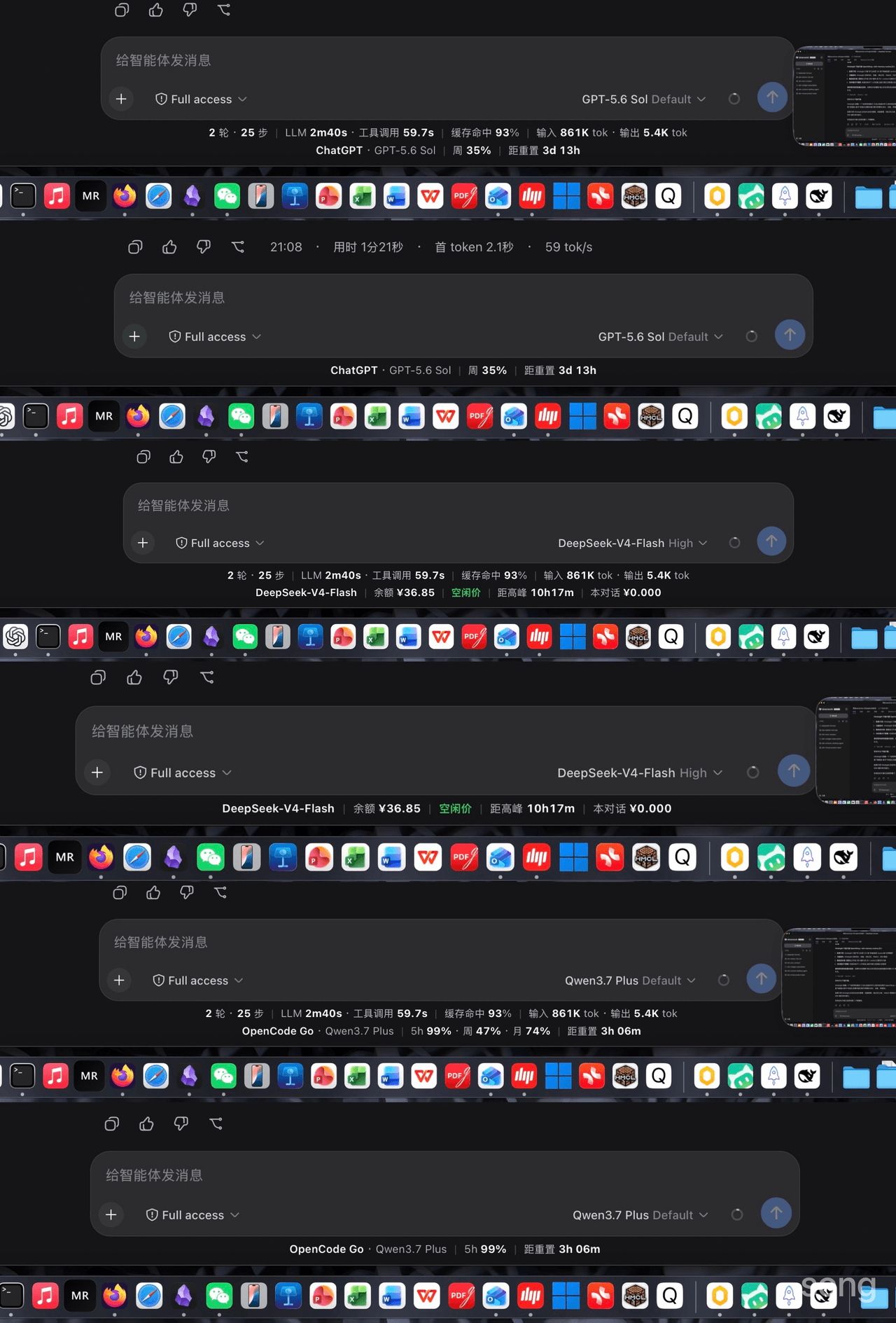 songoao25/dsh-bottom-info-bar
DeepSeek Harness (DSH) plugin: replaces the stats row under the composer with provider and model, balance or subscriptio…
songoao25/dsh-bottom-info-bar
DeepSeek Harness (DSH) plugin: replaces the stats row under the composer with provider and model, balance or subscriptio…
-
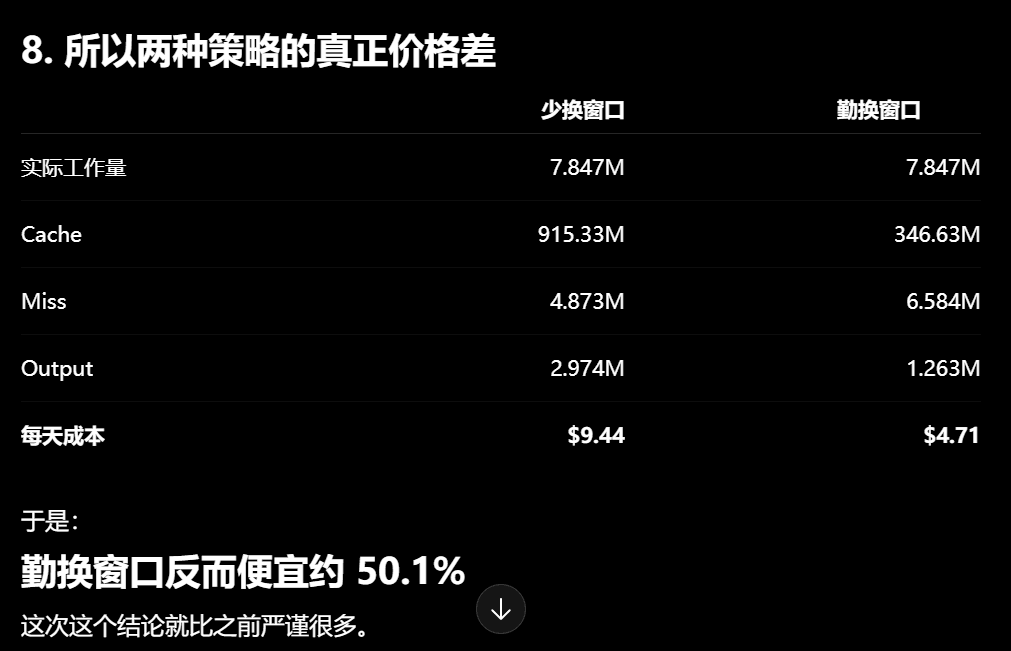 Phant0Meow/dsh-meow-cachebilling
一个能帮你省钱的插件!缓存其实比你想象的贵!换窗口可以省缓存钱,但换窗口有顾虑,或许你懒得重新描述项目和规则,或者你还需要那个上下文。所以这个插件,就是为了告诉你,当前轮,纯粹上下文缓存的部分,到底花了你多少钱。这样你才心里有个底,判断什么…
Phant0Meow/dsh-meow-cachebilling
一个能帮你省钱的插件!缓存其实比你想象的贵!换窗口可以省缓存钱,但换窗口有顾虑,或许你懒得重新描述项目和规则,或者你还需要那个上下文。所以这个插件,就是为了告诉你,当前轮,纯粹上下文缓存的部分,到底花了你多少钱。这样你才心里有个底,判断什么…
-
 Rianico/dsh-better-edit
Hash-anchored read/edit/undo_last_edit tools for DeepSeek Harness (dsh), fewer token consumption, lower cost.
Rianico/dsh-better-edit
Hash-anchored read/edit/undo_last_edit tools for DeepSeek Harness (dsh), fewer token consumption, lower cost.
-
 Ghost011118/dsh-balance-meter
DeepSeek account balance and session cost readout for the DeepSeek Harness Web GUI
Ghost011118/dsh-balance-meter
DeepSeek account balance and session cost readout for the DeepSeek Harness Web GUI
-
 ai-shushu/dsh-quota-meter
Per-session quota meter for DSH: real-token billing, live progress bar, budget blocking, configurable multi-model pricin…
ai-shushu/dsh-quota-meter
Per-session quota meter for DSH: real-token billing, live progress bar, budget blocking, configurable multi-model pricin…
-
 TwotwoPiggy/dsh-balance
dsh余额插件. A DeepSeek Harness plugin for real-time token tracking and highly accurate session cost estimation, featuring d…
TwotwoPiggy/dsh-balance
dsh余额插件. A DeepSeek Harness plugin for real-time token tracking and highly accurate session cost estimation, featuring d…