Sttrevens/dsh-cost-meter
dsh 插件:在 Web 界面中显示每轮 USD 成本徽章(会话总计 + 每消息页脚,悬停显示明细),基于令牌使用量乘以可配置的定价表计算得出。
项目介绍Project Overview
dsh-cost-meter 是一个 dsh 客户端插件,在 Web UI 的每条助手消息操作行显示 USD 费用徽章,按回合记录当前 provider/model,并按非缓存输入、输出、缓存读、缓存写四类用量累计会话与回合成本,悬停可看分项明细。启动时读取 ~/.dsh/cost-pricing.json(可用 DSH_COST_PRICING 或 config.pricingPath 覆盖),首次运行写入默认表。适合需要实时观察每轮与总会话花费的用户。注意:定价需手动编辑并重启 dsh web 才会生效,未列出的模型若无 default 则计为零。
dsh-cost-meter is a dsh.client plugin that shows a USD cost badge in each assistant message's action row in the Web UI. The host half registers a sessionCost projection that tracks the current provider/model from request/header events and accumulates per-turn and whole-session totals across uncached input, output, cache-read, and cache-write usage buckets, deduplicating same (turn, step) samples. Pricing is loaded from ~/.dsh/cost-pricing.json at boot (overridable via DSH_COST_PRICING or config.pricingPath); a default table is written on first run, and edits require restarting dsh web. Unlisted models fall back to the default entry, or zero cost if none is set.
请帮我了解并安装插件:【dsh-cost-meter】【https://github.com/Sttrevens/dsh-cost-meter】把上面这条消息直接发给当前会话里的 DSH,让它帮你了解并安装。安装命令不一定准确,发给 DSH 更稳。Send this message to DSH in your current session. CLI install commands may not be accurate across systems — DSH will figure it out for you.
或使用命令行安装(适合开发者)Or use CLI install (for developers)
命令行安装CLI Install
dsh plugin --profile web add @steven-wu/dsh-cost-meter把 Sttrevens/dsh-cost-meter 加入你的 DSH 配置(web profile)即可启用。
READMEREADME
@steven-wu/dsh-cost-meter
Out-of-tree dsh plugin that shows a live USD cost badge for the open conversation in the Web UI.
It is a dual-face dsh.client package:
- Host half (
lib/index.js) registers asessionCostprojection on the session-projection seam. The fold tracks the current provider/model fromrequest/headerevents and accumulates cost from the provider-reported usage buckets (uncached input / output / cache-read / cache-write), reusing token-meter's "replace the same(turn, step)sample instead of double-counting" rule. The view exposes the whole-session totals plus abyTurnmap keyed by turn number. - Client half (
lib/client.js) registers a badge into theconversation.chat.assistant-actionsslot — the action row at the end of each assistant message, alongside the turn's time/duration info. Each badge shows that turn's cost; hovering opens a tooltip with the per-bucket breakdown (input / output / cache-read / cache-write) plus the session total.
Pricing table
Pricing is USD per million tokens, keyed by provider/model:
{
  "per": 1000000,
  "currency": "USD",
  "default": { "input": 0.6525, "output": 1.9575, "cacheRead": 0.02175, "cacheWrite": 0 },
  "models": {
    "deepseek-official/deepseek-v4-pro":   { "input": 0.6525, "output": 1.9575,  "cacheRead": 0.02175, "cacheWrite": 0 },
    "deepseek-official/deepseek-v4-flash": { "input": 0.2175, "output": 0.6525,  "cacheRead": 0.00725, "cacheWrite": 0 }
  }
}
The plugin reads ~/.dsh/cost-pricing.json on boot (override the path with the
DSH_COST_PRICING env var or the row's config.pricingPath). On first run it
writes the default table to that path; edit it and restart dsh web to apply
changes. A model without a models entry falls back to default (zero cost
when no default is present).
Install
The package declares a dsh.bundle manifest, so dsh plugin add installs it
and adds it to the profile's bundle layers automatically — no manual patch
edit:
dsh plugin --profile web add @steven-wu/dsh-cost-meter
# restart the web profile, then refresh the page
For a local checkout during development:
dsh plugin --profile web add file:/path/to/dsh-cost-meter
Notes:
@deepseek-ai/dsh-*are declared as peerDependencies (resolved from the harness), never asdependencies— installing them into a profile shadows the harness copy and can pull a stale dist-tag.- The Settings "Plugins" panel is read-only (inventory + config cards); install
happens only through
dsh plugin --profile … add. - Purely-cordis mounting (a
cordis.patch.ymlinsert row) also works — the shippedcordis.patch.ymlholds that row for either path.
The sessionCost projection is delivered through the same seam as
tokenUsage / sessionStats, so it also appears in every projection carrier
(history tail page, session/projection push frames) without extra wiring.
相关推荐Related
-
 wssfk12138/dsh-damage-pulse
DeepSeek Harness Token 余额监控插件:鲸鱼娘待机/扣费/复苏动画、峰谷计费、连续扣费飘字与会话费用统计。
wssfk12138/dsh-damage-pulse
DeepSeek Harness Token 余额监控插件:鲸鱼娘待机/扣费/复苏动画、峰谷计费、连续扣费飘字与会话费用统计。
-
 multica-ai/dsh-multica-runtime
Support dsh runtime on Multica.
multica-ai/dsh-multica-runtime
Support dsh runtime on Multica.
-
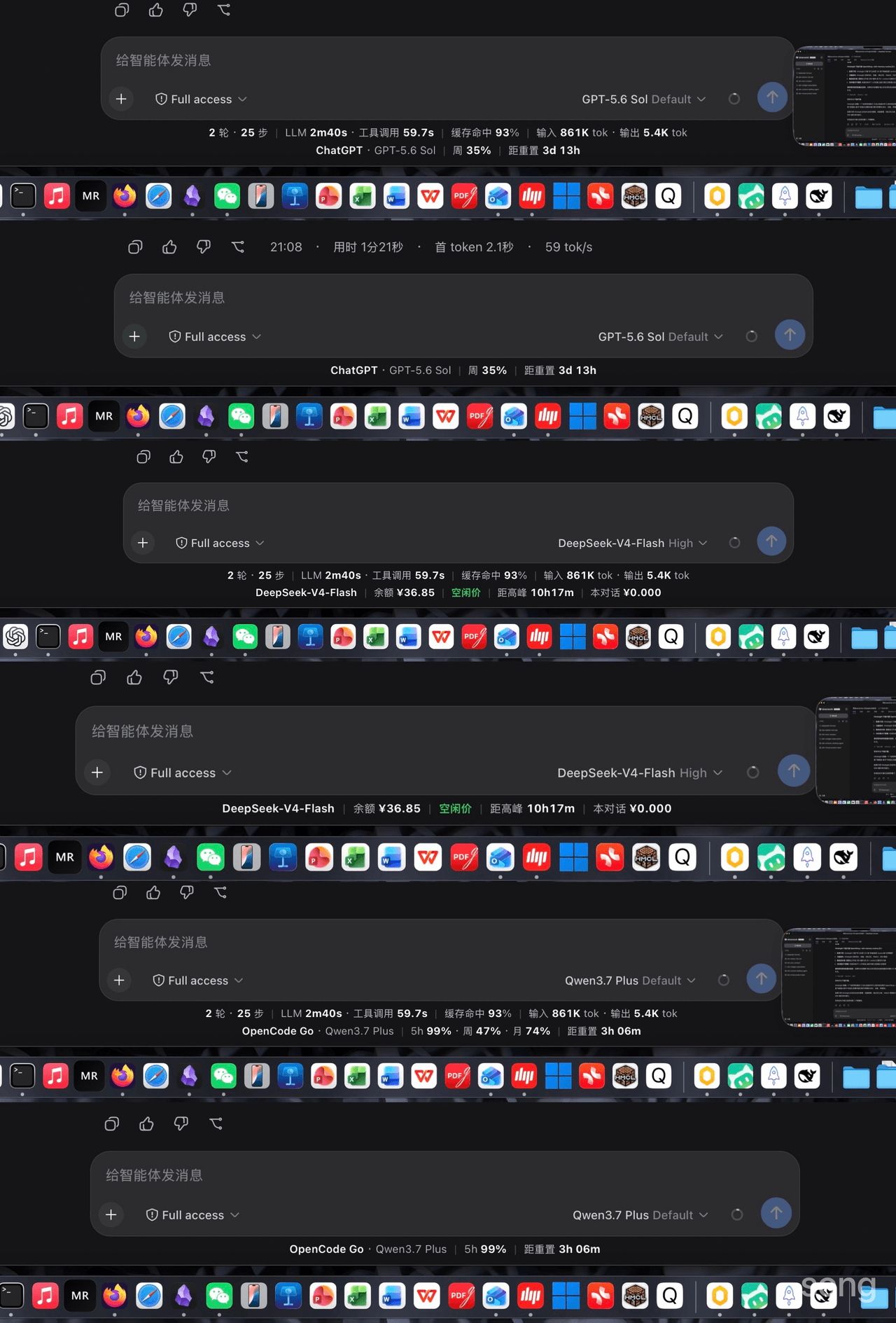 songoao25/dsh-bottom-info-bar
Bottom Info Bar — an information bar plugin for DeepSeek Harness: provider/model, live balance, peak/off-peak pricing wi…
songoao25/dsh-bottom-info-bar
Bottom Info Bar — an information bar plugin for DeepSeek Harness: provider/model, live balance, peak/off-peak pricing wi…
-
 Ghost011118/dsh-balance-meter
DeepSeek account balance and session cost readout for the DeepSeek Harness Web GUI
Ghost011118/dsh-balance-meter
DeepSeek account balance and session cost readout for the DeepSeek Harness Web GUI
-
 Rianico/dsh-better-edit
Hash-anchored read/edit/undo_last_edit tools for DeepSeek Harness (dsh), fewer token consumption, lower cost.
Rianico/dsh-better-edit
Hash-anchored read/edit/undo_last_edit tools for DeepSeek Harness (dsh), fewer token consumption, lower cost.
-
 ai-shushu/dsh-quota-meter
Per-session quota meter for DSH: real-token billing, live progress bar, budget blocking, configurable multi-model pricin…
ai-shushu/dsh-quota-meter
Per-session quota meter for DSH: real-token billing, live progress bar, budget blocking, configurable multi-model pricin…
-
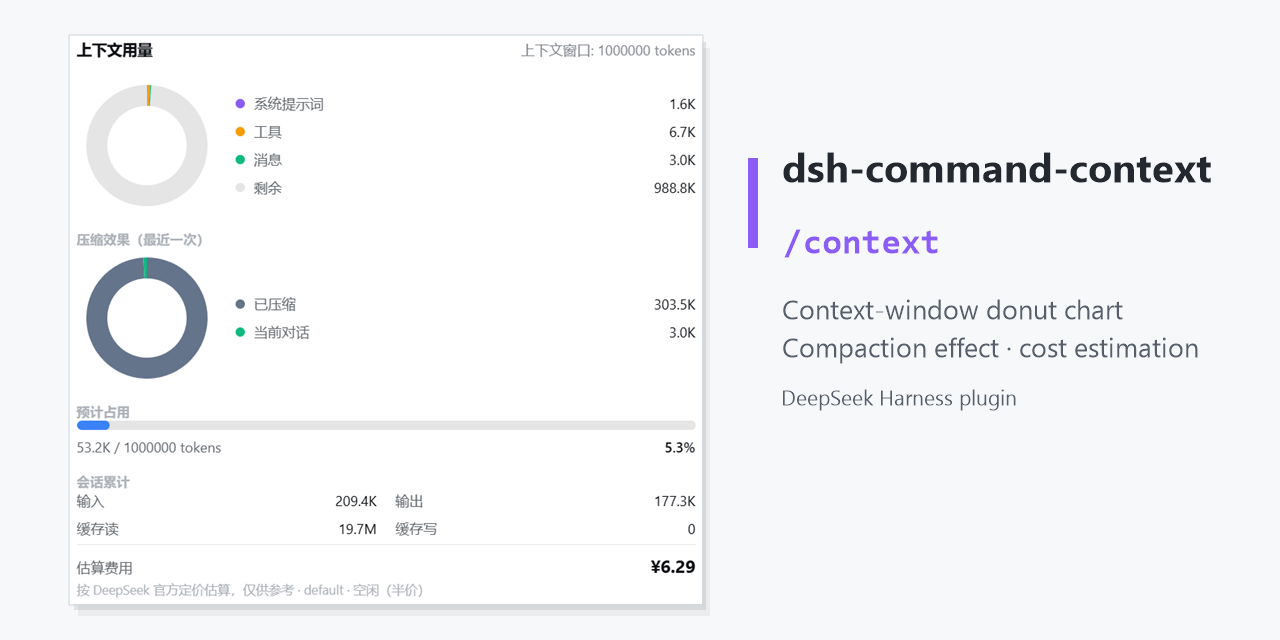 GooodWei/context-vista
为 DeepSeek Harness 提供右侧悬浮栏以及 /context 命令,用环形图实时展示当前上下文 token 用量与分配,compact指令效果,同时支持估算费用消耗,对标 Claude Code 的 /context。
GooodWei/context-vista
为 DeepSeek Harness 提供右侧悬浮栏以及 /context 命令,用环形图实时展示当前上下文 token 用量与分配,compact指令效果,同时支持估算费用消耗,对标 Claude Code 的 /context。
-
 OK-wx/dsh-ocgo-lite
OpenCode Go 用量常驻条:套餐余量圆环 + token/花费实时统计(本次会话/全部范围 + 按模型联动,官方实时定价),一键复制 API Key。OpenCode Go usage bar for DeepSeek Harnes…
OK-wx/dsh-ocgo-lite
OpenCode Go 用量常驻条:套餐余量圆环 + token/花费实时统计(本次会话/全部范围 + 按模型联动,官方实时定价),一键复制 API Key。OpenCode Go usage bar for DeepSeek Harnes…