如何让 AI 帮你回邮件Letting AI Handle Your Email Replies: A How-To Guide
如果收件箱就是你一天时间悄悄消失的地方,别焦虑——很多人都一样,而且解决办法并不复杂。如今的工具能替你起草大量常规回复,部分场景甚至能直接发出,同时保留足够多的个人语气,收件人根本察觉不到差别。下面是完整搭建方法,同时留住那份让人信任你的人情味。
When the inbox is the place your workday quietly disappears into, take comfort — plenty of people share that problem, and the fix doesn't demand an elaborate system. Today's tools can compose a big portion of routine replies, and occasionally dispatch them too, while carrying enough of your own tone that the person on the other end can't tell. Below is the precise way to build this, all while preserving the human warmth that earns trust.
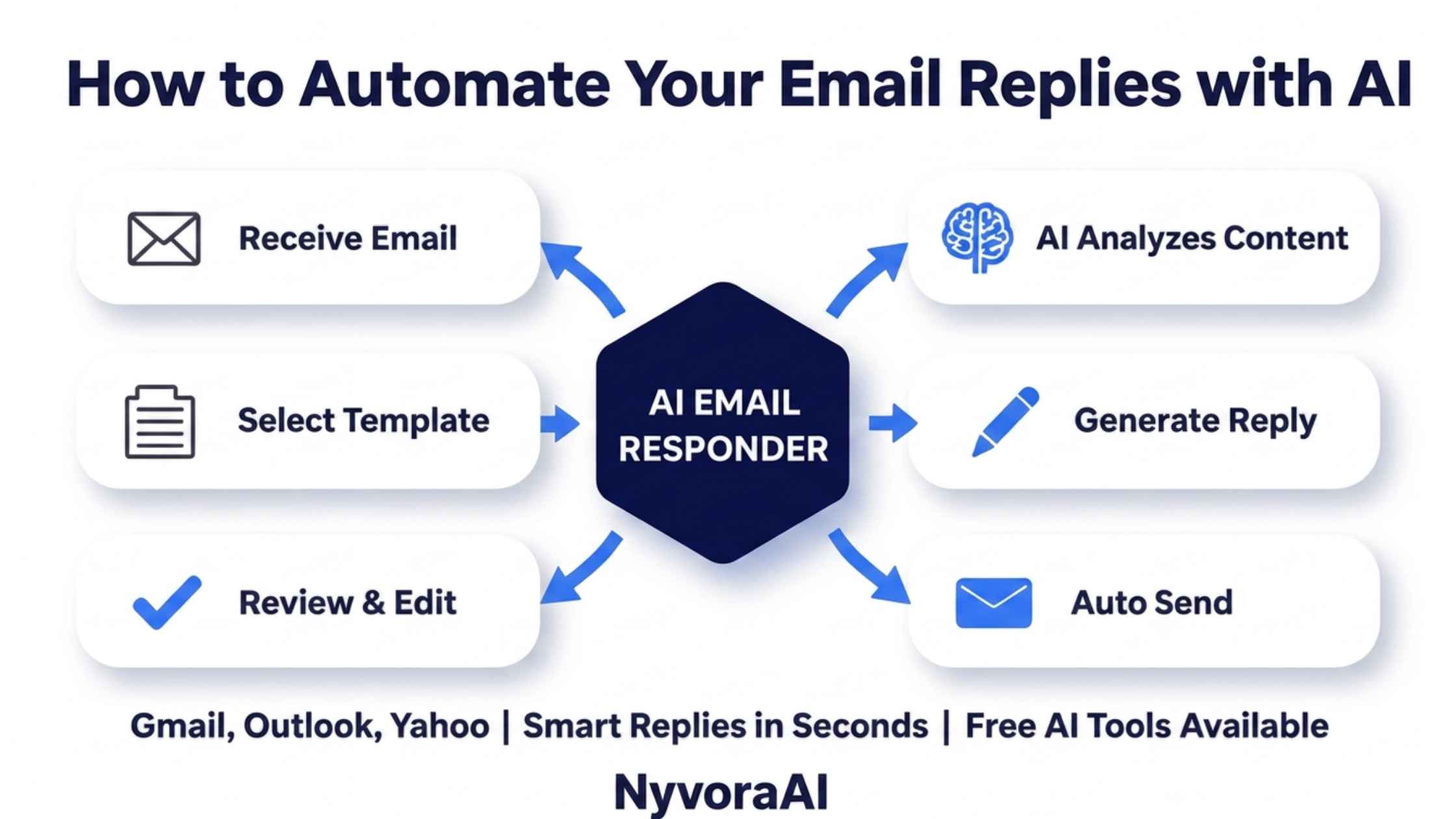
一周又一周,大多数人的收件箱里翻来覆去就是那么几种问题和请求,只是措辞略有不同。正是这种可预测性,让邮件成为最适合交给 AI 的工作之一。原因不在于回复不重要,而在于其中充满规律:给模型看几条真实样例,它通常就能快速学会。
本指南覆盖整个实操过程:为什么值得花时间搭建回复自动化、AI 真正擅长什么而哪些判断仍需人来做、按你现有工作习惯该选哪款工具、怎样写出毫无公函味的回复模板,以及在真实客户看到之前如何充分测试。网站上的对话是类似问题,我们关于免费为网站搭建聊天机器人的文章把这套思路用在实时对话而非邮件上。
01简短回答
先找出收件箱里反复出现的问题和请求。然后要么开启邮箱自带的起草功能(Gmail 里的 Gemini、Outlook 里的 Copilot),要么使用独立工具,并喂给它你自己的样例邮件,让草稿贴合你的风格。头几周每封草稿都由你亲自过目后再发。记录哪些草稿改动最大,据此优化模板。无人值守发送只留给最枯燥、风险最低的类别,而且要在输出持续可靠之后。
02为什么邮件最该最先自动化
在普通工作日里,没有哪项重复劳动在数量和打断专注的程度上比得上邮件;停下手中活去回一个小问题,可能毁掉二十分钟的深度工作。哪怕只自动化三分之一的回复,也能换回大块不被打断的时间,一周下来复利效应相当可观。
与创意写作相比,邮件也格外适合 AI。多数收件箱围绕少数几类反复出现的内容,只是换了措辞——日程安排、价格咨询、进度通报、简单排障。这种规律性让收件箱自动化成为更广泛的AI 辅助日常流程中见效最快的成果之一,与之并列的还有利用零碎时间学一门语言或新技能这类日常用法。
03收件箱里 AI 能做什么、不能做什么
常见问题解答
日程安排与跟进提醒
进度通报
仍需人处理的情形
决定能否放心交给机器的,往往不是复杂程度,而是利害关系和情绪。一个篇幅很长的常规发货问题可能风险很低,而三行字的暴怒消息则完全相反。在决定先交出哪一块之前,先按这条分界线梳理自己的收件箱。
04AI 邮件工具横向对比
| 工具 | 适合人群 | 主要优势 | 搭建难度 |
|---|---|---|---|
| Gmail (Gemini) | 已经在用 Gmail 的人 | 草稿建议原生内置,无需另装任何东西 | 非常简单 |
| Outlook (Copilot) | Microsoft 365 用户 | 就地起草回复、概括长邮件串,无需离开应用 | 非常简单 |
| Front | 共用一个收件箱的小团队 | AI 起草加上共享收件箱与分派规则 | 少量配置 |
| Superhuman | 追求速度的个人用户 | 快速 AI 起草,内建于键盘优先的邮箱 | 少量配置 |
| Zapier + Claude/ChatGPT | 需要完全定制自动化的人 | 来信自动流经模型,再自动流入其他工具 | 少量配置 |
想把前期投入降到最低,就先开启 Gmail 或 Outlook 自带的起草功能,别急着添新工具。等想自动化的类别明确之后,Front 这类产品或 Zapier 加模型的定制链路能让你对路由、语气和审批环节拥有更强控制。
05AI 邮件自动化分步搭建
- 1
盘点一个月的邮件
1 记下出现三四次以上的问题或请求,这份清单就是自动化的起点。
- 2
选定工具
2 在叠加专门平台之前,先把邮箱自带的功能用足。
- 3
用真实回复训练它
3 每个类别粘贴三到五条你过去真实发出的回复,让模型学到你的真实语气,而不是泛泛的腔调。
- 4
制定审批规则
4 明确哪些类别可以自动发出,哪些发出前必须等你批准。
- 5
带着人工审核跑两周
5 起初所有回复都保持草稿状态,这样语气或事实问题在到达任何人之前就能被拦下。
- 6
扩大自动化范围
6 当某一类回复持续只需极少修改甚至免修改时,再让它自动发送,或开始自动化相邻的类别。
06写出带有你个人风格的模板与提示词
想让自动回复听起来像机器,最快的办法就是给 AI 一句「请专业地回复」这样模糊的指令。换个思路,把配置过程当成带一名新助理:给它看真实邮件、点明你的小习惯、具体说清哪些东西要避免。
「真实样例优先于模糊指令」这一条纪律,正是区分「像你写的 AI」与「像所有人的 AI」的关键。我们关于如何用 AI 撰写产品描述的文章讲的是同一原则:输入具体的品牌语调,产出明显比泛泛提示词好得多。
07把 AI 邮件自动化嵌进日常工作流
自动化只有顺着你的真实工作习惯走才省时间,而不是变成另一个需要你惦记着去查看的流程。让 AI 草稿直接出现在你现有的收件箱里,而不是单独的应用中,这样审阅就融入了平常处理邮件的节奏,不会成为你迟早跳过的额外步骤。
如果有些咨询在回复前需要先做些快速查证——核实事实、确认细节、比对信息——把邮件工具配一个快速研究助手,能大幅加快审阅环节。如果你经常要在点发送前核实点什么,值得一读我们关于Perplexity AI 与 Google 在研究场景下的对比。
08信任它处理真实邮件前先充分测试
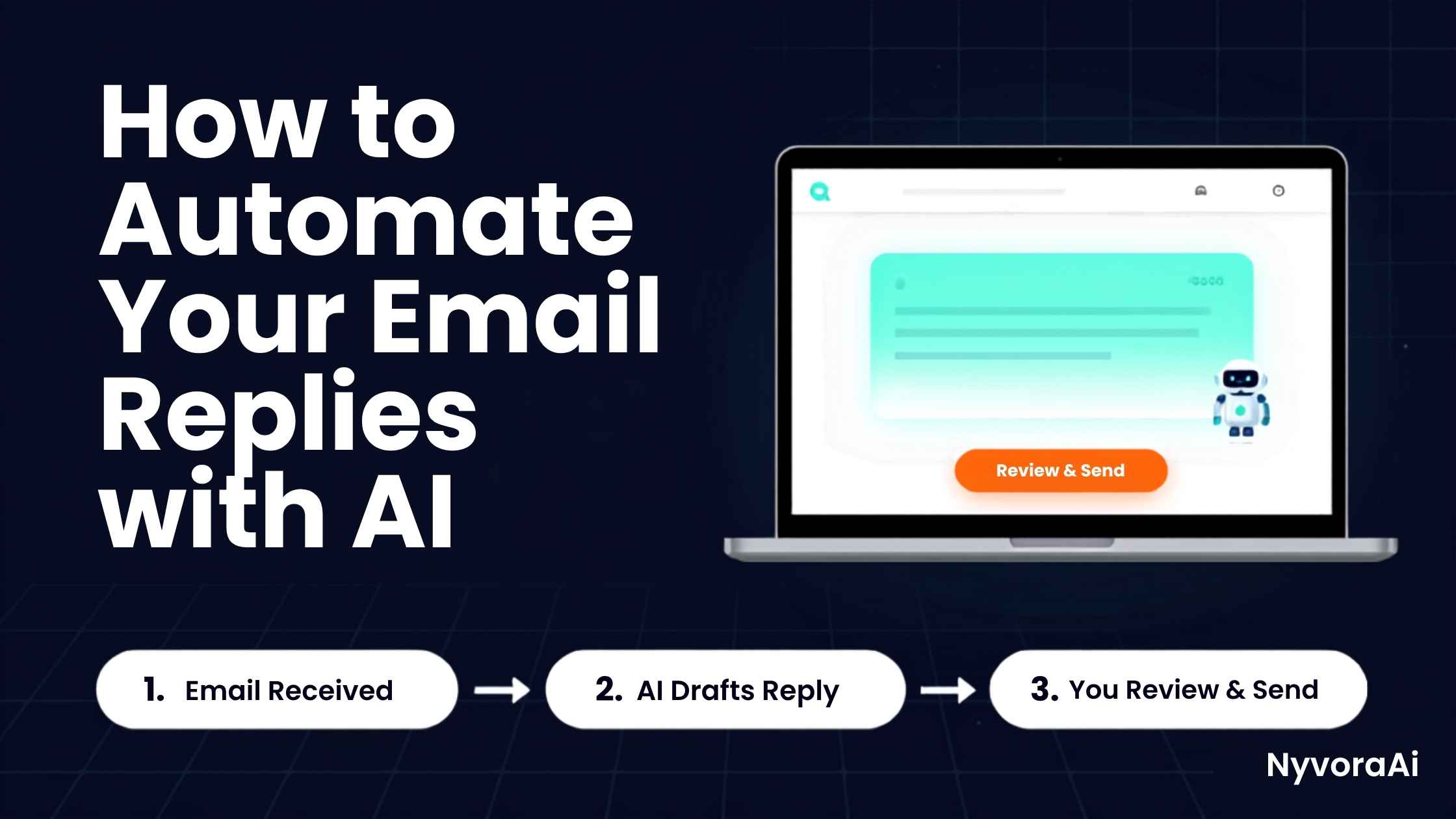
在让 AI 不经审阅代你发送任何内容之前,要像考察新员工那样认真测试——用真实场景,而不是假想情况。把一批过去的真实邮件喂给它,把它的草稿与你当时实际发出的回复逐一对照。发现的差距,正是你的模板和样例仍需补齐之处。
- 让至少十五封过去的真实邮件流经工具,把草稿与你的原始回复逐一比较
- 凡涉及价格、日期或具体承诺的内容,都要核查事实准确性
- 测试它如何处理略微超出训练类别的邮件
- 请同事或朋友读一批草稿,但不告诉他们哪些出自 AI
- 自动发送只从风险最低的类别开始,之后再慢慢扩大
09毁掉邮件自动化效果的常见错误
- 一上来就自动化所有邮件。先做好一两个类别、让它们稳定可靠,再扩大——任何 AI 的推行都是这个道理。
- 过早跳过审阅环节。只有在真实测试期内切实验证过准确性后,才适合完全自动发送,而不是看了几封像样的草稿就放手。
- 用泛泛指令代替真实样例。「语气专业」只会产出平庸内容;你过去的真实回复才能产出像你写的内容。
- 模板从不更新。价格、政策和优惠都会变;靠过时样例训练出的 AI,会信心十足地重复过时信息。
- 让 AI 处理情绪激烈的邮件串。投诉和敏感对话需要人的判断,而不是模板化回应——无论 AI 在其他方面已经多出色。
收件箱自动化顺畅运转后,「真实样例优先于模糊指令」的方法会自然延伸到其他 AI 辅助写作:往前一步,它可以优化带来回复率的主题行和正文内容——这时我们关于如何用 AI 做 SEO 关键词研究的指南对你收件箱的营销面就派上了用场;同样原则还能收紧简历等其他书面材料,如何用 AI 优化你的简历一文对此有介绍。
10常见问题
AI 真的能替我回复邮件吗?
不经审阅就让 AI 自动发邮件安全吗?
用 AI 自动回复邮件,最好的免费工具是什么?
AI 写的邮件回复在客户听来会像机器人吗?
自动回复邮件到底能省多少时间?
11结语
用 AI 自动回复邮件,并不是把整个收件箱彻底交出去——而是清走那些吞噬你时间的重复、低风险问题,好让你把全部注意力放在真正需要它的邮件上。搭建只需一个下午;模板调好之后,回报就是每周实实在在拿回来的数小时。
起步范围要窄:挑出两三种你重复最多的邮件类型,把以前真实的回答样例喂给 AI,头几周审阅每一封草稿,再考虑进一步放手。「真实样例—人工审阅—逐步扩大」这个顺序,正是「像你写的自动回复」与「像公函的自动回复」之间的分野;以后任何 AI 工具进入你的日常流程,都值得按同样的顺序来。
Week after week, the average inbox contains a narrow set of questions and asks, each restated in only slightly altered language. That predictability is precisely why email is among the strongest candidates for AI assistance. The reason isn't that answers lack weight; it's that patterns dominate, and a handful of genuine samples is usually all the model needs to pick them up.
Every piece of the process gets covered here: the case for spending setup time on reply automation, where AI genuinely delivers versus where judgment stays human, which tool fits depending on your current habits, the craft of building reply templates that read nothing like junk mail, and how to trial the setup before real customers or clients ever see it. Website conversations are a related problem, and our piece on building a free chatbot for your website applies this thinking to live chat rather than the inbox.
01Short Version
Pinpoint the questions and asks that land over and over in your inbox. Then either switch on the native drafting features there — Gemini inside Gmail, Copilot inside Outlook — or bring in a standalone product, feeding it sample messages of yours so drafts match your style. For several weeks, open and send each draft yourself. Track which drafts need heavy edits and improve the templates accordingly. Reserve hands-off sending for the dullest, lowest-risk categories, and only once the output has been trustworthy for a sustained stretch.
02Why Email Should Be Your First Automation Target
Across a normal working day, few repetitive chores match email for sheer volume or for the way it shatters attention; pausing concentration to handle one brief question can cost twenty minutes of flow. Reclaim even one in three replies and you get back sizable blocks of focus, and the gain stacks quickly by Friday.
Email also fits AI unusually well when compared with creative writing. Most inboxes revolve around a few recurring genres dressed in fresh wording — calendars, price checks, progress notes, simple fixes. This predictability puts inbox automation among the quickest victories inside a wider daily routine augmented by AI, alongside small everyday wins such as picking up a language or skill during otherwise dead minutes.
03Where AI Helps in the Inbox — and Where It Doesn't
Answers to Common Questions
Calendars and Nudges
Progress Notes
Situations That Stay Human
Complexity rarely decides what's safe to hand off; stakes and feeling do. A long, detailed question about shipping can be routine and low-risk, whereas a three-line furious message is anything but. Sort your own incoming mail along that divide before choosing the first batch to automate.
04AI Email Tools: A Side-by-Side Look
| Tool | Ideal User | Main Advantage | How Hard to Set Up |
|---|---|---|---|
| Gmail (Gemini) | People who already live in Gmail | Draft suggestions are native — nothing else to install | Trivially simple |
| Outlook (Copilot) | Microsoft 365 subscribers | Composes replies and condenses lengthy threads without leaving the app | Trivially simple |
| Front | Compact teams working one shared inbox | AI drafts paired with a shared inbox and routing rules | Minor configuration |
| Superhuman | Individuals obsessed with speed | Rapid AI drafts embedded in a keyboard-driven mailbox | Minor configuration |
| Zapier + Claude/ChatGPT | Anyone needing bespoke automation | Incoming mail flows through the model and onward into other apps on its own | Minor configuration |
For the smallest possible upfront effort, activate the drafting features native to Gmail or Outlook before introducing anything new. Later, once the categories worth automating are clear, a product such as Front or a tailored Zapier-and-model chain offers firmer control over routing, voice, and who approves what.
05Configuring AI Email Automation, One Step at a Time
- 1
Review thirty days of mail
1 Record every question or ask appearing at least three or four times. That record marks where automation begins.
- 2
Choose the tool
2 Exhaust what the mailbox offers natively before layering a separate platform on top.
- 3
Train it with genuine samples
3 For each category, drop in three to five messages you genuinely sent before, so the model absorbs your actual register rather than a bland default.
- 4
Define your approval policy
4 Mark the categories that may leave without you, and the categories that always wait on a sign-off.
- 5
Run a fortnight with approvals on
5 Initially nothing skips draft status; tone slips and factual errors get caught while they're still private.
- 6
Widen the automated scope
6 When a category repeatedly comes back nearly edit-free, either let it send unattended or start automating its neighbor.
06Templates and Prompts That Carry Your Voice
Vague direction is the shortest path to stiff, machine-flavored replies — think instructions along the lines of "respond in a professional manner." Approach configuration as onboarding a freshly hired assistant instead: hand over real messages, spell out your odd habits, and list exactly what you never want to see.
This single habit — concrete samples instead of fuzzy commands — is what distinguishes output that sounds like you from output that sounds like everybody's model. The same idea runs through our piece on using AI for product description writing: feeding in a defined brand voice yields plainly sharper results than a generic prompt ever could.
07Making Automated Email Part of the Actual Workday
Time savings only materialize when automation rides along with existing habits rather than becoming yet another queue to remember. Have drafts surface inside the mailbox you already open; review then folds into your normal pass through the inbox, instead of dangling as a separate chore you'll eventually ignore.
Some replies demand a little digging first — a fact to verify, a detail to confirm, sources to compare. Marrying the mailbox to a quick research companion makes that review dramatically faster. Our head-to-head on Perplexity AI against Google for research is a useful read whenever a send button waits on verification.
08Prove It Works Before Real Messages Flow
Before anything goes out unattended, put the system through genuine trials, much as you'd assess a new employee using realistic situations rather than imagined ones. Send a set of historical messages through it and hold its drafts beside what you actually wrote at the time. Every discrepancy you spot points to a gap your samples and templates still need to fill.
- Push no fewer than fifteen genuine past messages through the tool, holding drafts next to your real answers
- Scrutinize accuracy wherever prices, dates, or concrete promises appear
- See what happens when a message sits just outside the categories it was trained on
- Ask a coworker or friend to inspect a set of drafts with no clue which ones came from a model
- Begin unattended sending with the single lowest-stakes category, then broaden cautiously
09Errors That Wreck Email Automation
- Switching on everything on day one. One or two categories, made dependable first, then widened — the rollout rule for AI of any kind.
- Dropping human review before the system has earned it. Unattended sending belongs after honest, real-world validation across an actual trial window, not after a few pretty drafts.
- Leaning on abstract commands in place of samples. "Be professional" begets bland prose; your own historical messages beget prose in your voice.
- Freezing templates forever. Rates, rules, and deals shift; a model trained on stale samples will repeat stale facts with total confidence.
- Allowing the model near heated threads. Grievances and delicate exchanges call for human empathy and judgment — a patterned reply can't substitute, however polished the rest of the workflow has become.
Once inbox automation hums along, the samples-first, commands-second mindset travels naturally into other writing. Upstream, it can sharpen the subject lines and body copy that earn replies in the first place — our piece on AI-assisted SEO keyword research serves the marketing side of that funnel — and the same principle tightens other documents, including a résumé, as explained in using AI to strengthen your resume.
10Common Questions
Can the model genuinely answer mail in my place?
Is unattended, hands-off sending safe?
Which free option works best for AI reply automation?
Will customers sense a machine behind the words?
What's the actual time payoff?
11Wrapping Up
AI-assisted replies don't mean surrendering the inbox wholesale. The point is sweeping away the repetitive, low-stakes questions that devour attention, leaving room to focus properly on messages that genuinely deserve it. Configuration costs an afternoon; once templates are tuned, the dividend arrives as recovered hours, week after week.
Keep the first scope deliberately small: choose the two or three message types you write most, give the model real examples of your past answers, and personally check drafts for a fortnight or so before loosening the reins. That sequence — samples, then review, then slow expansion — is precisely why some automated replies read like you while others read like mailers, and it's the same sequence worth following with whatever AI tool joins your routine next.