如何免费为网站搭建一个聊天机器人How to Get a Free Chatbot Running on Your Website
想给网站装一个能真正干活的聊天机器人,既不用请开发,也不用留营销预算。如今免费的搭建工具已经相当能打:挑一个合你情况的,配置到位,今晚就能让机器人真的开始接待访客。下面只讲干货。
Putting a chatbot that actually works on your site does not require a developer's invoice or a marketing budget. Today's free builders are far better than most people assume — pick the one that suits your setup, configure it carefully, and by tonight you can have a bot answering visitors for real. What follows is the practical version, no padding.
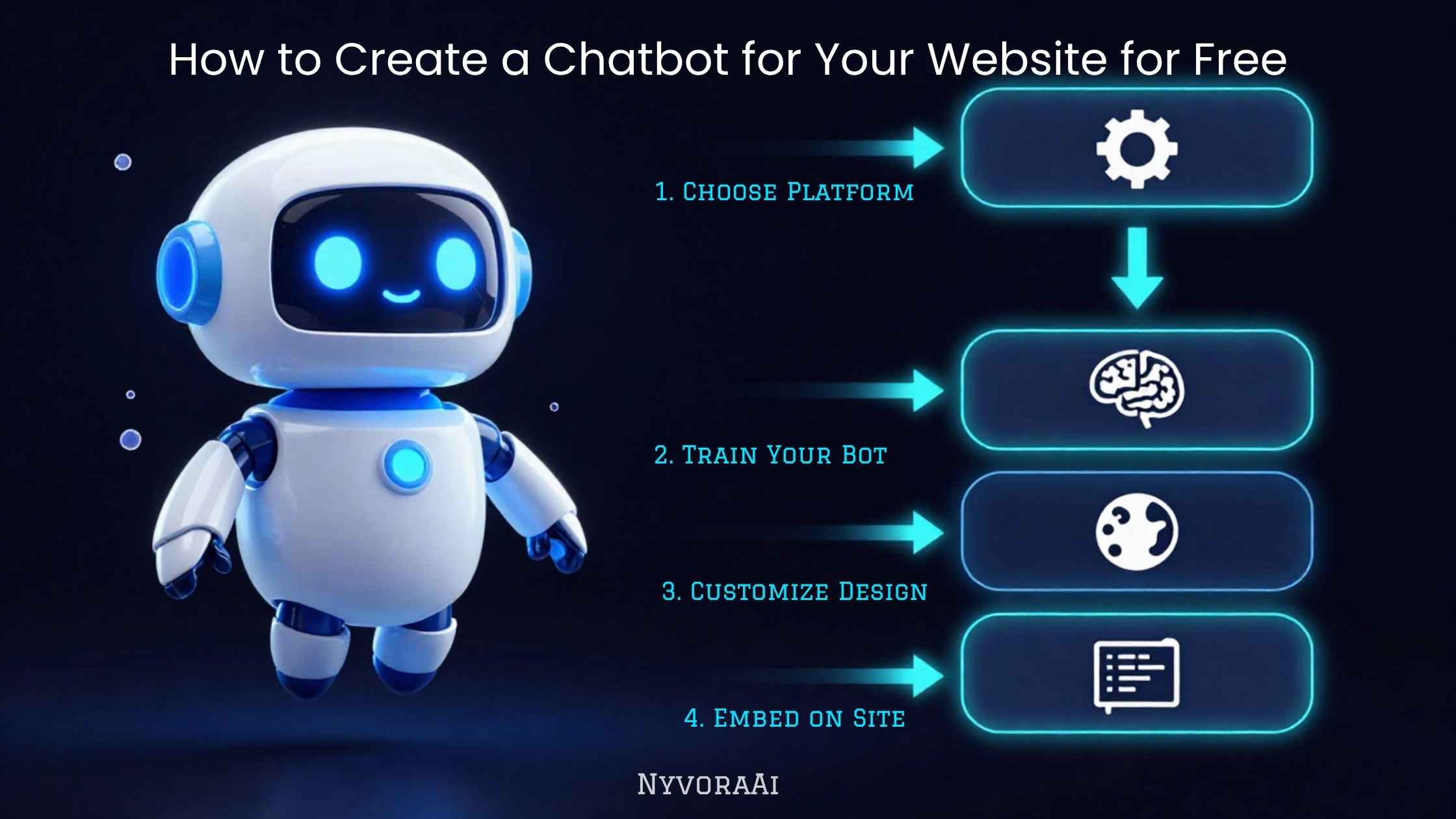
很多站长迟迟不给网站加聊天机器人,是觉得这事要么得雇开发,要么得买昂贵平台——这个判断已经过时了。到了 2026 年,一批实力不俗的工具能让你在不写一行代码、不花一分钱(无论卢比还是美元)的前提下,完成搭建、训练和发布。买不买得起,已经不是问题了。真正剩下的问题是:你选的免费工具是否对得上要它干的活,以及你的配置方式能不能换来访客的信任,而不是被无视。
接下来的内容,就像跟一个从零开始的朋友聊天:免费聊天机器人对你的网站到底能做到什么程度、哪些免费平台值得花时间、怎么训练它才不会像照本宣科、怎么把挂件真正装到你自己的网站上,以及在任何真实访客看到它之前该怎样完整测试。等机器人跑起来之后,如果你还想把 AI 用在业务的更多环节,我们那篇 如何为企业配置 AI 助手 会是很好的延伸读物。
01简答
想免费给网站做聊天机器人,先在一个有真实免费额度的无代码平台上注册——Tidio、Tawk.to、Chatbase、Landbot 都是不错的起点。然后搭一段简短的对话流程,或直接把你已有的常见问答内容喂给它,再把那一行嵌入脚本复制到网站的 HTML、页脚模板或建站工具里。多数人一小时内就能跑起一个基础版本。更费功夫、也更关键的部分,是用准确的业务信息把它训练好,并在投入真实流量之前拿真实问题测一遍。
02为什么对多数网站来说,免费版就够用
聊天机器人领域里,人们常以为凡是被标上“免费”的工具,跟付费的企业软件相比必然是阉割版、不靠谱。对大多数小微企业、个人创作者和本地服务商来说,这个判断已经不成立了。如今主流平台的免费方案,一般都会给到一个能用的引擎(AI 驱动或规则驱动)、网站挂件、基础自定义选项,以及足以撑起中小型网站的月对话额度。
平台上的付费升级,买的主要是更高的对话量、更进阶的集成、更多团队席位和更细的数据报表。这些是你流量真的超出免费额度之后才需要的东西,不是第一天就得有的。从免费起步,能让你先证明这个机器人值得日后掏钱升级;先验证价值再付费,正是 AI 落地的正确姿势,也是更宏观的 用 AI 搭建日常工作流 里的一环。
03免费的网站聊天机器人实际能做什么
即时解答常见问题
收集销售线索
接受预约
引导选择产品
以上这些都不需要付费方案。它们真正需要的,是一份明确而狭窄的任务——这条原则适用于几乎所有 AI 部署场景,无论你在做面向客户的聊天机器人,还是在用 AI 工具为同一家公司 制作 YouTube 内容。
04值得一试的免费聊天机器人搭建工具对比
没有哪个免费工具能单独称“最”。哪个合适,取决于你的网站是怎么搭的、以及你想让机器人干什么。下面是几个最值得先试的选项的直接对比:
| 工具 | 最适合 | 免费方案包含 | 搭建难度 |
|---|---|---|---|
| Tidio | 常见问答+在线客服组合 | 每月 50 次 AI 对话,可视化流程搭建器 | 非常简单 |
| Tawk.to | 完全免费的在线客服挂件 | 客服席位不限,含聊天记录和手机 App | 非常简单 |
| Chatbase | 用你网站内容训练的 AI | 免费消息条数有限,可从网址自动训练 | 配置较轻 |
| Landbot | 可视化对话流程与线索表单 | 提供基础流程搭建器的免费方案 | 配置较轻 |
| Claude / ChatGPT +聊天挂件 | 完全自定义,开放式回答 | 免费聊天账号,需要一步简单嵌入 | 配置较轻 |
一个实用的选择思路:主要想零配置地应对重复提问,就从 Tidio 或 Tawk.to 入手;需要机器人真正读懂网站内容、并用自然语言回答开放式问题,Chatbase 正是为此而生;不介意自己写一小段指令的话,用 Claude 配一个可嵌入的基础聊天挂件,对语气和准确度的掌控最强——我们那篇 如何用 Claude AI 处理写作任务 讲的就是这套方法,它写聊天机器人话术和写博客文章一样管用。
05六步:一小时内搭出一个免费网站聊天机器人
- 1
先定下它要完成的那一件事
1 常见问答、线索收集、预约接待——先挑一个开始。想第一天就全覆盖,最快的结果就是做出一个让人看不懂、也不敢信的机器人。
- 2
在选好的平台上注册免费账号
2 用你的企业邮箱注册。多数平台会立刻要你的网站地址,并借此预填好基础设置。
- 3
搭建流程,或者写指令
3 用可视化搭建器把常见问题和答案铺出来;如果你用的是 Claude、ChatGPT 这类 AI 工具,那就写一小段指令代替。
- 4
调整挂件外观,贴合你的品牌
4 把头像、问候语和配色改掉,让它看起来属于你的网站,而不是一个通用插件。
- 5
把嵌入脚本复制进网站
5 把平台给的代码片段粘到 `` 标签前,或者放进 CMS 的自定义代码区。
- 6
测试完毕再发布
6 自己以访客的身份把整个流程走一遍,把别扭的地方改掉,然后再让它面对真实流量。
06用你的真实业务把它训练好——这一步别省
回答含糊、套话连篇的机器人,几秒内就会被关掉。访客愿意用还是直接忽略,区别不在你选了哪个平台,而在于它背后喂了多少你业务的具体信息。
最低限度要喂给这些东西:你真实的常见问答答案、配送范围或服务区域、定价结构(或一句明确的“价格需人工确认”)、你想要的语气,以及一份它绝对不许宣称或承诺的清单。用 Chatbase 这类靠 AI 训练的工具,通常就是把网址指向它,或者上传一份文档;用 Tidio、Landbot 这类流程型工具,就得亲手把你最常被问的十到十五组问答写出来,而不是套现成模板。
无论你是在写流程内容,还是写 AI 系统提示词,下面这个结构对免费聊天机器人同样适用:
认真写完这些内容大概要半小时,而它是整个流程里回报最高的一步。训练得好的免费机器人,会稳定胜过训练得差的付费机器人。
07把聊天挂件装到你的网站上
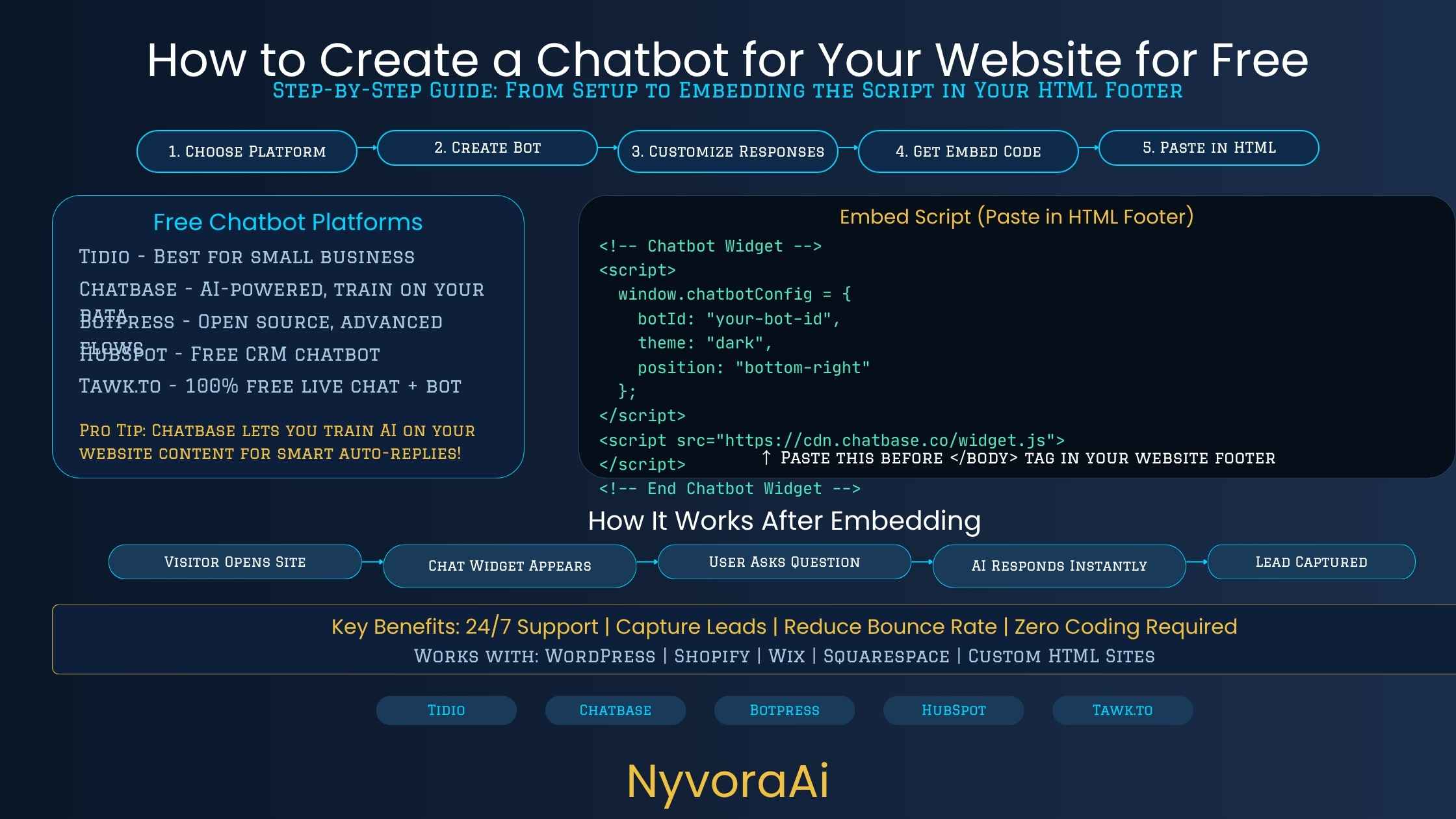
主流免费平台都会给你一小段 JavaScript 让你复制粘贴——你不需要懂这段代码在做什么,只要知道它该放在哪里。网站跑在 WordPress 上的话,多数平台都有专门插件自动完成。如果是 Shopify、Wix、Squarespace 或自建站,通常把脚本粘到网站设置里的“自定义代码”“页头/页脚”或“跟踪脚本”区域即可。
如果你的网站是用纯 HTML 手写的,就把 script 标签放在每个需要出现聊天机器人的页面的 `` 标签之前——或者放进共用的页脚包含文件里。粘好代码后刷新线上站点,确认聊天气泡出现在角落里,通常是右下角,也就是访客习惯去找的位置。
08在任何人看到它之前,认真测一遍
这一步多数人都草草带过,也正是大量网站聊天机器人在上线第一周给出错误或别扭回答的原因。在对外公布这个机器人、或往它那里导流之前,先坐下来,把自己当成一个彻底摸不着头脑的访客。问它人们真正会问的问题——包括带错别字的、含糊不清的,以及略微超出它职责范围的。
- 把它该答的十个最常被问的问题都问一遍,逐条核对答案是否准确
- 问它一个完全不在职责范围内的问题,看它如何应对
- 在手机上试一遍——你的访客大多在用手机,而不是电脑
- 确认“联系真人”这条路真的能走通,并且真的能找到人
- 先让同事或朋友在没有任何提示的情况下试用一遍
如果你做这个聊天机器人是更大的内容与营销计划的一部分,那么配套值得一读的是我们这篇 2026 年如何用 AI 工具赚钱——一个搭得好的免费聊天机器人,本身也正成为服务商向其他小微企业收费提供的项目。
09让免费聊天机器人翻车的常见错误
- 默认问候语和默认流程原样上线。未经修改的通用模板,最快让机器人显得像个外挂插件,而不是你业务的一部分。
- 没有转人工的通道。任何机器人都需要一条明显、可用的联系真人路径——尤其是遇到投诉或涉及具体账户的问题时。
- 用过期信息训练它。价格、营业时间、政策都会变。一个还在复述去年配送时效的机器人,会实实在在地损害信任。
- 忽视手机访客。如果大部分流量来自手机,移动端就该最先测、而不是最后测——一个占掉半屏的聊天气泡会立刻被关掉。
- 从不翻看对话记录。多数免费平台都会展示访客到底问了什么。上线第一个月每周看一次,并据此更新机器人的答案。
基础打好之后,同一套聊天机器人逻辑还能延伸到工作流的其他环节——比如把它和 AI 写作工具配合使用,就像学生已经在用 AI 备考 那样,把“训练、测试、迭代”的循环套到完全不同的场景上。
10常见问题
真的可以免费给网站做出一个聊天机器人吗?
对新手来说,最容易上手的免费搭建工具是哪个?
免费聊天机器人用的是真 AI,还是固定脚本?
免费聊天机器人会不会拖累网站的 SEO 或加载速度?
在网站上配好一个免费聊天机器人要多久?
11结语
免费给网站做聊天机器人,早已不是一种缩水的妥协;对多数小微企业来说,它是一个相当扎实的起点,几个月、有时甚至几年都不需要再往上换。工具成熟了,免费方案在真实条件下也经得起用,而实际要做的事——搭流程、贴脚本、拿真实问题测试——一个下午就能从容完成。
让访客愿意用、还是看一眼就关掉,区别不在你选了哪个平台。它取决于三件事:你把它训练得多贴合自己的真实业务信息,上线前测试得多认真,以及是否为它处理不了的事情保留了一条清晰可见的转人工通道。这三件事做到位,一个完全免费的聊天机器人从今天起就能在网站上真正派上用场。
如果这是你为业务引入的第一个 AI 工具,它同时也是一扇很自然的门,通向接下来值得探索的一整套 AI 辅助工作流——客户支持自动化、内容创作、内部行政事务等等。它们遵循同一个简单规律:先从小处着手,认真训练,信任之前先测试,等真的跑通了再扩大范围。
Many site owners still delay chatbots on the belief that one requires a hired developer or a pricey subscription — a belief that no longer holds. As of 2026, you can build, train, and ship a chatbot with capable tools while writing zero code, and pay nothing in rupees or dollars to begin. Affordability stopped being the obstacle. The question that remains is whether your pick matches the job you need done, and whether the way you configure it earns a visitor's confidence rather than their indifference.
Think of the pages ahead as a conversation with a friend who has never done this: the realistic ceiling of a free chatbot on your site, which no-cost platforms deserve your attention, tuning it so replies do not read like a script being recited, the mechanics of getting the widget onto your live pages, and a proper round of testing before any real visitor encounters it. Once the bot is up and running, our companion guide on configuring an AI assistant for your business is worth reading if you are thinking about AI across the rest of your operations.
01The Short Answer
The route to a zero-cost website chatbot starts with registering on a no-code platform that offers a real free tier — good places to begin include Tidio, Tawk.to, Chatbase, and Landbot. From there, either assemble a brief conversation flow or hand the system your FAQ material, and drop the single-line embed snippet into your HTML, footer template, or page builder. An hour is generally enough for a working first version. What takes longer and matters more: loading the bot with correct details about how your business operates, and putting it through real questions before live traffic ever touches it.
02Why Free Is Sufficient for Most Sites
People often assume that anything labelled “free” in the chatbot space must be a gutted, flaky alternative to enterprise software you pay for. That assumption has stopped holding for the majority of small businesses, independent creators, and local service providers. What the leading platforms put in their no-cost plans is usually a functional engine — AI-driven or rule-based — plus a site widget, some styling options, and a monthly conversation allowance that comfortably serves a small or mid-sized site.
Paying usually buys you more monthly conversations, richer integrations, extra seats for teammates, and deeper reporting. Those become relevant only after your traffic outgrows the free allowance — none of them is a day-one necessity. Beginning at zero cost also gives you evidence that the chatbot deserves a paid tier before any money changes hands, and that pattern of proving value first is what a sound AI rollout looks like within a wider daily workflow using AI tools.
03Realistic Capabilities of a Free Site Chatbot
Instantly Handle FAQs
Collect Leads
Take Bookings
Steer Product Choices
Every one of these is achievable on a free plan. The requirement is a single, well-defined job — a principle that holds for AI projects in general, whether the bot faces customers or you are using AI tools to produce YouTube content for the very same company.
04Free Chatbot Builders Worth Trying, Side by Side
No single free tool can claim the “best” label outright; what suits you hinges on how your site is put together and the task you have in mind for the bot. Below is a plain comparison of the candidates most worth your first attempt:
| Platform | Ideal For | What the Free Tier Gives You | How Hard to Set Up |
|---|---|---|---|
| Tidio | FAQ handling paired with live chat | 50 AI conversations per month, plus a drag-and-drop flow builder | Effortless |
| Tawk.to | A live chat widget that costs nothing at all | No cap on agents, conversation history, and a mobile app | Effortless |
| Chatbase | An AI that learns from your own site's pages | Auto-training from your URL, with a capped number of free messages | Minimal setup |
| Landbot | Lead forms and visual conversation flows | A free tier offering a basic flow builder | Minimal setup |
| Claude / ChatGPT plus a chat widget | Total control, with answers that are not scripted | A free chat account, then one simple embed step | Minimal setup |
Here is how to choose without overthinking it. When your goal is simply to field the same questions repeatedly and you would rather not configure anything, Tidio or Tawk.to is your starting point. When you need the bot to genuinely digest your site's content and respond to open-ended questions in everyday language, Chatbase was purpose-built for exactly that. And if you do not mind drafting a short instruction set yourself, the combination of Claude and a basic embeddable chat widget hands you the tightest grip on tone and factual accuracy — the same technique our guide on using Claude AI for writing tasks describes, which serves chatbot scripts every bit as well as it serves blog posts.
05Six Steps to a Working Free Chatbot in Under an Hour
- 1
Settle on the single job it will do
1 Start with one: FAQ answering, lead capture, or booking. Attempt to cover the whole list on day one and you will almost certainly end up with a muddled bot that visitors distrust.
- 2
Register a free account on the platform you picked
2 Register using your business email address. Plenty of platforms request your site URL right away and then pre-fill your basic settings from it.
- 3
Assemble the flow, or write the instructions
3 If you are on an AI-based tool such as Claude or ChatGPT, draft a brief instruction set instead; otherwise map your common questions and answers inside the visual builder.
- 4
Style the widget so it matches your brand
4 Adjust the avatar, the greeting, and the colour scheme until the widget reads as part of your site rather than an off-the-shelf plugin.
- 5
Paste the embed script into your site
5 Drop the code snippet you are given just before the closing `` tag, or place it in whatever custom code area your CMS provides.
- 6
Test everything, then publish
6 Walk the whole thing yourself in the role of a visitor, repair whatever feels clumsy, and only after that open it to genuine traffic.
06Feed It Your Actual Business Details — This Step Is Not Optional
Vague, cookie-cutter replies get a chat window shut in seconds. What decides whether visitors engage with your bot or disregard it is the specificity of the business information behind it — your choice of platform has far less to do with it.
The floor is this: your genuine FAQ answers, delivery or service coverage, how you price things (or an explicit note about when a person must handle pricing), the voice you want it to use, and an inventory of claims it must never make. On an AI-trained platform such as Chatbase, that normally translates to aiming it at your URL or uploading a file. On a flow-based platform such as Tidio or Landbot, it means typing out your ten to fifteen most common questions and answers by hand instead of leaning on stock templates.
One simple framework covers both routes for a free chatbot — flow content and an AI system prompt alike:
Putting this together properly costs roughly half an hour, and no other step in the process pays off as much. A free bot that has been trained well will beat a paid one that has not, every time.
07Getting the Widget Onto Your Site
Whichever free platform you choose, it hands over a short JavaScript snippet to copy — understanding the code is not part of the job, only knowing its destination. A WordPress site usually has a purpose-built plugin that takes care of it with no manual work. On Shopify, Wix, Squarespace, or something custom-built, hunt through your site settings for the field labelled “tracking scripts,” “header/footer,” or “custom code,” and paste the snippet in.
Hand-coded HTML sites should place the script tag immediately before the closing `` tag on each page where the bot should show up — or inside a shared footer include, if your build uses one. Once it is in, reload the live site and check that the bubble shows up in the corner, normally the lower right, which is precisely where people look for it.
08Run Proper Tests Before Any Visitor Sees It
Most site owners race past this stage, which explains why so many chatbots produce wrong or clunky answers during their opening week. Before telling anyone the bot exists, or pushing traffic toward it, take the seat of a thoroughly confused visitor. Put the real questions to it — typos included, along with the vague ones and the ones that sit just past its remit.
- Run your actual ten most common FAQ questions through it and verify each reply
- Throw it a question it has no business answering, and watch how it handles the situation
- Test it on a phone, because the majority of your visitors are on mobile rather than desktop
- Confirm the “talk to a human” route genuinely works and lands with a real person
- Let a friend or colleague loose on it with no instructions from you
Should the chatbot be one part of a wider content and marketing effort, our article on earning money with AI tools in 2026 makes a good companion read — a well-built free chatbot is itself a service that agencies increasingly sell as a paid setup to other small businesses.
09Common Missteps That Sink Free Chatbots
- Shipping the stock greeting and flow as-is. Nothing makes a bot feel more like a bolt-on plugin than untouched, generic templates.
- Forgetting an escalation route. Any bot needs an obvious, functioning path to a human — above all for complaints or account-specific matters.
- Feeding it stale information. Rates, opening hours, and policies shift over time; a bot still quoting last year's delivery windows does measurable harm to trust.
- Treating mobile as an afterthought. When phones carry most of your traffic, mobile testing belongs first, not last — a bubble that swallows half the screen gets dismissed on sight.
- Skipping the conversation logs. Nearly every free platform records what visitors really asked; review them weekly through your first month and revise the bot's answers to match.
With the fundamentals solid, that same logic can spread into other corners of your workflow — running it beside AI writing tools, for instance, in the way students already turn to AI to study for exams, carrying the “train it, test it, refine it” cycle into an entirely different setting.
10Questions People Ask Most
Is a genuinely free website chatbot actually possible?
For a complete beginner, which free builder is simplest?
Are free chatbots powered by real AI, or only fixed scripts?
Could a free chatbot drag down my site's SEO or load times?
How much time does a free chatbot setup demand?
11Final Thoughts
Building a website chatbot at zero cost is no longer a watered-down compromise; for most small businesses it is a strong enough foundation to stay on for months, occasionally years. The tooling has grown up, free tiers hold up under real conditions, and the work itself — assembling the flow, pasting the script, testing with actual questions — fits inside one afternoon without strain.
The gap between a bot people engage with and one dismissed instantly has nothing to do with your platform choice. It comes down to three things: how precisely you trained it on your own business details, how rigorously you tested before going live, and whether a visible path to a human stays open for whatever it cannot resolve. Nail those, and a chatbot that cost you nothing starts doing real work on your site today.
For a business trying its first AI tool, a chatbot doubles as a natural doorway into the broader range of AI-assisted workflows worth exploring next — support automation, content production, internal admin among them. Each one obeys the same simple sequence: begin with something narrow, train it well, test it before trusting it, and widen the scope only once it has proven itself.