deepforce/dsh-balance
DSH插件:/balance命令,composer-dock余额显示及充值链接,会话费用估算
Project Overview项目介绍
This is a native DeepSeek Harness (DSH) plugin that adds real-time DeepSeek account balance tracking and usage cost estimation to DSH. It ships with a slash command /balance and a native web GUI component that displays balance right in the composer dock area under the conversation input. To install the plugin, you can run the dsh plugin --profile web add github:deepforce/dsh-balance command after setting up DSH, or add it as a patch overlay via a custom cordis config file. After installation, you need to restart the dsh web service to load the plugin correctly.
Once installed, you can type /balance in the DSH session composer to get a full breakdown of your current DeepSeek account balance, including total, topped-up, and granted balance. In the web GUI, the stats area below the composer displays a compact balance reading that updates automatically, and you can hover over it to see the split between topped-up and granted balance. There is also a manual refresh button and a direct link to the DeepSeek top-up page right in the GUI component. The plugin also estimates your current session spending based on token usage and DeepSeek's pricing tiers.
The plugin follows strict security practices: your DeepSeek API key is never stored in the plugin configuration, hard-coded, or exposed to the browser frontend. It is resolved per request via DSH's credential service or environment variable and never leaves the DSH host process. You can configure multiple settings via the plugin config, including the API key environment variable name, API base URL, request timeout, model for cost estimation, peak/off-peak pricing, and the number of days to show in the daily spending chart. The plugin is released under the permissive MIT license, and has been tested against DSH version 0.1.0-rc.6.
这是一款面向 DeepSeek Harness(DSH)的原生插件,用于查询 DeepSeek 账号的实时余额并估算当前会话和近期的使用成本。它提供了 /balance 斜杠命令和 Web GUI 端的组合dock余额读数模块,调用 DeepSeek 官方接口返回总余额、充值余额和赠金余额。API 密钥通过 DSH 的凭证服务解析,不会写入配置或暴露给前端浏览器。
用户可以在会话输入框输入 /balance 命令获取完整的余额明细,也可以直接在 Web 界面的统计区域查看简洁的余额读数。鼠标悬浮余额读数可以查看充值和赠金的拆分,还提供跳转至 DeepSeek 充值页面的链接和手动刷新按钮。插件同时会估算当前会话的花费,并展示近几日的日花费柱状图,方便用户追踪使用成本。
支持通过 dsh plugin 命令一键安装,也可以使用 patch 叠加方式安装。该插件已经在 DSH 0.1.0-rc.6 版本测试通过,使用 MIT 许可证开源。用户可以通过配置文件调整价格模型、高峰时段倍率、API 端点、超时时间和历史统计天数等参数,适配自己的使用需求。
请帮我安装这个 DSH 插件。安装前先完成【兼容性检查 + 安全性检查】,检查通过再动手。

插件:dsh-balance(deepforce/dsh-balance)
仓库:https://github.com/deepforce/dsh-balance
本站详情页:https://www.yhbd.top/plugins/deepforce-dsh-balance/
本站登记:类型 plugin · 归类 原生 DSH 插件 · 许可证 MIT · ⭐ 2 · 最近提交 2026-08-15 · 主语言 TypeScript

按下面顺序执行,每步先把结论告诉我,再进入下一步:

【1 兼容性检查】
① 我这边:DSH 版本、Node 版本、操作系统、当前 profile(web / desktop)。
② 读它的 README、package.json、插件 manifest,列出它要求的 DSH 版本 / Node 版本 / 操作系统 / 外部依赖 / 需要另外先装的运行时。
③ 逐条比对,结论只写「满足 / 不满足 / 未知」三种;不满足的给出可行替代方案。
④ 检查是否和我已装的插件冲突:命令名重复、skill / tool 重名、端口占用、重复注册的 MCP server。

【2 安全性检查】
① 仓库可信度:和上面「本站登记」是否一致;star / fork 数、创建时间、最近提交,是否归档或长期停更。
② 安装脚本:逐行看 package.json 的 preinstall / install / postinstall,以及 install.sh、setup.ps1 之类脚本。出现 curl|bash、下载后直接执行、混淆代码、访问与插件功能无关的域名,立刻停下来告诉我,不要继续装。
③ 依赖:列出新增依赖,标出无人维护、或与知名包拼写近似的可疑包(typosquatting)。
④ 权限与副作用:它会读写哪些目录、访问哪些域名、需要哪些 DSH 权限(filesystem / network / shell / clipboard 等),以及怎么卸载和回滚。
⑤ 如果它要求 sudo / 管理员权限,或权限明显超出功能所需,先停下来问我。

【3 安装】
上面两步没有「不满足」和「高危项」时才执行;用官方推荐方式安装,不要自行提权。

【4 汇报】
用表格输出:检查项 / 结论 / 依据 / 是否需要我决策。拿不准的一律写「未知」并说明要我怎么确认——不要猜,也不要替我决定。
Send this message to DSH in your current session: it verifies compatibility and security first (answering met / not met / unknown item by item) and only installs once everything checks out — it will stop and ask you if it finds a high-risk item. The box scrolls; the copy is the full prompt. CLI install commands may not be accurate across systems, so DSH is the safer route.把上面这条消息直接发给当前会话里的 DSH:它会先核对兼容性与安全性(逐条给「满足 / 不满足 / 未知」),确认没问题再安装,有高危项会停下来问你。框内可滚动,复制到的是完整提示词;安装命令不一定准确,发给 DSH 更稳。
- Only 2 stars - very few users, little community feedback星标只有 2,几乎没人在用,遇到问题缺少社区反馈
DSH walks through these 9 checksDSH 会逐条核对这 9 项
Compatibility兼容性
- DSH, Node, OS and profile requirementsDSH 版本 / Node 版本 / 操作系统 / profile 是否满足要求
- External dependencies and runtimes (Electron / Python / Docker, ...)外部依赖与运行时(Electron / Python / Docker 等)是否齐备
- Conflicts with installed plugins: command names, skill / tool names, ports, duplicate MCP registration与已装插件是否冲突:命令名、skill / tool 重名、端口占用、重复 MCP 注册
Security安全性
- Repo matches the facts registered here; archived or abandoned?仓库是否与页面登记一致,是否归档或长期停更
- Safety of preinstall / install / postinstall and install.sh / setup.ps1preinstall / install / postinstall 与 install.sh、setup.ps1 是否安全
- curl|bash, download-then-execute, obfuscation, unrelated domains → stop immediatelycurl|bash、下载即执行、混淆代码、无关域名 → 立刻停止
- Typosquatting or unmaintained packages among the new dependencies新增依赖里有没有 typosquatting 或无人维护的包
- Requested permissions vs. what the feature actually needs申请了哪些权限、是否超出功能所需(filesystem / network / shell / clipboard)
- Any sudo / admin requirement, plus uninstall and rollback是否要求 sudo / 管理员权限,以及卸载与回滚方式
Anything uncertain must be marked unknown with a note on how to confirm it. This site's signal screen is a static snapshot, not a security audit.拿不准的必须标「未知」并说明要我怎么确认。本站的信号筛查是静态快照,不能替代安全审计。
Or use CLI install (for developers)或使用命令行安装(适合开发者)
CLI Install命令行安装
dsh plugin --profile web add github:deepforce/dsh-balance把 deepforce/dsh-balance 加入你的 DSH 配置(web profile)即可启用。
READMEREADME
dsh-balance
English | 中文
A DeepSeek Harness plugin that adds a
/balance slash command and a composer-dock balance readout to the web GUI, querying the
DeepSeek account balance live.
It calls DeepSeek's official Get User Balance
endpoint and returns the total, topped-up, and granted balance per currency. The API key is
resolved through the credential seam (ctx.credentials) or the environment on every call —
it is never written into configuration, into the returned text, or into the browser.
Features
/balance— human slash command that prints the full balance breakdown in the session.- Web GUI readout — the conversation stats area (below the cache-hit figure) shows a
compact
Balance: ¥…line with hover details (topped-up / granted), a Top up link to the DeepSeek platform top-up page, a manual refresh button, and an estimated Session ≈ ¥… spend figure (hover shows the token buckets × unit prices). The readout copy is bilingual and follows the active dsh language (Chinese / English). The browser fetches the host's/dsh-balanceroute; the API key never leaves the host. - Daily-spend chart — hovering
Last {days}d ≈ ¥…floats a comic speech bubble upward from the summary: a titled SVG bar chart of the lastusageDaysdays' estimated spend, with a Y axis of ¥ ticks, an X-axis date per bar, and per-bar hover details (date, amount, request count, tokens). Moving away closes it. Data comes from the host's/dsh-usageroute, which foldsassistant/messageusage across persisted sessions, pricing each request at the tier in effect at its own time.
Session-cost estimate
The Session ≈ ¥… figure prices the session's cumulative token usage — the same
tokenUsage projection the cache-hit stat reads — at DeepSeek's published per-million-token
rates (peak/off-peak, selected by the current Beijing time). It is an estimate, not a
billing record: the model used is the configured estimateModel (not per-request model
selection), and cache-write tokens are unpriced. Prices can be adjusted through the
offpeakPrices / peakMultiplier / peakWindows config fields.
Showing the opening section of the README — the full document lives in the repository以上为 README 开头摘要,完整文档在仓库内 · View the full README on GitHub →在 GitHub 查看完整 README →
Related相关推荐
-
 Han-1413141/dsh-cost-meter
Cost tracking for DeepSeek Harness: session and model costs, token usage, budgets, provider balances, and coding-plan qu…
Han-1413141/dsh-cost-meter
Cost tracking for DeepSeek Harness: session and model costs, token usage, budgets, provider balances, and coding-plan qu…
-
 wssfk12138/dsh-damage-pulse
DeepSeek Harness Token 余额监控插件:鲸鱼娘待机/扣费/复苏动画、峰谷计费、连续扣费飘字与会话费用统计。
wssfk12138/dsh-damage-pulse
DeepSeek Harness Token 余额监控插件:鲸鱼娘待机/扣费/复苏动画、峰谷计费、连续扣费飘字与会话费用统计。
-
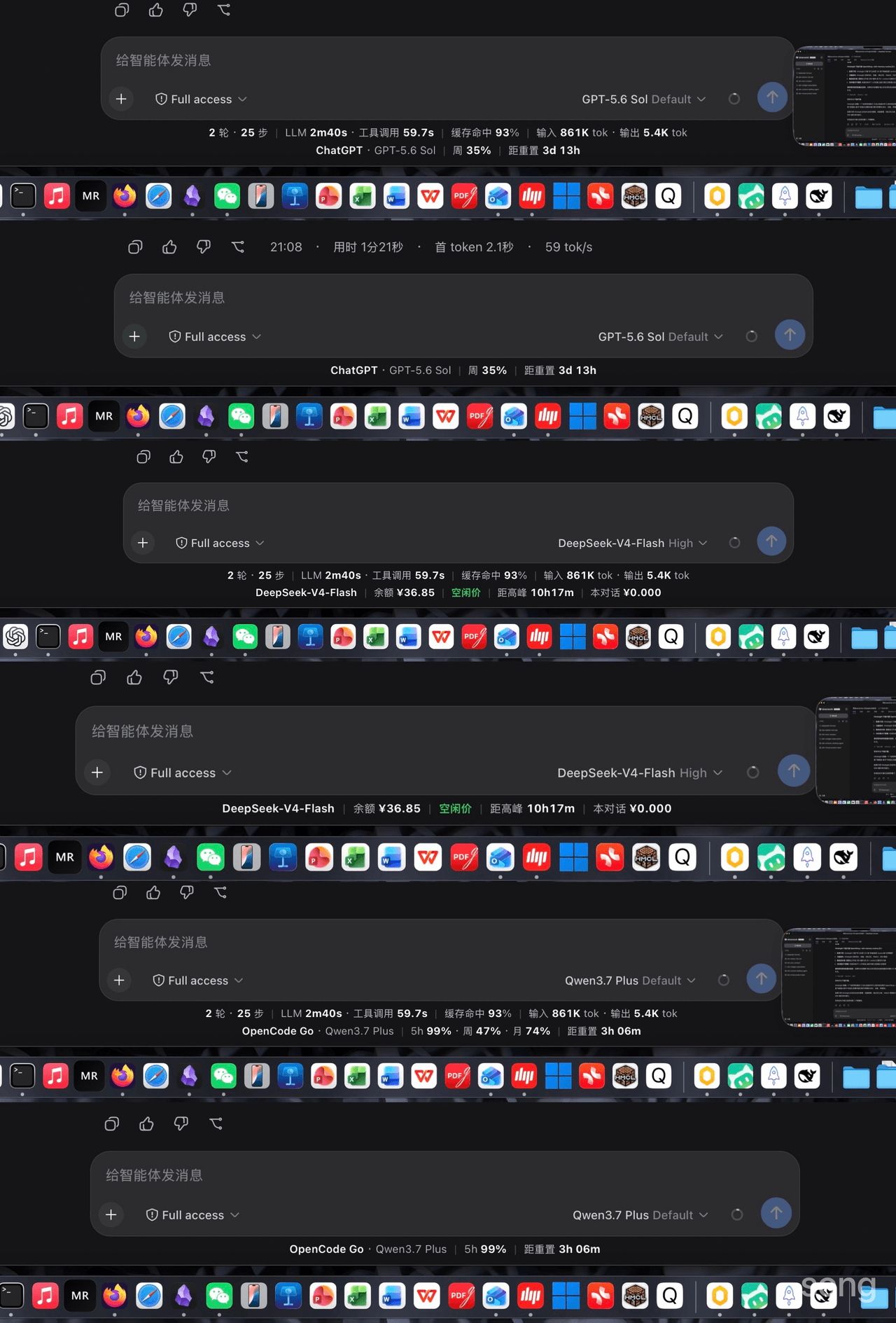 songoao25/dsh-bottom-info-bar
DeepSeek Harness (DSH) plugin: replaces the stats row under the composer with provider and model, balance or subscriptio…
songoao25/dsh-bottom-info-bar
DeepSeek Harness (DSH) plugin: replaces the stats row under the composer with provider and model, balance or subscriptio…
-
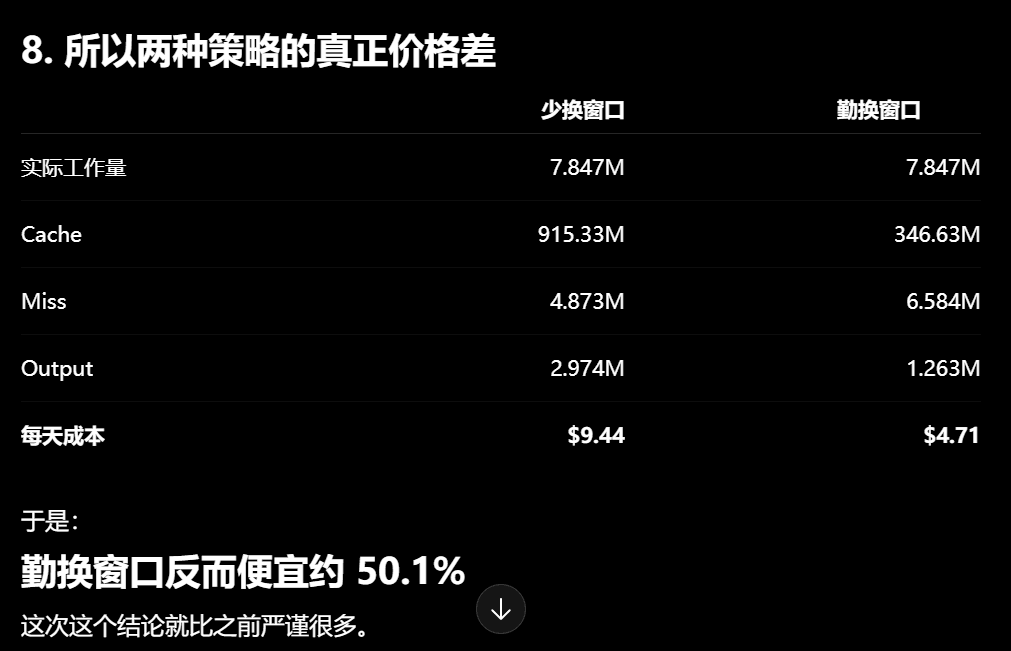 Phant0Meow/dsh-meow-cachebilling
一个能帮你省钱的插件!缓存其实比你想象的贵!换窗口可以省缓存钱,但换窗口有顾虑,或许你懒得重新描述项目和规则,或者你还需要那个上下文。所以这个插件,就是为了告诉你,当前轮,纯粹上下文缓存的部分,到底花了你多少钱。这样你才心里有个底,判断什么…
Phant0Meow/dsh-meow-cachebilling
一个能帮你省钱的插件!缓存其实比你想象的贵!换窗口可以省缓存钱,但换窗口有顾虑,或许你懒得重新描述项目和规则,或者你还需要那个上下文。所以这个插件,就是为了告诉你,当前轮,纯粹上下文缓存的部分,到底花了你多少钱。这样你才心里有个底,判断什么…
-
 Rianico/dsh-better-edit
Hash-anchored read/edit/undo_last_edit tools for DeepSeek Harness (dsh), fewer token consumption, lower cost.
Rianico/dsh-better-edit
Hash-anchored read/edit/undo_last_edit tools for DeepSeek Harness (dsh), fewer token consumption, lower cost.
-
 Ghost011118/dsh-balance-meter
DeepSeek account balance and session cost readout for the DeepSeek Harness Web GUI
Ghost011118/dsh-balance-meter
DeepSeek account balance and session cost readout for the DeepSeek Harness Web GUI
-
 ai-shushu/dsh-quota-meter
Per-session quota meter for DSH: real-token billing, live progress bar, budget blocking, configurable multi-model pricin…
ai-shushu/dsh-quota-meter
Per-session quota meter for DSH: real-token billing, live progress bar, budget blocking, configurable multi-model pricin…
-
 TwotwoPiggy/dsh-balance
dsh余额插件. A DeepSeek Harness plugin for real-time token tracking and highly accurate session cost estimation, featuring d…
TwotwoPiggy/dsh-balance
dsh余额插件. A DeepSeek Harness plugin for real-time token tracking and highly accurate session cost estimation, featuring d…